Job Posting Software for Candidate Quality: Features That Actually Work
41 % of organizations say they’re now seeing candidates ghost them mid-interview process, according to SHRM’s 2025 Talent Trends Report, up from a problem that used to be rare enough to joke about.
That number alone should reframe how most hiring teams think about their tech stack. Most of them are still optimizing for applicant volume, when the real cost is sitting in the candidates who never show up, never convert, or never should have been shortlisted in the first place.
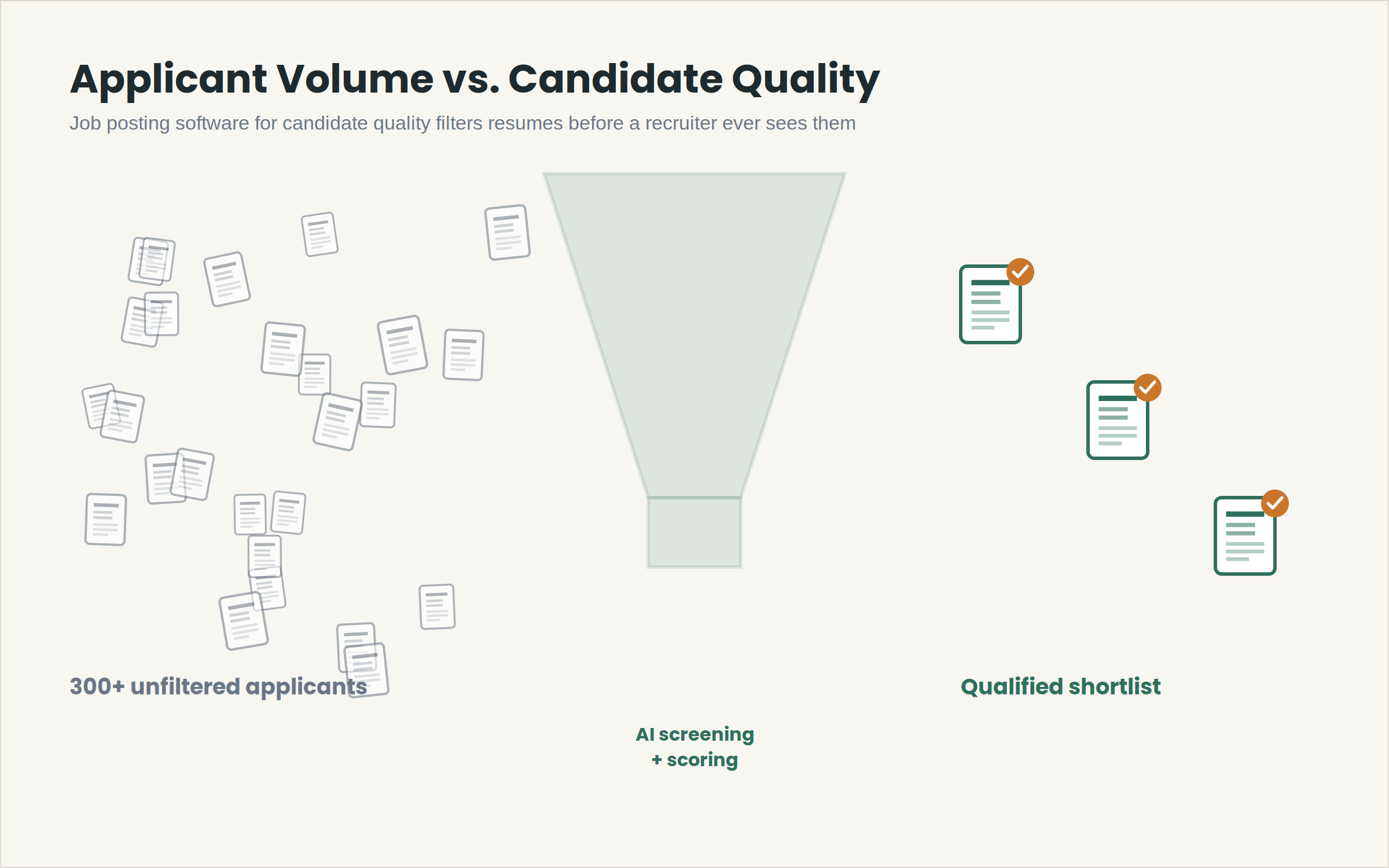
More applicants were supposed to solve the hiring problem. It didn’t. A posting that pulls in 300+ resumes just moves the bottleneck downstream into screening hours, interview scheduling, and recruiter fatigue.
The teams that are actually hiring faster in 2026 aren’t the ones getting more applications. They’re the ones using job posting software for candidate quality instead of job posting software built to maximize reach.
This matters most for startups and SMBs, where one recruiter or a two-person HR team is often running the entire funnel sourcing, screening, scheduling, and closing without the headcount to manually triage hundreds of resumes per role.
The gap between “software that posts jobs” and “software that improves who you interview” is where most of the wasted time in 2026 hiring actually lives.
Founders and talent leads evaluating tools right now tend to default to the same shortlist: which platform posts to the most job boards, and which one has the biggest applicant database.
Those are reasonable questions for a company that’s still building its first hiring process.
They stop being the right questions the moment a team is running multiple open roles simultaneously, and the constraint shifts from “not enough applicants” to “too many of the wrong applicants and not enough hours to sort them.”
What Is Job Posting Software for Candidate Quality?
Job posting software for candidate quality is recruitment technology that filters, scores, and surfaces applicants based on job-fit signals, skills, experience relevance, and screening responses rather than simply distributing a listing to maximize application count.
It combines AI resume screening, structured candidate scoring, and workflow automation to reduce the volume of unqualified applicants a recruiter has to manually review before reaching a shortlist.
The Core Problem: Volume Without Filtering Wastes Recruiter Hours
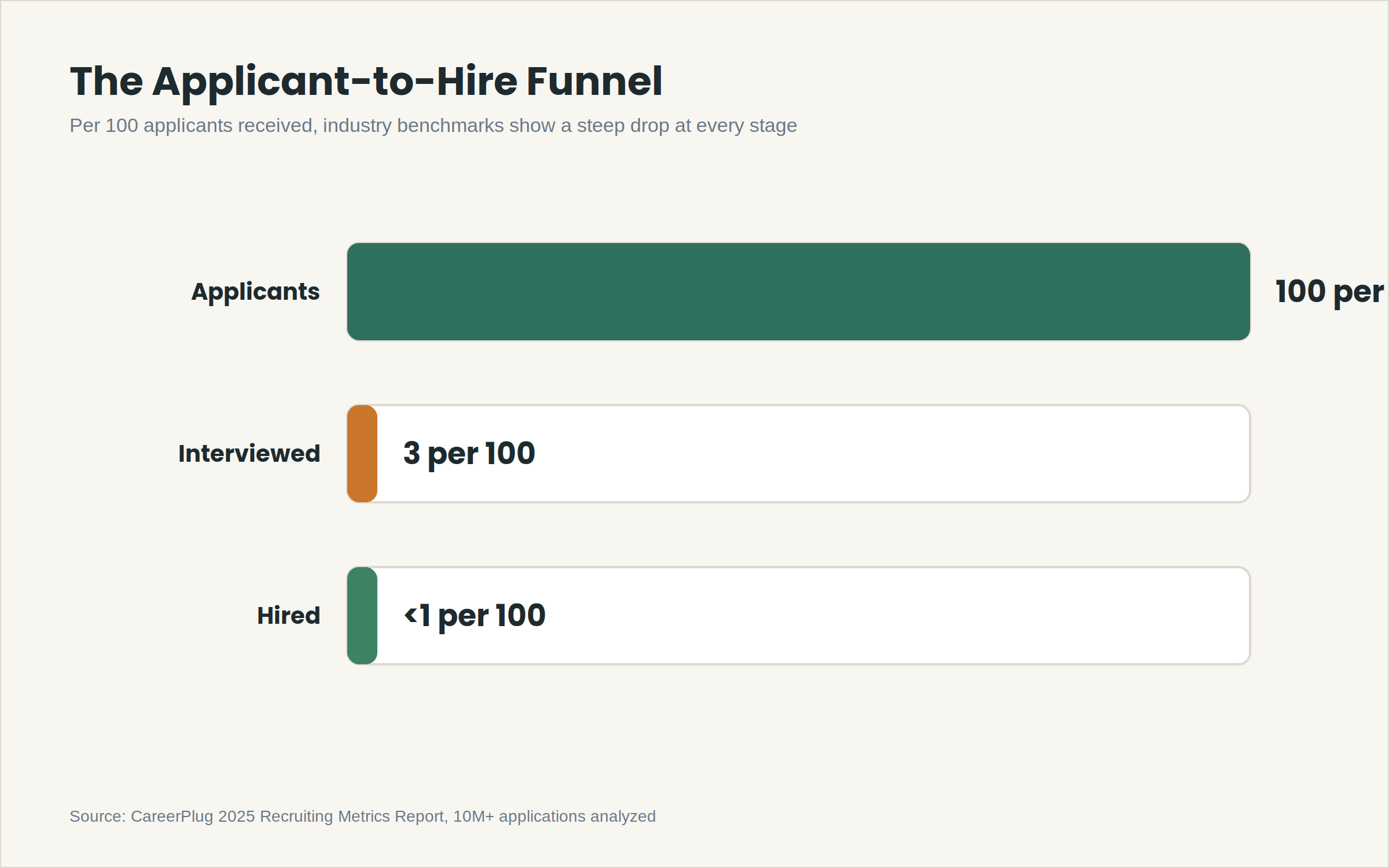
Most applicant tracking systems were built in an era when the applicant-to-interview ratio wasn’t the bottleneck. That era is over. Industry benchmarking from CareerPlug’s 2025
Recruiting Metrics Report, based on 10 million+ applications, puts the applicant-to-interview conversion rate at roughly 3%, meaning 97 out of every 100 resumes a recruiter receives never should have reached a human review queue in the first place.
For a startup posting five open roles at once, with 150–300 applicants per role, that’s 750–1,500 resumes a month competing for a recruiter’s attention.
Most teams underestimate this by 3–4x when they’re scoping headcount for a hiring function, because they plan around the number of roles, not the number of resumes each role generates.
The downstream cost compounds. Every unqualified resume that reaches a phone screen costs roughly 20–30 minutes of recruiter time.
Every unqualified candidate that reaches a first-round interview costs 45–60 minutes of a hiring manager’s time plus scheduling coordination, calendar holds, and the opportunity cost of a slot that a stronger candidate didn’t get.
Interview no-shows make the math worse. Industry KPI benchmarks put a healthy no-show rate under 5%, with anything above 10% signaling a process problem rather than bad luck.
Three causes show up consistently across recruiting teams: too much lead time between scheduling and the interview date, no reminder touchpoints in between, and unclear logistics (wrong time zone, missing video link, unclear address for on-site rounds). None of these are candidate-quality problems; they’re workflow automation software gaps.
The cost implications add up faster than most hiring plans account for. A recruiter earning the equivalent of ₹8–12 lakhs annually costs a business roughly ₹400–600 per working hour once loaded costs are included.
If 60 of that recruiter’s hours each month go toward screening resumes that were never going to pass a first-round interview, that’s ₹24,000–36,000 a month spent on volume the process should have filtered out before it reached a human reviewer.
Multiply that across a hiring season with five or six open roles, and the unfiltered-volume problem stops being an inconvenience and starts showing up as a real line item.
Time-to-hire compounds the same way. Industry data across small businesses puts average time-to-hire between 40–45 days, and every extra week a role stays open has a measurable cost in lost productivity, team overload, and, for revenue-generating roles, delayed output.
Teams that treat screening as a manual, one-resume-at-a-time task are effectively accepting a longer time-to-hire as the price of not investing in filtering technology.
None of this means volume is worthless. A posting still needs enough reach to surface qualified candidates in the first place, particularly for niche or senior roles where the talent pool is naturally smaller.
The problem is treating volume as the finish line instead of the starting point, which is exactly the shift that separates reach-focused job boards from job posting software for candidate quality.
Deep Dive: The Features That Actually Move Candidate Quality
Reach-focused job boards and quality-focused job posting software look similar from the outside; both let you write a listing, publish it, and collect applications. The difference is entirely in what happens between “applicant submits resume” and “recruiter sees a shortlist.” That gap is where four categories of features do the real work.
1. AI Resume Screening That Scores Against the Role, Not Keywords
Early resume-parsing tools worked off keyword matching, which meant a candidate who wrote “led a team of 5” scored lower than one who copy-pasted the job description’s exact phrasing. Modern AI resume screening evaluates context years of relevant experience, skill adjacency, and career trajectory against the specific role’s requirements, not a static keyword list.
The practical difference: keyword-based filtering rejects strong candidates who phrase things differently and passes weak candidates who know how to game the parser. Context-based scoring reduces both false negatives and false positives, which is the entire point of screening software in the first place.
For a startup hiring a senior engineer, this is the difference between a shortlist of 8 genuinely qualified candidates and a shortlist of 25 where a recruiter still has to manually re-screen half of them.
2. AI Candidate Insights for Ranking, Not Just Sorting
AI candidate insights go one layer past parsing. Instead of a pass/fail flag, the software surfaces a ranked shortlist with reasoning attached on why a candidate scored where they did, which requirements they matched, and where the gaps are. Some platforms, including Hirium, extend this with an AI interviewer that runs unbiased first-round screening conversations before a human recruiter ever gets involved, which removes a layer of scheduling friction for high-volume roles.
This matters for consistency. Two recruiters screening the same 100 resumes manually will disagree on which 15 are worth interviewing; human fatigue and unconscious pattern-matching both creep in after resume 40 or so. A scoring model applies the same criteria to resume 1 and resume 300.
3. Candidate Database Management That Doesn’t Lose Warm Leads
Candidate database management is the most underrated feature category in recruitment technology, because its value doesn’t show up until 3–6 months after a role closes. A centralized, searchable database means the strong second-place candidate from a March hire is retrievable for a similar August role without re-running a full sourcing cycle.
Without this, teams re-source from zero for every open role, even when a qualified, previously-vetted candidate already exists in an old spreadsheet or a closed email thread. Real-time candidate tracking across every open requisition also prevents the common SMB failure mode of two recruiters unknowingly reaching out to the same candidate for two different roles.
4. Workflow Automation That Reduces No-Shows, Not Just Admin Time
This is the category most directly tied to interview attendance, and it’s worth breaking into a concrete process:
- Confirm within 24 hours of scheduling: an automated confirmation email or SMS sent immediately after a candidate books a slot, restating date, time, time zone, and format (video link or address).
- Send a reminder 48 hours out: a second automated touchpoint with a one-click reschedule option, so candidates with a genuine conflict self-serve instead of silently no-showing.
- Send a same-day reminder 2–3 hours before the final touchpoint, timed to catch candidates before they lose the window to reschedule gracefully.
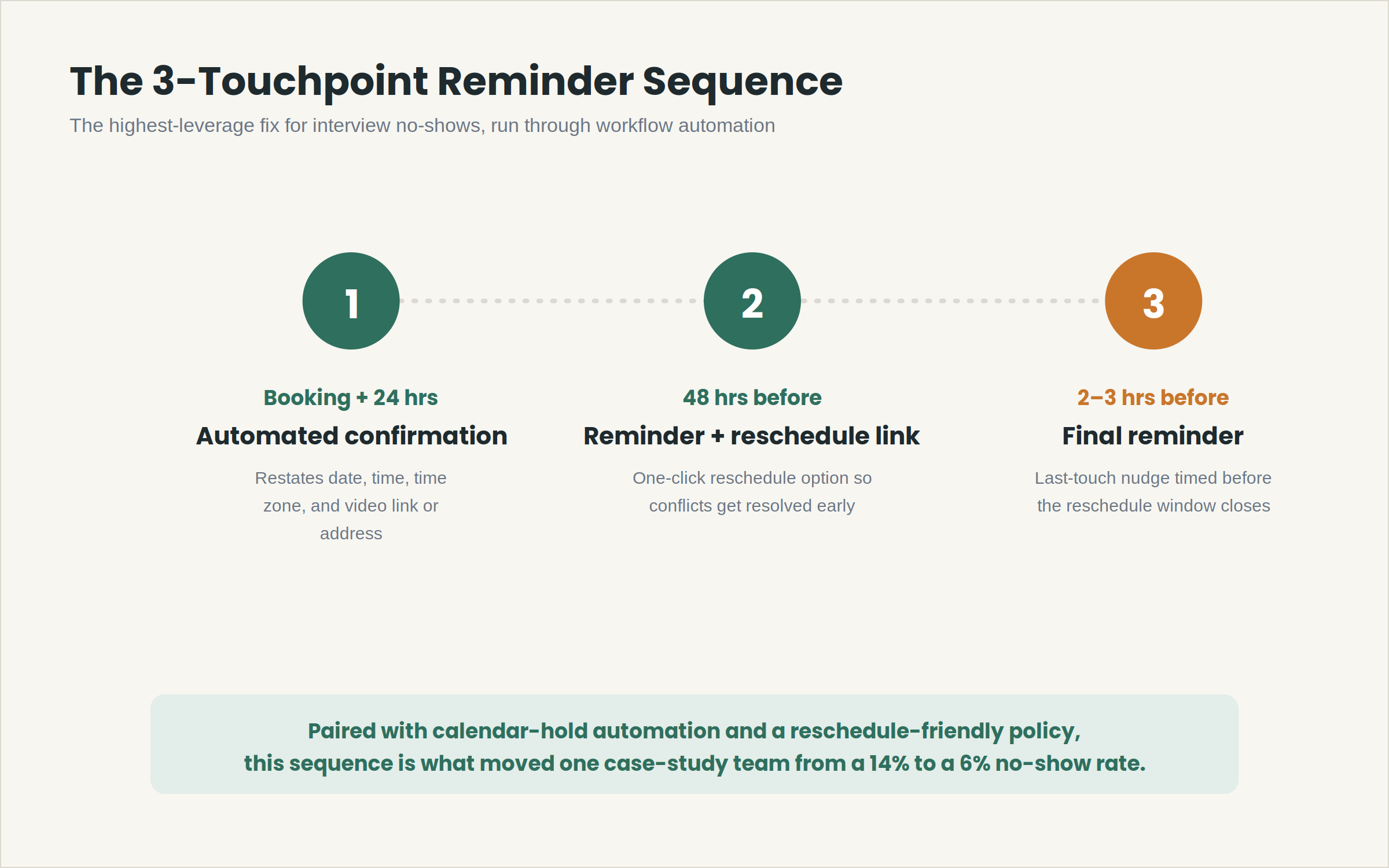
Calendar-hold automation reinforces it: auto-blocking the interviewer’s calendar the moment a slot is confirmed, and auto-releasing it the moment a candidate reschedules, prevents the wasted hiring-manager time that no-shows create even when the candidate does eventually reconnect.
A reschedule-friendly policy removes the reason candidates ghost instead of rescheduling. A workable version reads: “Life happens. If you need to move your interview, use the link in your confirmation email up to 4 hours before your slot, no explanation needed. If something comes up last-minute, just reply to this email and we’ll find a new time.”
Removing the friction and the awkwardness of asking for a reschedule directly reduces silent no-shows, because most candidates who ghost do so. After all, rescheduling feels like it requires an excuse.
5. Recruitment Analytics That Show Which Channels Actually Convert
Applicant volume by source is a vanity metric on its own. What matters is source effectiveness: which job boards, referral channels, or sourcing efforts produce candidates who actually convert to interviews and offers, not just applications.
Recruitment analytics dashboards that break down time-to-hire, offer acceptance rate, and recruiter load by channel let a hiring team redirect budget away from high-volume, low-conversion sources and toward the ones that are quietly outperforming.
This is especially relevant for startups running paid job board listings on a fixed budget. A channel generating 150 applications with a 1% shortlist rate is a worse spend than one generating 40 applications with a 12% shortlist rate, even though the first number looks more impressive in a monthly report.
Without analytics broken out by source, that distinction is invisible until a recruiter manually cross-references spreadsheets, which most SMB teams don’t have the bandwidth to do consistently.
6. Branded Career Pages and Candidate Experience
A generic, unbranded application form is itself a quality filter, just not the kind a hiring team wants. Candidates evaluating multiple offers read a career page as a signal of how organized the company is likely to be as an employer, and a clunky or generic application flow disproportionately loses stronger candidates who have other options and less patience for friction.
Customizable, branded career pages that load quickly, work on mobile, and clearly communicate role expectations reduce application abandonment at the top of the funnel.
This doesn’t directly filter for skill match the way AI resume screening does, but it does affect who applies in the first place, and candidate experience research consistently shows that process friction disproportionately drives away higher-caliber applicants who have competing offers.
Compliance and Integration Considerations
For startups and SMBs evaluating talent acquisition software, two practical factors matter beyond feature lists: data residency for candidate PII, and how cleanly the platform migrates existing candidate records from a prior ATS.
A forced re-upload of years of candidate history is a common reason teams delay switching tools even when the current one is clearly underperforming, which is why migration support, not just onboarding support, should be part of the evaluation.
Integration depth is the second practical filter. A platform that only handles job posting and resume intake, without connecting to the calendars, video-conferencing tools, and email systems a team already uses, just relocates the manual-coordination problem instead of solving it.
Calendar-hold automation, for example, only works if the software can write directly to the interviewer’s calendar rather than relying on a recruiter to manually block time after every scheduled interview.
The same applies to automated status emails: if a platform can’t trigger candidate updates directly from a stage change in the pipeline, teams end up building a manual parallel process anyway, which defeats the purpose of adopting workflow automation software in the first place.
Cost structure interacts with both of these.
Per-recruiter-seat pricing can look inexpensive at a two-person hiring team and become disproportionately expensive the moment a startup scales its talent function to five or six recruiters during a growth phase.
Flat pricing with no per-hire or per-recruiter fees removes that scaling penalty, which matters more for SMBs than the headline monthly price usually suggests during a first look at a vendor’s pricing page.
Case Study: Candidate Quality Over Volume in Practice
A 40-person fintech startup running four open roles simultaneously was receiving roughly 220 applications per posting through a generic job board integration, with a recruiter manually screening each one.
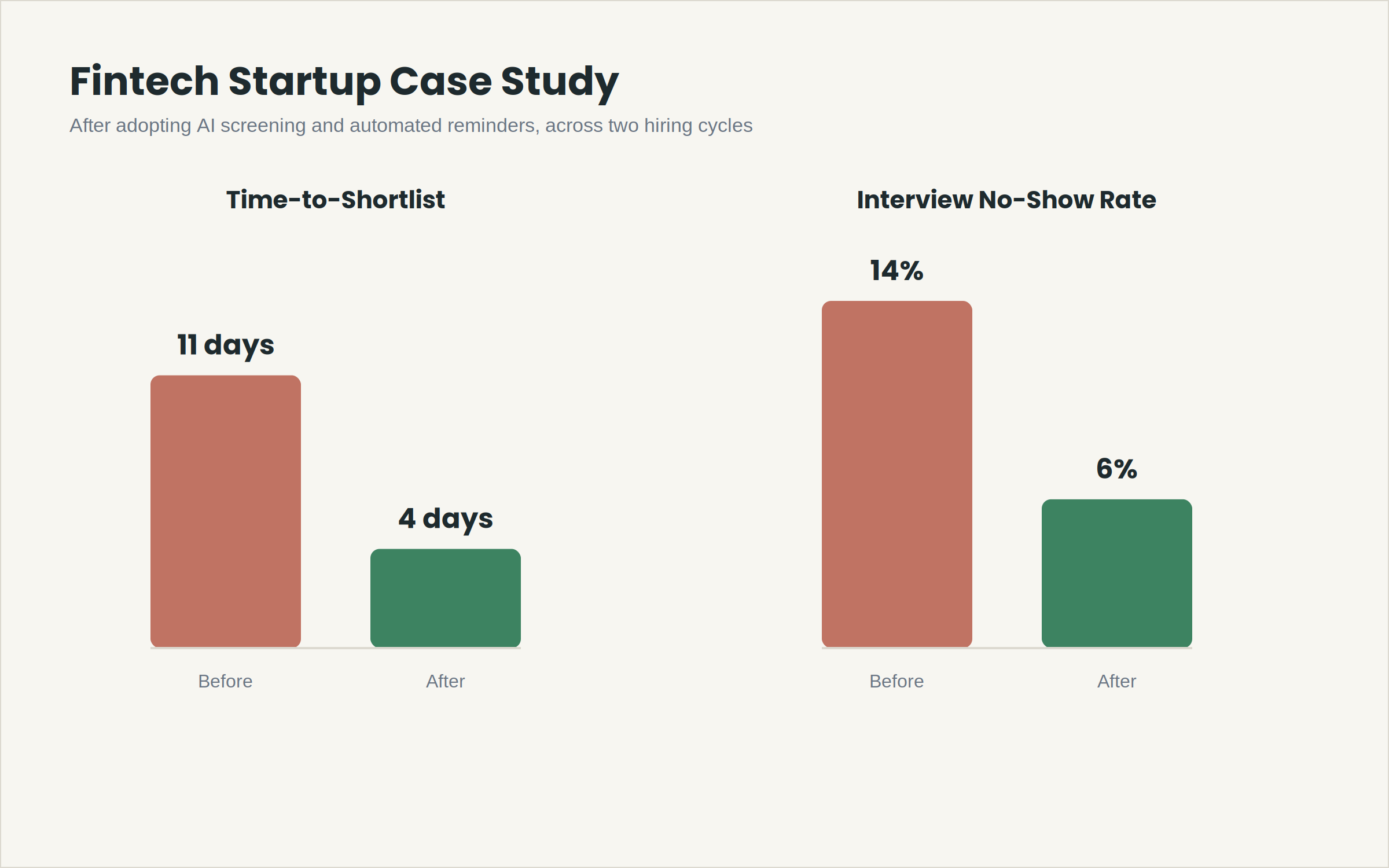
Average time-to-shortlist was 11 days per role, and interview no-show rate sat at 14%, well above the 10% threshold considered a warning sign.
After introducing AI resume screening and a 3-touchpoint reminder sequence, time-to-shortlist dropped to 4 days, and the no-show rate fell to 6% within two hiring cycles.
The applicant volume didn’t change meaningfully; what changed was how much of that volume ever reached a recruiter’s manual queue, and how many confirmed interviews actually happened.
A separate case from a 15-person B2B SaaS company illustrates the database side: a candidate who reached final rounds for a product marketing role in Q1 but lost out narrowly was resurfaced from the centralized candidate database for a similar role in Q3, cutting a 3–4 week sourcing cycle down to a single follow-up call and an offer within 10 days.
Neither case involved reducing applicant volume. Both involved filtering that volume faster and following up on it more reliably, which is the distinction that matters when evaluating job posting software for candidate quality against software optimized purely for reach.
The fintech team didn’t need fewer applicants; it needed fewer of those applicants reaching a human screener before being ranked. The SaaS team didn’t need a bigger candidate pool; it needed the pool it already had to remain searchable past the point a role closed.
Comparison Framework: Evaluating Job Posting Software for Candidate Quality
Not every platform marketed as “AI-powered recruiting software” actually filters for quality. Many simply add a keyword-matching layer on top of the same reach-maximizing job distribution model, which produces a slightly cleaner-looking applicant list without changing the underlying volume-versus-quality tradeoff.
The evaluation framework below is built around the five factors that most directly separate quality-focused platforms from reach-focused ones, based on the feature categories covered above.
Use it as a checklist during vendor demos rather than relying on a feature comparison chart pulled from a sales deck, since demo behavior on your own job requisitions is a more reliable signal than marketing copy.
| Evaluation Criteria | What to Check | Why It Matters |
| Screening logic | Keyword match vs. contextual scoring | Determines false-positive and false-negative rates on shortlists |
| Reminder automation | Manual follow-up vs. built-in multi-touch sequences | Directly affects interview no-show rate |
| Candidate database | Siloed per-role vs. centralized, searchable across roles | Determines whether past candidates are reusable |
| Migration support | Self-service export vs. supported, free migration | Determines real switching cost from an existing ATS |
| Pricing structure | Per-recruiter fees vs. flat pricing | Affects total cost as a team scales hiring volume |
What Most Teams Get Wrong
The most common mistake isn’t picking the wrong software; it’s optimizing the evaluation for the wrong metric. Teams compare platforms on applicant volume generated per posting, when the metric that actually predicts hiring speed and quality is time-to-qualified-shortlist.
A second pattern: teams treat interview no-shows as a candidate-behavior problem rather than a process design problem.
Blaming candidate flakiness ignores that most no-shows are traceable to scheduling gaps a recruiter’s own workflow created, too much lead time with zero touchpoints in between, or logistics details buried three emails deep instead of restated at every reminder.
A third, quieter mistake: abandoning a candidate database every time a role closes. Recruiters who don’t revisit near-miss candidates from prior searches are effectively re-doing sourcing work they already paid for in recruiter hours, every single time a similar role opens.
A fourth pattern shows up specifically during vendor selection: teams evaluate job posting software for candidate quality primarily on the strength of a sales demo, using a curated sample job requisition, rather than testing the screening logic against one of their own historically difficult-to-fill roles.
A demo built around a clean, well-defined role will make almost any AI resume screening tool look accurate.
The real test is how the same tool handles a role with ambiguous requirements or a title that doesn’t map cleanly to standard taxonomy, which is exactly the kind of role most startups and SMBs are actually hiring for.
FAQ
1. What is candidate quality in recruitment?
Candidate quality refers to how closely an applicant’s skills, experience, and role-fit match a specific job’s requirements, as distinct from the total number of applications a posting receives.
High-quality candidates require fewer screening cycles to identify, move through the interview pipeline with fewer drop-offs, and convert to hires at a meaningfully higher rate once they actually reach an interview.
A posting can generate hundreds of applications and still produce low candidate quality if most of those applicants don’t meet the role’s core requirements.
2. How do you measure candidate quality instead of volume?
Track time-to-qualified-shortlist, interview-to-offer ratio, and interview no-show rate rather than total applicants per posting.
A posting generating 300 applications with a 2% shortlist rate is performing worse than one generating 80 applications with a 15% shortlist rate, even though the raw application count tells the opposite story.
Recruitment analytics that break these figures out by role and by sourcing channel make the comparison visible instead of anecdotal.
3. What features should job posting software have in 2026?
At minimum: contextual AI resume screening, a centralized and searchable candidate database, automated multi-touchpoint interview reminders, and recruitment analytics covering time-to-hire and source effectiveness.
Branded career pages and free, supported ATS migration are strong secondary signals of a mature platform, since they indicate the vendor has built for teams switching from an existing tool rather than only for greenfield setups.
How can automation reduce interview no-shows?
A structured reminder sequence confirmation within 24 hours of booking, a reminder at 48 hours out with a one-click reschedule option, and a final reminder 2–3 hours before the slot addresses the three most common no-show causes: long lead times between scheduling and the interview, missing follow-up in between, and unclear logistics that only get restated once, in the original invite.
4. Is AI resume screening accurate enough to trust?
Contextual AI screening, which evaluates experience relevance rather than keyword matches, meaningfully reduces both false rejections of strong candidates and false shortlisting of weak ones compared to older keyword-parsing tools.
It works best as a first-pass filter that narrows volume down to a manageable shortlist, with human recruiters making the final call on borderline or ambiguous cases rather than relying on the score alone.
5. How much does job posting software cost for a startup?
Costs vary widely, from per-recruiter-seat pricing that scales with team size to flat-fee platforms with no per-hire or per-recruiter charges.
Startups evaluating job posting software for candidate quality should weigh total cost at their expected hiring volume across a full year, not just the entry-tier monthly price, since per-recruiter and per-hire fees compound quickly during high-volume hiring quarters when several roles are open at once.
6. Which recruiting tools help track candidate quality over time?
Recruitment analytics dashboards that report time-to-hire, offer acceptance rate, recruiter load, and source effectiveness by channel let teams see which job boards and sourcing efforts produce candidates who actually convert to hires, not just which channels produce the most raw applications.
Reviewing these numbers quarterly, rather than only at the end of a hiring cycle, makes it easier to catch an underperforming channel before it eats further budget.
If You’re Evaluating This Now
If you’re comparing job posting software for candidate quality against a platform built mainly for reach, the fastest way to pressure-test a vendor is to ask for their actual shortlist rate and average interview no-show rate across customers your size, not just their applicant-volume numbers.
Run the vendor’s screening logic against one of your own historically difficult-to-fill roles before signing anything, not the clean sample requisition in their demo script.
Hirium runs AI resume screening, candidate database management, and automated reminder workflows on a forever-free plan with no per-recruiter fees, and offers free, supported migration if you’re moving off an existing ATS like Zoho Recruit. You can explore the platform at hirium.com and test the screening logic against a real open role before committing to anything.