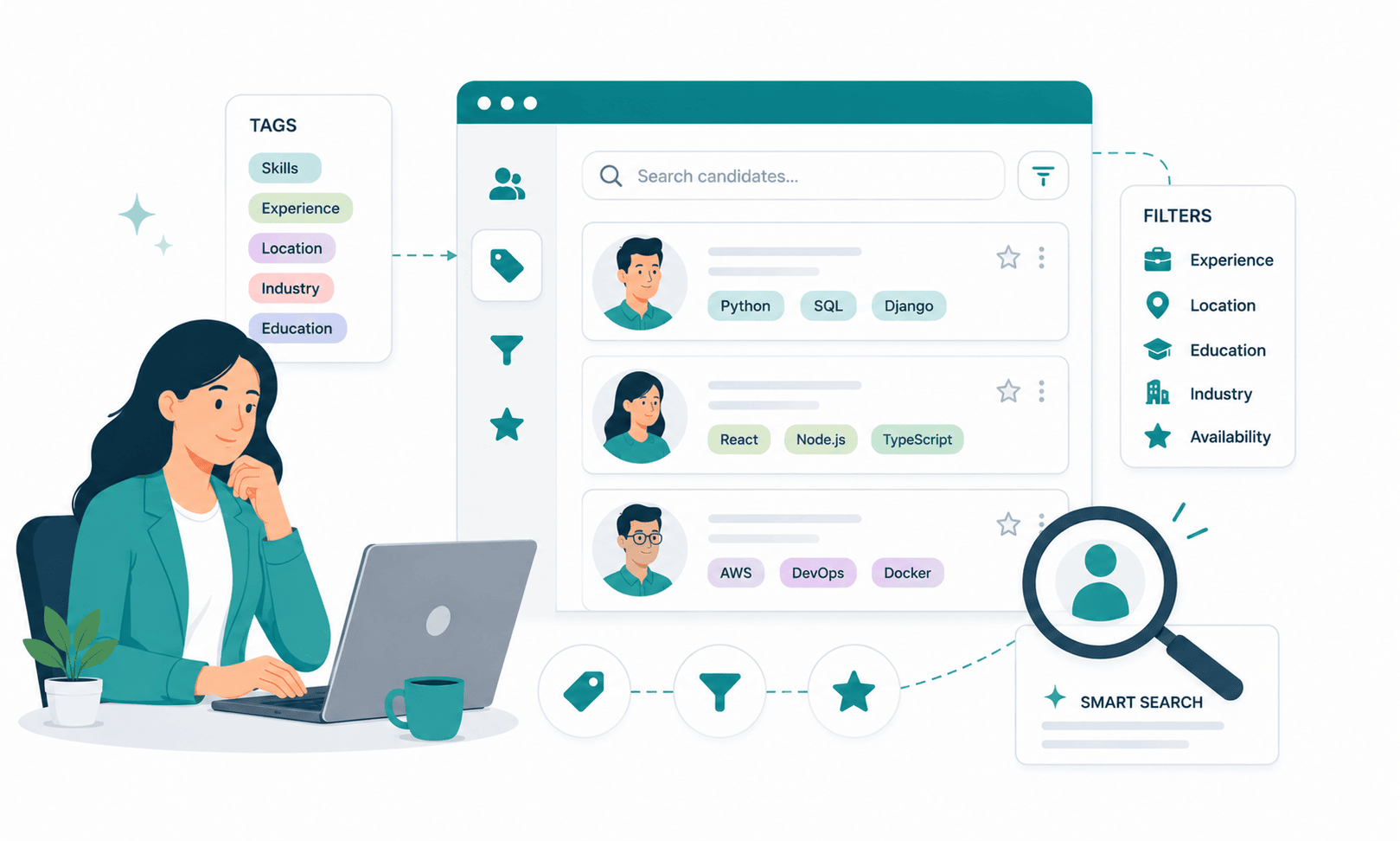
Building a Searchable Candidate Database: Tags, Filters, and Smart Search Explained
Roughly half of the candidates a growing company will hire this year have already applied to that company before. They sat in a talent pool, went through a screening call, maybe reached a final round and then the record went dark. When the next similar role opened, the recruiter posted the job, paid for ads, and started sourcing from zero.
That is the quiet math problem inside most hiring teams. A searchable candidate database is not a storage feature; it is a sourcing channel, usually the cheapest one available and most teams have effectively switched it off. The average corporate role attracts 250 applications. Hire one person, and 249 profiles enter the database. After three years of hiring at even modest SMB volume say, 20 roles a year that is 15,000+ profiles. If even 2% of those are re-engageable for future roles, that is 300 pre-screened, brand-aware candidates who cost nothing to source.
The reason teams don’t tap that pool is rarely laziness. It is architecture. Resumes were stored as PDFs instead of structured data. Nobody agreed on a tagging convention, so “PM,” “Product Manager,” and “product mgmt” exist as three separate labels. Search returns 4,000 results or 4, with nothing in between. So recruiters do the rational thing: they stop searching their searchable candidate database and start re-sourcing externally, paying again for candidates the company already paid to attract once.
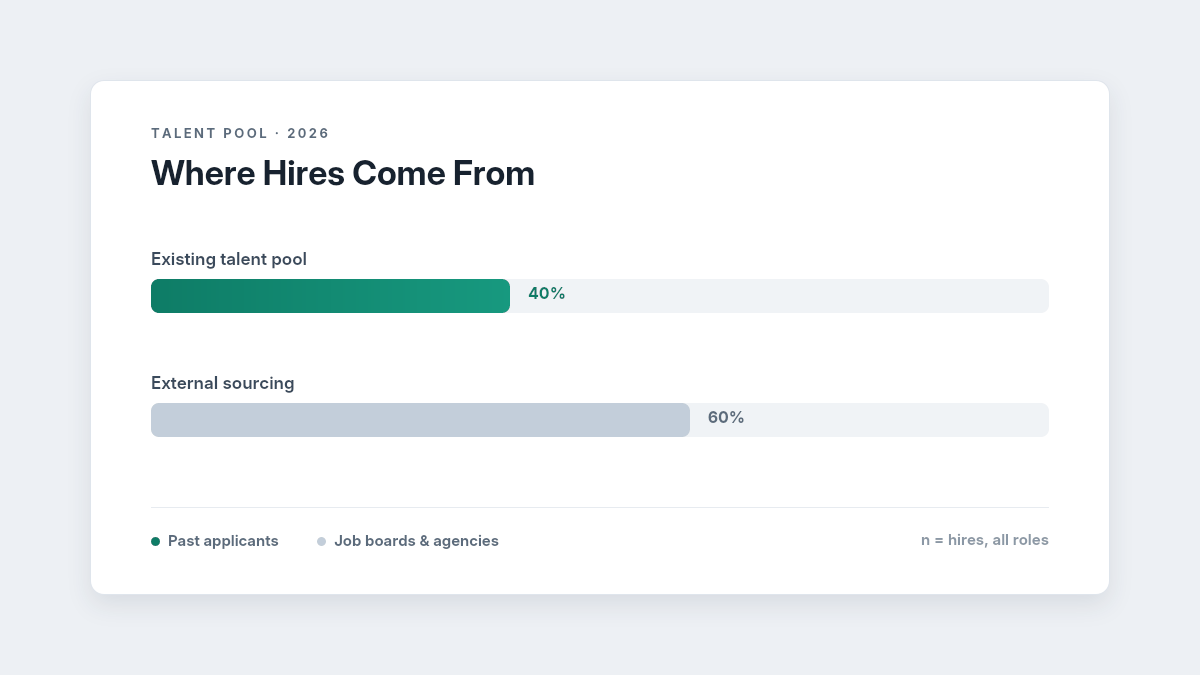
According to recent 2026 recruiting insights, nearly 40% of hires come from existing talent pools and past applicants, emphasizing the importance of maintaining a searchable and organized candidate database. For more insights, explore recruiting statistics and hiring trends.
This guide covers how to fix that the difference between tagging systems and free-text search, how to build Boolean and filter queries that actually narrow a pool, how to set up saved searches for recurring roles, and a searchability audit checklist you can run on your current applicant tracking system in under an hour.
What Is a Searchable Candidate Database?
A searchable candidate database is a centralized, structured repository of candidate profiles resumes, skills, experience, interview feedback, and status history indexed so recruiters can retrieve matching candidates in seconds using tags, filters, Boolean queries, or AI-powered semantic search, instead of manually reviewing files or re-sourcing candidates externally.
The Core Problem: You’re Paying to Re-Find People You Already Found
Every external hire carries a sourcing cost that most teams underestimate by 3–4x once you count job board spend, recruiter hours, and screening time. Industry benchmarks put average cost-per-hire near $4,700 and time-to-fill at 40–45 days for most roles. A meaningful slice of that spend goes toward finding candidates who already exist in the company’s own candidate sourcing history which is precisely the spend a functioning searchable candidate database eliminates.
The failure compounds in three specific ways:
Unstructured storage. When resumes live as attachments rather than parsed fields, keyword search can only match literal text. A recruiter searching “React” misses the candidate who wrote “ReactJS,” and a search for “team lead” misses “led a team of 6.” In practice, literal-text search misses an estimated 30–50% of genuinely relevant profiles sitting inside the searchable candidate database it is supposed to query.
Taxonomy drift. Without enforced conventions, five recruiters create five vocabularies. Within 12–18 months, a typical SMB database accumulates 400–800 unique tags, of which perhaps 60 are used consistently. At that point, filtering by tag is no longer trustworthy, and trust is the entire value of a searchable candidate database. Once a recruiter gets burned twice by a filter that missed an obvious candidate, they stop filtering permanently.
Decay. Candidate data has a half-life. Contact details go stale in 18–24 months; skills and seniority change faster still. A searchable candidate database that isn’t refreshed through re-engagement or enrichment loses roughly a third of its practical value every two years which is why teams that only “store” candidates end up with an archive, not a recruitment pipeline.
The fix is not more data. It is structured: parsing on the way in, a controlled tagging layer, filter-friendly fields, and search behaviors (Boolean, saved searches, semantic matching) that recruiters actually use under deadline pressure. The next section walks through that structure layer by layer.
Architecture of a Searchable Candidate Database: Five Layers That Have to Stack
Building a genuinely usable searchable candidate database comes down to five layers, in order: structured intake, a tagging taxonomy, filterable fields with Boolean logic, saved searches, and an AI search layer on top. Skip a lower layer and the ones above it underperform AI matching on unparsed PDFs produces confident nonsense, and Boolean queries against inconsistent fields return unreliable shortlists.
Layer 1: Structured Intake with an AI Resume Parser
The foundation is parsing. An AI Resume Parser converts incoming resumes PDF, DOCX, even scanned files into structured fields: name, contact, skills, employers, titles, dates, education, certifications. Modern parsers use natural language processing and named-entity recognition, so “Led a 6-person growth team at a Series B fintech” becomes queryable attributes (leadership: yes; team size: 6; industry: fintech; stage: Series B) rather than a sentence trapped in a file.
Why this matters for search: filters and tags can only operate on fields that exist. If skills aren’t extracted as discrete entities, a “skills contains Python AND SQL” filter is impossible, and the searchable candidate database degrades into a document folder with a search bar. Resume parsing accuracy is therefore the single highest-leverage technology decision in this entire stack; a parser operating at 95%+ field accuracy versus one at 80% is the difference between trusting your filters and manually double-checking every result.
Cost implication: parsing is now table stakes in most modern ATS pricing rather than a paid add-on, but if you’re evaluating tools, test the parser on 20 of your real resumes including non-standard formats before committing. Ask vendors for parsing accuracy on skills and dates specifically, since those two fields power most searches. And if you have a legacy archive, confirm the vendor will re-parse historical resumes during migration; a searchable candidate database that only covers profiles created after go-live leaves your most valuable asset years of past applicants unindexed.
Layer 2: Tagging Systems vs. Free-Text Search
This is the distinction most teams get wrong, so it’s worth being precise about how to organize a candidate database around each.
Free-text search scans everything resume text, notes, emails for a literal string. It is high recall, low precision: search “designer” in a 10,000-profile searchable candidate database and you’ll get every product designer, graphic designer, and candidate who once “designed a sales process.” It’s the right tool for one-off lookups (“find the candidate who mentioned Figma plugins”) and the wrong tool for building shortlists.
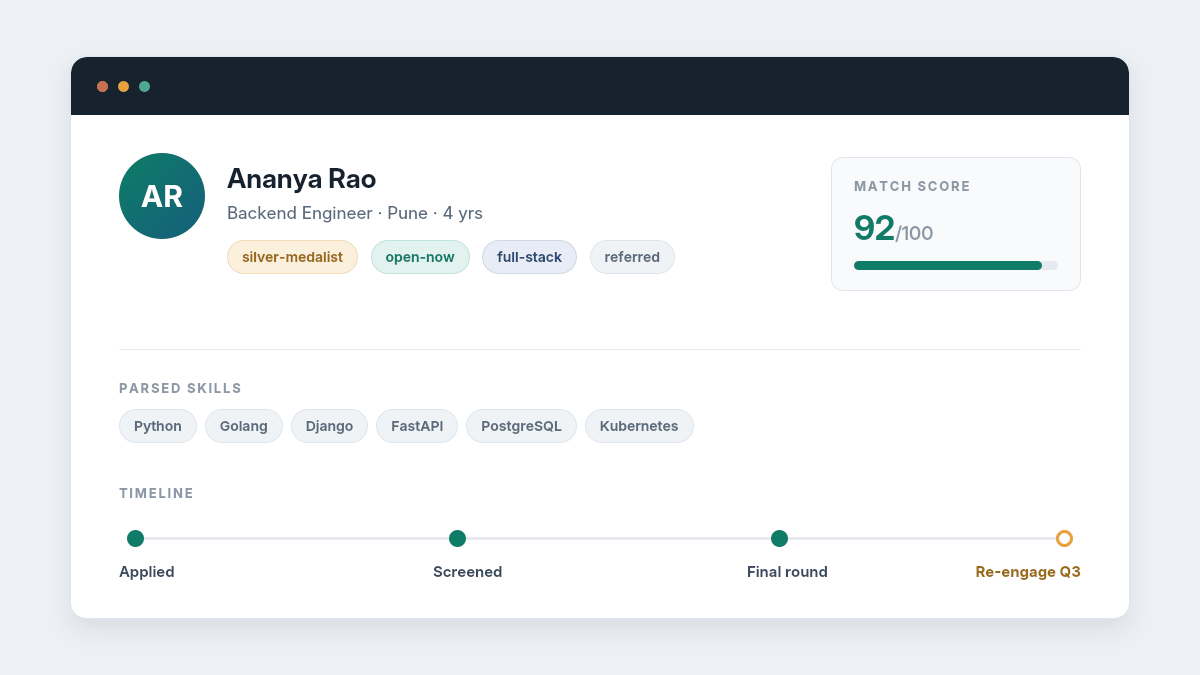
Tags are deliberate, human- or AI-applied labels that encode judgment the resume text doesn’t contain: silver-medalist, strong-culture-fit, open-to-contract, relocating-2026, do-not-rehire. A resume will never say “came second in our March backend hiring round.” A tag can. That is the core rule of candidate tagging: tag what search can’t infer, and let parsed fields handle what it can.
A working taxonomy for a startup or SMB needs only 4 tag families, roughly 40–60 total tags:
- Outcome tags silver-medalist, offer-declined, withdrew, future-fit. These are the highest-ROI tags in the system; silver medalists convert to hires 2–3x faster than cold candidates because screening evidence already exists.
- Availability tags open-now, open-in-6-months, passive, contract-only. These make time-based re-engagement queries possible.
- Skill-cluster tags broader than parsed skills: full-stack, growth-marketing, enterprise-sales. Use parsed fields for individual skills like “Kubernetes”; use cluster tags for the shape of a career.
- Process tags referred, needs-visa, agency-sourced, re-engage-Q3. These carry operational context that affects outreach and compliance.
Two governance rules keep the taxonomy alive inside the searchable candidate database: one person owns tag creation (nobody else can invent tags), and any tag unused for 6 months gets merged or deleted in a quarterly review. Teams that skip governance end up back at 600 orphan tags within a year, at which point recruiters quietly abandon tags altogether.
Layer 3: Boolean Search Examples for Recruiters Filters That Actually Narrow
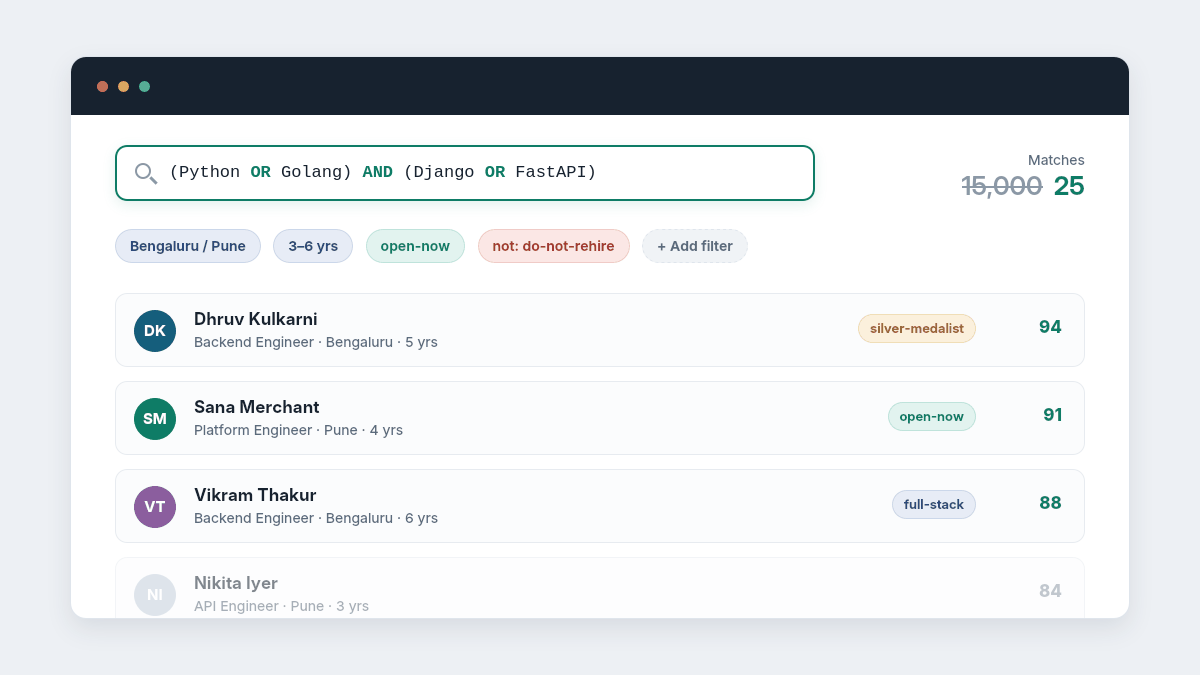
Filters operate on structured fields (location, years of experience, current stage, source); Boolean search combines terms with AND, OR, NOT, and parentheses. Together they turn a 15,000-profile searchable candidate database into a 25-person shortlist in under two minutes. Effective candidate profile management starts here, because filters are only as good as the fields kept current on each profile; a stale location field silently excludes a relocated candidate from every geographic query.
Concrete examples recruiters can copy:
Backend engineer, hybrid-friendly: (Python OR Golang) AND (Django OR FastAPI OR microservices) AND NOT intern + Filters: Location = Bengaluru OR Pune; Experience = 3–6 years; Tag ≠ do-not-rehire
SDR for a SaaS team: (“sales development” OR SDR OR BDR) AND (SaaS OR B2B) AND (Outreach OR Salesloft OR HubSpot) + Filters: Experience = 1–3 years; Tag = open-now OR silver-medalist; Last activity < 12 months
Recurring high-churn role (e.g., customer support): Filters only: Tag = future-fit + Stage reached ≥ “Interview” + Rejection reason = “position filled” + Location = target city. No keywords needed process history inside the searchable candidate database does the qualifying.
The pattern to teach your team: filters narrow the who, Boolean narrows the what. Start with 2–3 filters (location, experience band, tag), then add one Boolean skills clause. Queries with more than 5–6 clauses become brittle and get abandoned; recruiters revert to free-text, and precision collapses. Track which queries your team actually runs most recruitment analytics dashboards ignore search behavior, but it is the leading indicator of whether the database is being used or bypassed.
Layer 4: Saved Searches for Recurring Roles
If your company hires the same profile repeatedly SDRs every quarter, support agents monthly, engineers continuously building the query once and saving it is the difference between a 3-day sourcing sprint and a 30-minute one. Saved searches convert search from an activity into an asset, and they are the feature that makes a searchable candidate database compound in value over time rather than merely accumulate records.
The setup process:
- Identify your 3–5 recurring roles. Pull 12 months of requisitions; any role opened 3+ times qualifies.
- Build the master query for each. Combine the filter set and Boolean string that produced your last successful hire for that role. Validate it returns your actual past hires if the query wouldn’t have found the person you hired, it’s miscalibrated.
- Save and name by role, not by search terms. SDR North India 1-3 yrs beats sales AND B2B v4.
- Set alerts. Modern systems notify you when a new applicant or updated profile matches a saved search effectively passive candidate rediscovery running in the background of the searchable candidate database, 24 hours a day.
- Review quarterly. Skills vocabularies shift (yesterday’s “prompt engineering” is tomorrow’s baseline); stale queries silently lose recall.
Teams running saved searches on recurring roles consistently report that 20–40% of shortlists now come from the existing database before a job ad is even posted the point at which the searchable candidate database stops behaving like a compliance archive and starts behaving like a sourcing channel with a $0 marginal cost per candidate.
Layer 5: Smart Search AI Candidate Insights on Top
The final layer is semantic. Instead of matching literal strings, semantic search matches meaning: paste a job description and the system surfaces candidates whose experience aligns, even when vocabulary differs the “customer success lead” who is a strong “account manager” fit, or the bootcamp graduate whose project work signals mid-level capability that no keyword query would catch.
Layered on that, AI Candidate Insights rank and explain matches: why this profile scores highly, which requirements it misses, how it compares against the rest of the pool. This is where an AI-first applicant tracking system materially outperforms legacy tools whose search was designed in the keyword era systems like Hirium apply AI shortlisting directly to the existing searchable candidate database, so every new requisition automatically checks past applicants before a rupee of ad spend goes out.
Two cautions apply. First, AI ranking inherits the quality of layers 1–3; a semantic engine running on unparsed PDFs and chaotic tags simply automates bad retrieval. Second, keep humans in the rejection loop of the searchable candidate database. AI should surface and rank while recruiters decide, both for shortlist quality and for compliance under frameworks like NYC Local Law 144 and the EU AI Act, which treat automated employment decisions as high-risk and subject to audit.
Compliance and Data Hygiene Considerations
A searchable database is also a regulated one. Under GDPR, candidate data requires a lawful basis and a defined retention period 12–24 months is the common standard, with consent-based renewal for longer holds. India’s DPDP Act pushes in the same direction, and both regimes grant candidates deletion rights on request.
Practically, that means building retention rules into the searchable candidate database itself: auto-archive at 24 months unless the candidate re-engages, honor deletion requests within statutory windows, and log consent at the point of application. Good data hygiene deduplication, contact refresh, retention enforcement is both a legal requirement and a search-quality feature: every duplicate and dead profile in the index is noise in every future query, and noise is what drives recruiters back to job boards.
Real-World Application: What This Looks Like at SMB Scale
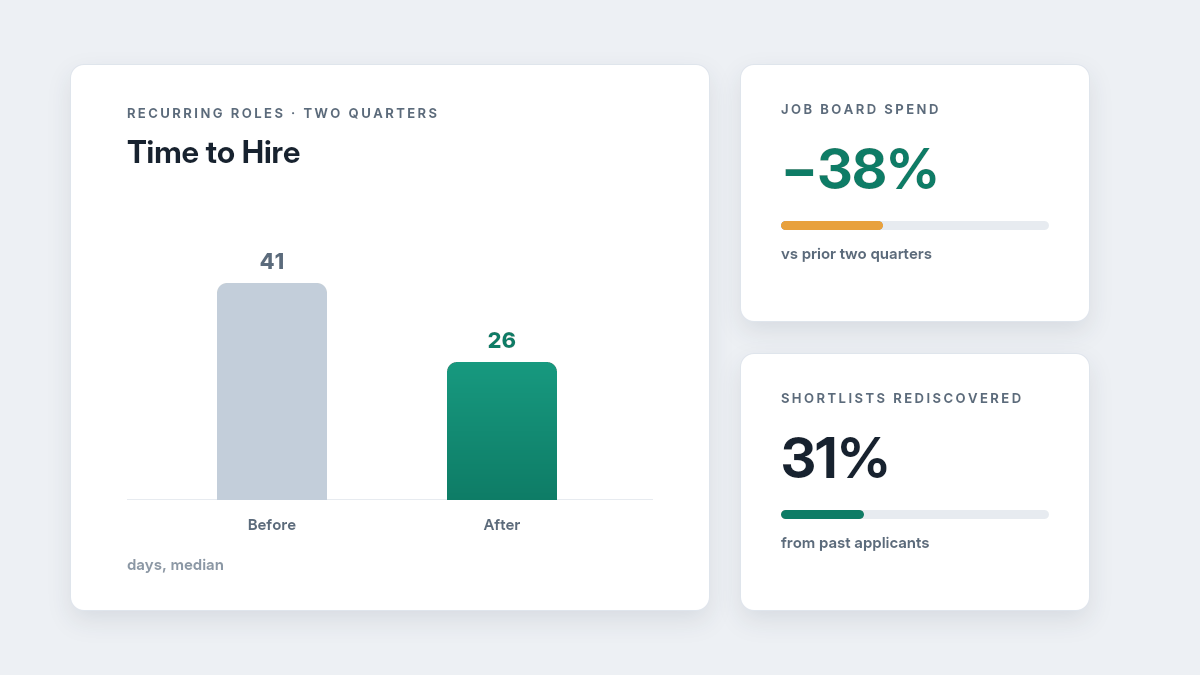
A 40-person fintech startup hiring 25 roles a year moved from spreadsheet-plus-inbox tracking to a structured searchable candidate database with enforced tags and saved searches for its two recurring roles (backend engineers and SDRs). Within two quarters, 31% of interview shortlists came from rediscovered past applicants, job board spend dropped 38%, and time-to-hire on the recurring roles fell from 41 to 26 days.
A 15-recruiter staffing agency sitting on 60,000 legacy profiles ran a one-time cleanup AI re-parsing of old resumes, deduplication (11% of records were duplicates), and a 45-tag controlled taxonomy then trained recruiters on the Boolean-plus-filter templates above. Fill rate on repeat client requisitions improved 22% in the following quarter, driven almost entirely by faster first-shortlist delivery: 4 hours from the searchable candidate database instead of 3 days of fresh sourcing.
Comparison Framework: Choosing Your Search Approach
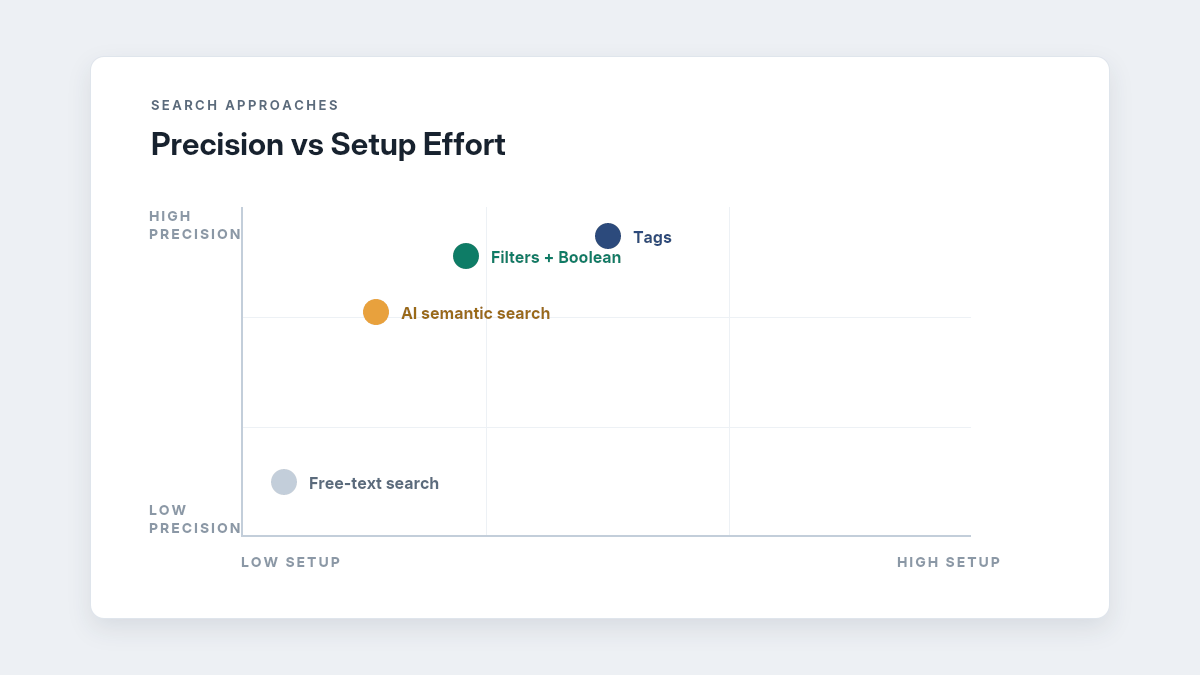
Different retrieval methods solve different problems inside a searchable candidate database. Most teams need all four, applied deliberately in one system rather than scattered across disconnected tools.
| Approach | Best for | Precision | Setup effort | Key risk |
| Free-text search | One-off lookups, “I remember a candidate who…” | Low | None | Noise; misses synonyms |
| Tags | Encoding recruiter judgment (silver medalists, availability) | High | Medium (taxonomy + governance) | Taxonomy drift without an owner |
| Filters + Boolean | Building shortlists for defined roles | High | Low–medium (training) | Over-complex queries get abandoned |
| AI semantic search | Rediscovery at scale, JD-to-database matching | Medium–high | Low (if ATS-native) | Garbage-in if parsing/tags are weak |
The decision rule when evaluating vendors: confirm AI Resume Parser quality first, tags-plus-filters second, semantic search third in that order because each layer depends on the one below it. A demo of impressive AI matching on the vendor’s clean sample data tells you nothing about how their searchable candidate database performs against your ten-year-old PDF archive; insist on a trial with your own exported records.
What Most Teams Get Wrong
The pattern across hundreds of ATS migrations is consistent, and it runs contrary to how most teams diagnose the problem: search failure is almost never a software problem in year one it’s a discipline problem and almost never a discipline problem by year three, when it becomes a software problem.
Early on, teams buy capable tools and then skip the unglamorous work: nobody owns the taxonomy, tags multiply, profiles aren’t updated at rejection, and within 18 months the searchable candidate database is unsearchable regardless of the technology underneath it. Later, teams over-correct and try to fix architectural gaps with heroic recruiter effort manually re-reading old pipelines because the legacy system can’t parse, filter, or match. Both failure modes burn the same resource: recruiter hours that recruitment analytics never capture, because “time spent not finding people we already had” isn’t a dashboard metric anywhere.
Three specific mistakes worth naming:
Tagging everything. A tag applied to 80% of candidates filters nothing. If more than a quarter of your searchable candidate database shares a tag, it’s a field, not a tag that moves it into structured data.
Treating rejection as the end of the record. The 30 seconds spent tagging a rejected finalist (silver-medalist, re-engage-Q1) is the highest-ROI half-minute in recruiting; it converts a sunk screening cost into a future shortlist. Most teams skip it, which is why their candidate rediscovery rate sits near zero while their sourcing budget climbs.
Buying workflow automation software but not automating the database itself. Teams automate emails and interview scheduling the visible workflow while leaving data upkeep manual. The better move is pointing workflow automation software at the searchable candidate database itself: auto-tag on rejection reason, auto-archive at retention limits, auto-alert on saved-search matches, auto-request profile updates from candidates every 12 months. Automation that maintains search quality compounds; automation that only sends emails doesn’t.
A Quick Searchability Audit: The Candidate Database Audit Checklist
Before changing tools or processes, measure where you stand. This candidate database audit checklist takes about 15 minutes against any live system:
- The filter test. Can you find your last three hires using only filters and tags, no name search? If not, your structured fields aren’t carrying real signals.
- The synonym test. Does a search for a common skill return both the exact term and its variants (“React” and “ReactJS”)? If not, you’re running literal-text matching and missing 30–50% of relevant profiles.
- The taxonomy test. Do fewer than 60 tags account for 90%+ of tag usage? Hundreds of single-use tags mean the taxonomy has already drifted.
- The recurrence test. Is there a saved search for every role you’ve opened 3+ times in the past year? Each missing one represents repeated, avoidable sourcing spend.
- The rediscovery test. For your last five hires, check whether a matching profile already existed in the searchable candidate database before the job was posted. If yes for two or more, you’re paying twice for the same candidates.
- The compliance test. Can you list every profile due for retention deletion this quarter, and produce consent records on demand? If not, the database is a liability as well as an underused asset.
Three or more failures means you have an archive, not a sourcing channel and it is usually faster to rebuild the structure in a modern AI-native system than to retrofit a legacy one field by field.
Turn Your Database Into Your First Sourcing Channel
Before you spend on the next job ad, run the audit above against your current system. If the structure isn’t there parsing, tags, filters, saved searches the fastest path is usually rebuilding on a platform where those layers are native rather than bolted on. Hirium’s forever-free plan includes AI resume parsing, tagging, smart search, and supported migration from tools like Zoho Recruit, so you can load your existing profiles and test rediscovery against your real data, your actual silver medalists, your actual recurring roles before committing anything. The candidates you need next quarter are probably already sitting in the searchable candidate database you have today; the only question is whether you can find them.
FAQ: Common Questions About Candidate Database Search
What is the difference between tags and keywords in an ATS?
Keywords are literal strings matched inside resume text; the candidate controls them by what they wrote. Tags are labels your team applies to encode judgment; the resume can’t contain interview outcomes, availability, fit signals. Keywords answer “what does the resume say,” tags answer “what do we know about this person.” A reliable searchable candidate database uses parsed keywords for skills and tags for context, and never asks one to do the other’s job.
How do recruiters search a candidate database effectively?
Start with structured filters location, experience band, tag to cut the pool by 90%+, then apply one Boolean skills clause, then review. Working a searchable candidate database this way keeps result sets small enough to actually read. Surveys show roughly 76% of recruiters search and rank primarily by skills from the job description, so validate that skills are parsed accurately; otherwise every downstream query inherits the gap. Save any search you expect to run more than twice.
What is candidate rediscovery and why does it matter?
It is the practice of sourcing new roles from past applicants already in your system silver medalists, near-miss finalists, and prior applicants whose experience has since grown. Rediscovered candidates typically move through the funnel 2–5x faster because screening history already exists and they already know your brand. It is the primary financial return on maintaining a searchable candidate database at all.
How do you clean up a messy candidate database?
Run it as a one-time project, not an ongoing chore: deduplicate the searchable candidate database first (expect 8–12% duplicates in systems older than 3 years), re-parse legacy resumes through a modern parser, collapse the tag list to a governed set of 40–60, archive profiles past your retention window, and rebuild saved searches for recurring roles. Budget 2–4 weeks; choosing an ATS that includes free supported migration can fold the entire cleanup into the move itself.
Is it legal to keep old resumes in a candidate database?
Yes, within limits. GDPR and similar laws including India’s DPDP Act require a lawful basis, a defined retention period (commonly 12–24 months), and honoring deletion requests. The practical standard: collect consent at application, auto-archive at your retention limit unless the candidate re-engages, and document the policy. Retention rules should be configured inside the searchable candidate database, not enforced by memory.
How do I know whether to fix my current system or migrate?
Run the six-point audit above. One or two failures are usually process fixes: assign a taxonomy owner, build saved searches, retrain on Boolean templates. Three or more especially failed synonym and rediscovery tests indicate the underlying platform can’t support structured search, and migration is the cheaper path. Most teams pressure-test this by migrating a sample of real profiles into a free trial and re-running the audit before committing to anything.