Workflow Automation Software for Recruiters: 7 Tasks You Should Never Do Manually Again
A recruiter screening 200 applications by hand spends 5 to 15 hours on that single job req before a single interview is booked. Multiply that across six open roles and the math stops being a productivity question it becomes a hiring capacity problem. Recruitment workflow automation is not about replacing recruiters. It’s about deciding which of the 40 hours in a recruiter’s week should actually require a human.
Most talent acquisition teams already believe they’re “using automation” because they own an applicant tracking system. But owning the software and configuring the workflows inside it are two different things. The gap between the two is where most of the wasted hours live.
According to SHRM’s 2026 Recruiting Benchmarking data, organizations with the most effective recruitment practices those that lean on AI to automate repetitive tasks fill open roles roughly five days faster than organizations that don’t, and median time-to-fill for nonexecutive roles has already dropped from 44 days in 2025 to 39 days in 2026 as automation adoption has grown.
For a hiring team running four or five open roles at once, the difference between manual and automated recruiting isn’t marginal. It’s the difference between a recruiter who spends their week reacting to a backlog and one who spends it building a pipeline ahead of demand. Recruitment workflow automation is what closes that gap, and it’s worth understanding exactly where the hours go before deciding what to fix first.
What Is Recruitment Workflow Automation?
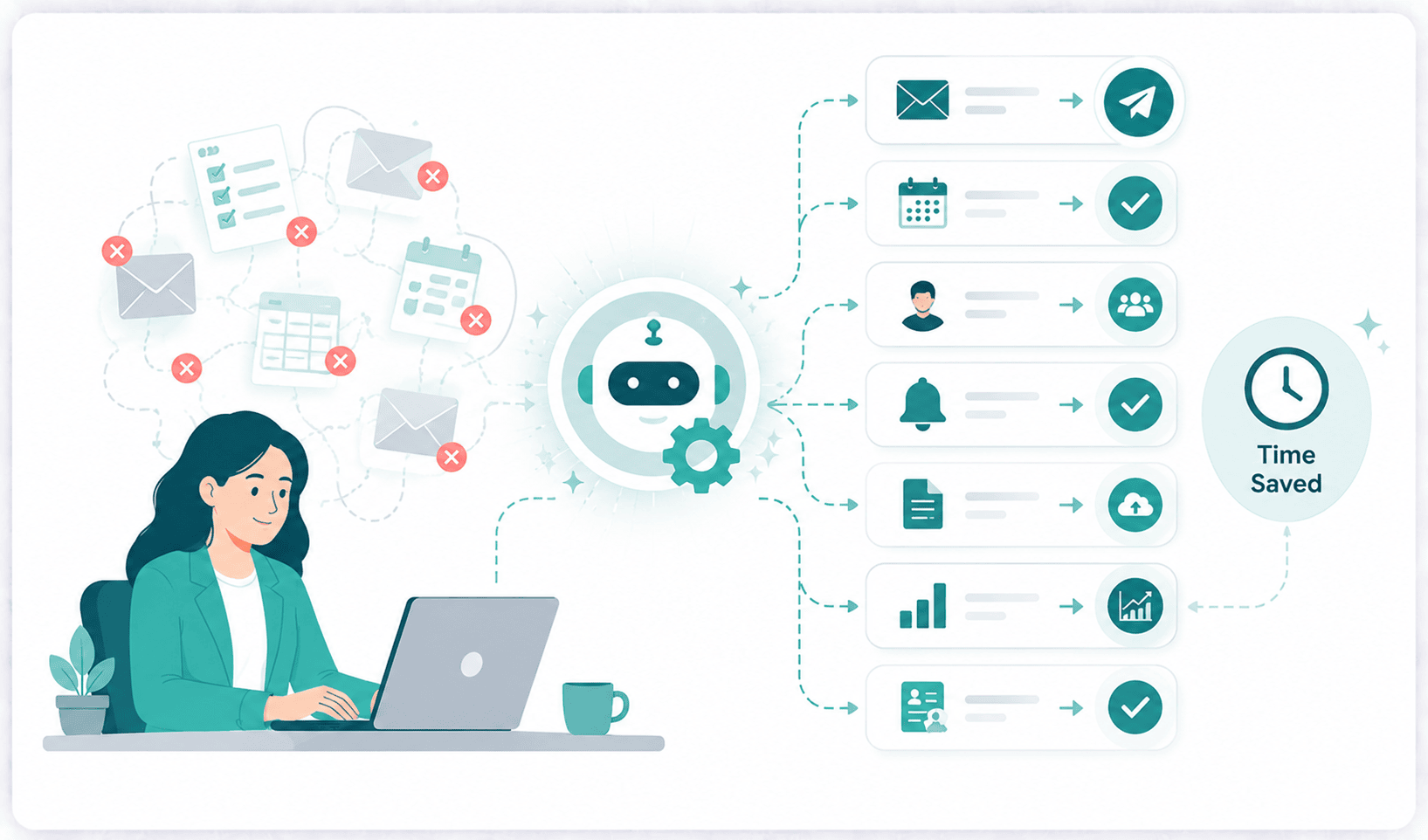
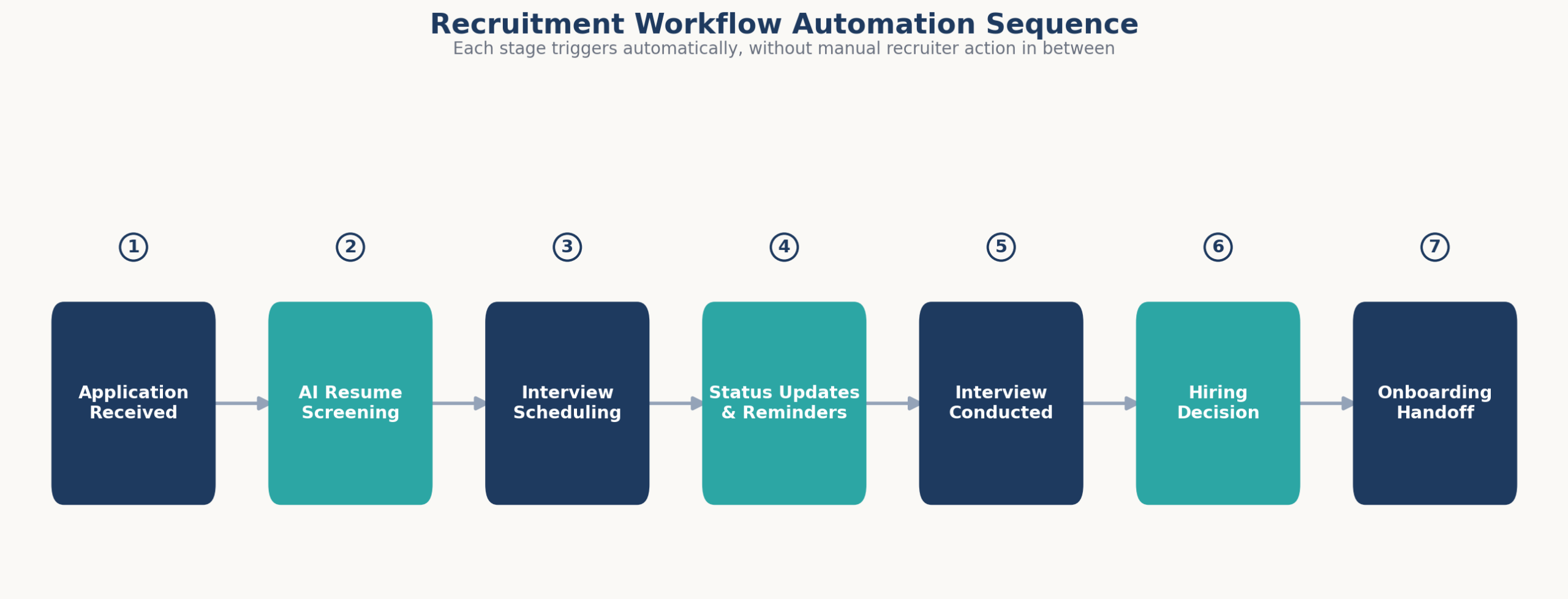
Recruitment workflow automation is the use of software to trigger, sequence, and complete repetitive hiring tasks screening, scheduling, status updates, reminders, reporting, and rejections without manual recruiter intervention at each step. It sits on top of or inside an applicant tracking system and replaces manual data entry with rule-based or AI-driven actions.
It’s worth separating this from automation in the abstract. A calendar reminder or a canned email template is a small piece of automation; recruitment workflow automation specifically refers to connecting those pieces into a sequence that runs across the full candidate lifecycle, from application to onboarding, without a recruiter manually triggering each step in between.
The Core Problem: Recruiter Hours Are Going to the Wrong Work
Most teams underestimate how much of a recruiter’s week disappears into administrative overhead usually by 3 to 4x. It doesn’t feel like 20 hours a week when it’s broken into 15-minute scheduling emails and two-minute status updates. It adds up anyway.
A recruiter managing 200 active candidates typically spends 8 to 15 minutes per candidate on manual data entry and status tracking alone 27 to 50 hours a month, before sourcing or interviewing even starts. Interview coordination, when done manually, consumes another 5 to 15 hours per recruiter per week, since coordinating one interview across two calendars and a candidate’s inbox routinely takes 30 minutes to 2 hours of back-and-forth.
The consequence isn’t just recruiter burnout. It’s slower time-to-hire, higher candidate drop-off, and a hiring funnel that scales worse every time headcount targets go up. A team hiring for 15 roles a quarter with no recruitment workflow automation in place is functionally understaffed, even if the org chart says otherwise.
This shows up most clearly at the extremes of hiring volume. A startup hiring for its first 20 employees can often get away with manual processes because the absolute number of applications is low. The moment volume crosses roughly 150–200 applicants per role which happens fast once a company posts to major job boards the manual model breaks. Recruiters stop being able to give every candidate a fair, timely response, and the tasks that get skipped first are exactly the ones candidates notice most: status updates and rejection notices.
There’s also a cost dimension most teams don’t calculate. A mid-level recruiter loaded cost (salary, benefits, overhead) typically runs $75,000–$100,000 a year. If half of that time goes to work a workflow tool could do data entry, scheduling logistics, sending the same email forty times the effective cost of manual admin per recruiter is $35,000–$50,000 a year in fully-loaded time, before counting the slower time-to-hire that comes with it.
None of this means recruiters are doing their jobs poorly. It means the tooling underneath them hasn’t caught up to the volume they’re expected to handle. Recruitment workflow automation exists specifically to close that gap not by removing recruiters from the process, but by removing the parts of the process that were never a good use of a recruiter’s judgment in the first place.
The 7 Recruiting Tasks You Should Never Do Manually Again
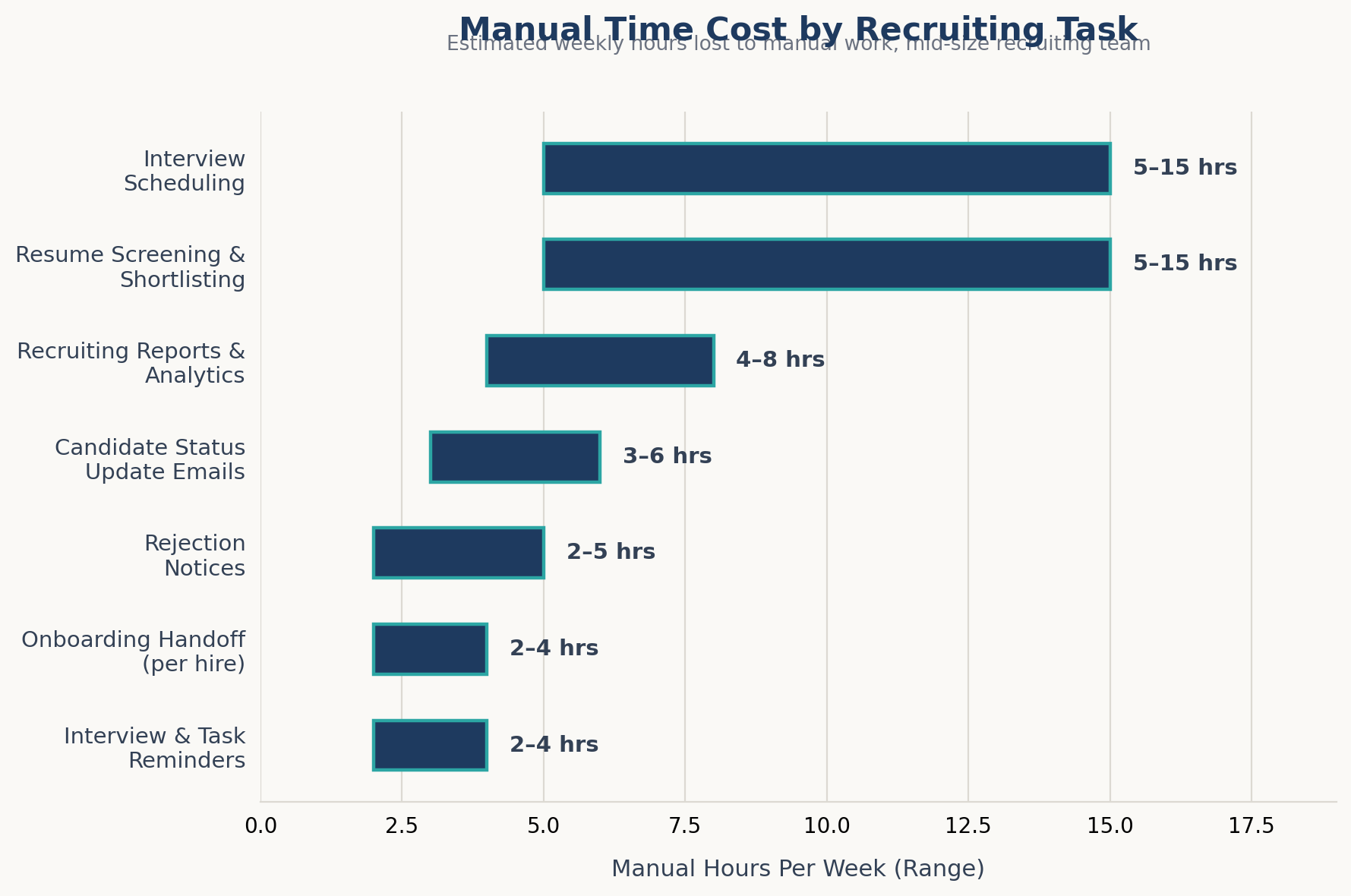
This is the deep section of the actual checklist. Each task below includes the realistic manual-hours cost per week for a mid-size recruiting team (3–5 open roles, 150–300 applicants per role) and what automating it typically requires.
1. Resume Screening and Shortlisting
Manual cost: 5–15 hours per week, per open role.
Screening 150–300 resumes by hand, at 30–90 seconds each, is the single biggest time sink in early-stage hiring and it’s also where resume screening automation delivers the fastest payback. Rule-based keyword filters catch obvious mismatches; AI resume parsing and shortlisting go further by ranking candidates against the actual job requirements, not just keyword density. Startups running high applicant volume against a small team (5:1 or worse recruiter-to-req ratios) see the largest relative gain here, since screening scales linearly with volume and recruiter hours don’t.
Setup consideration: parsing accuracy depends on how well the job requirements are structured before the first resume ever arrives. A vague job description produces vague shortlists no matter how good the AI is. Teams that see the best results spend 20–30 minutes upfront defining must-have versus nice-to-have criteria before turning screening over to automation skipping that step is the single most common reason automated shortlists disappoint on the first job req.
There’s a bias-and-compliance angle here too. Manual screening at 30–90 seconds per resume leaves enormous room for inconsistent, unstructured judgment calls between recruiters and even between candidates reviewed by the same recruiter on different days. A properly configured candidate database management system applies the same criteria to every applicant, which is easier to document and defend if a hiring decision is ever questioned provided the criteria themselves are reviewed periodically for disparate impact.
2. Interview Scheduling
Manual cost: 5–15 hours per week, per recruiter.
Coordinating a single interview across a hiring manager’s calendar, a panel’s availability, and a candidate’s timezone takes 30 minutes to 2 hours when done over email. AI interview scheduling tools remove this by reading calendar availability directly and letting candidates self-select a slot from pre-approved windows. For high-volume hourly or entry-level hiring, batch scheduling (fixed interview blocks, e.g., every Tuesday 10am–1pm) removes coordination almost entirely and tends to improve show-up rates because candidates commit to a specific slot rather than an open-ended “let’s find a time.”
Calendar integration is the technical dependency most teams underestimate here. Scheduling automation is only as good as its connection to Outlook or Google Calendar; if hiring managers keep a second, unsynced calendar for interviews, the tool will offer times that are already booked, and recruiters end up doing manual cleanup anyway. Confirming calendar sync across every interviewer before rollout avoids the most common complaint about scheduling automation in the first month.
3. Candidate Status Update Emails
Manual cost: 3–6 hours per week across an active pipeline.
Candidates who don’t hear back within a week routinely disengage, and manually updating 150+ candidates per role on where they stand is unrealistic for most recruiters. Automated, stage-triggered recruitment email templates “application received,” “moved to interview,” “in final review” keep candidates informed without a recruiter typing the same update forty times a week. This is separate from rejection notices (task 6) because status updates fire mid-pipeline, not at the close of a req.
4. Interview and Task Reminders
Manual cost: 2–4 hours per week.
Reminder emails and texts to candidates and hiring managers ahead of interviews reduce no-show rates. One documented case saw no-shows drop from 31% to 8% after automating this single step. Manually sending reminders doesn’t scale past a handful of interviews a week; automated, time-triggered reminders do it identically whether there are 5 interviews or 500.
5. Recruiting Reports and Pipeline Analytics
Manual cost: 4–8 hours per week for a hiring manager or TA lead.
Pulling time-to-hire, source effectiveness, offer-acceptance rate, and recruiter workload into a spreadsheet by hand is slow and usually out of date by the time it’s presented. Recruitment analytics dashboards that pull live data directly from the pipeline remove the manual export-and-format cycle and let hiring managers see bottlenecks (a stalled stage, a slow interviewer) while there’s still time to fix them, not after the req has been open for 60 days.
6. Rejection Notices
Manual cost: 2–5 hours per week.
Sending individual rejection emails to 90%+ of an applicant pool is both time-consuming and the most commonly skipped step which is exactly why 61% of job seekers report being ghosted after an interview. Automated, templated (but not robotic-sounding) rejection notices, triggered the moment a candidate is moved out of consideration, protect employer brand at a fraction of the manual time cost, and they close the loop candidates are explicitly asking for: over three-quarters of job seekers say they want visibility into their application status regardless of outcome.
7. Onboarding Handoff
Manual cost: 2–4 hours per hire.
The handoff from recruiter to hiring manager to HR offer letter, background check status, start-date paperwork, IT provisioning requests is where hires quietly fall through the cracks between systems. Automating the handoff as a triggered workflow (offer accepted → onboarding checklist auto-generated → relevant teams notified) removes the manual relay race and the delays that come with it.
Total manual time reclaimed across all seven tasks: roughly 23–57 hours per week for a team running 3–5 concurrent open roles, the equivalent of adding half a recruiter’s capacity back to the team without a new hire.
Integration, Data, and Compliance Considerations Before You Automate
Automating these seven tasks isn’t purely a software decision; three practical considerations determine whether it works cleanly or creates new problems.
Integration depth. Point tools that don’t talk to each other (a scheduling app that doesn’t update the ATS, an email tool that doesn’t log to the candidate record) recreate manual work at the handoff points between them. An integrated applicant tracking system where screening, scheduling, communication, and reporting share one candidate record removes this failure mode entirely, since there’s no second system to keep in sync.
Data retention and candidate privacy. Automated systems store far more candidate data, more consistently, than manual spreadsheets ever did which is a benefit for reporting but a responsibility for compliance. Retention periods for rejected-candidate data vary by jurisdiction (commonly 6 months to 3 years), and any automation vendor should let you configure deletion schedules rather than retaining data indefinitely by default.
Cost structure. Recruiting automation platforms are typically priced per seat, per hire, or as a flat monthly fee; a handful, including some ATS platforms built for startups and SMBs, now offer core automation (screening, scheduling, status emails) on a free tier with no per-recruiter fee. For a team evaluating a paid platform against payroll costs, the earlier calculation is worth repeating: 20+ hours a week in reclaimed recruiter time at a fully loaded cost of roughly $35–50 an hour puts the value of automation well into five figures annually for a small team, which is usually more than the platform costs outright.
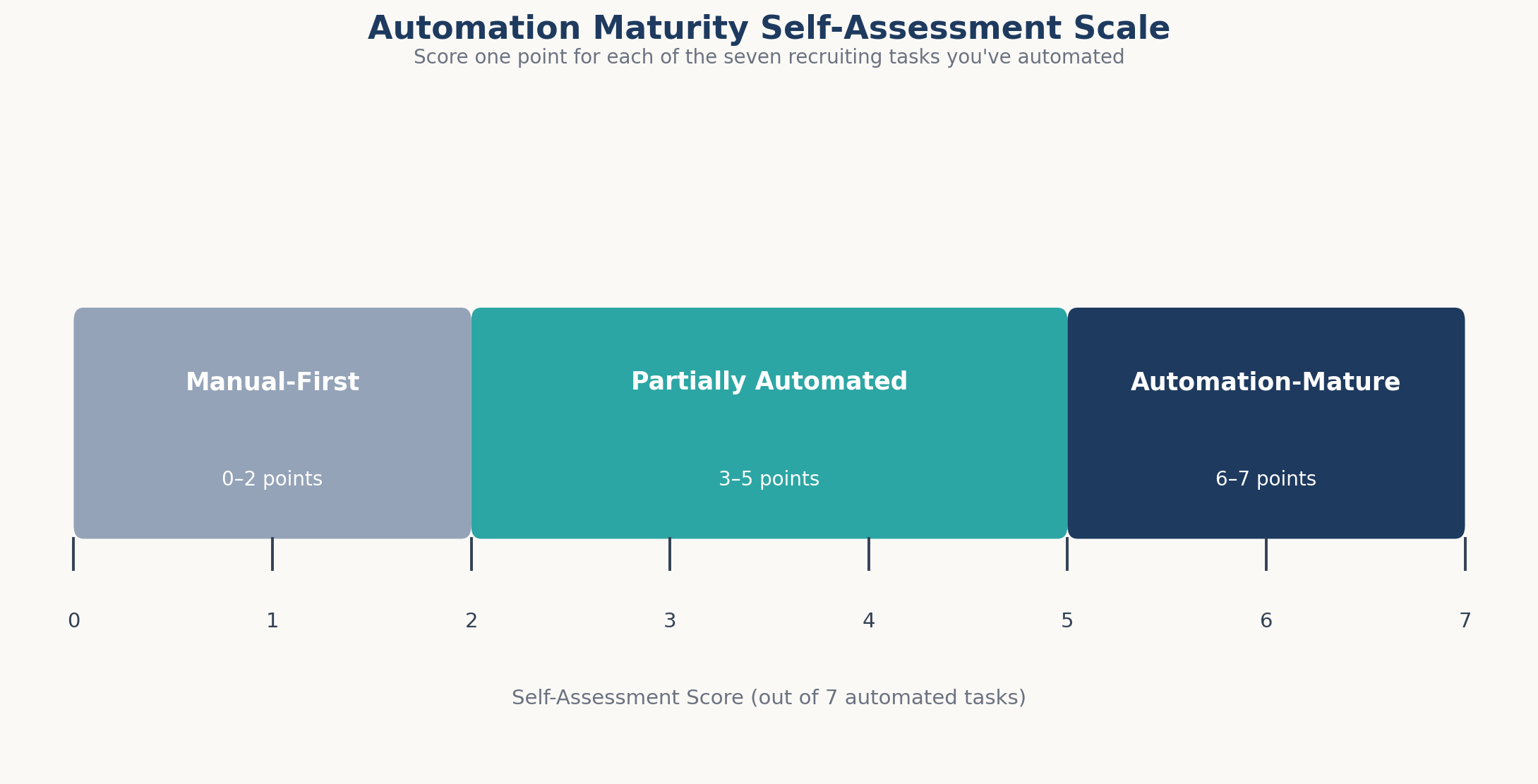
Automation Maturity Self-Assessment
Score one point for each that’s true of your current process:
- Resumes are screened or ranked by software before a human opens them.
- Interview scheduling requires zero manual back-and-forth emails.
- Candidates receive automatic status updates at every pipeline stage.
- Interview and task reminders fire without a recruiter sending them.
- Recruiting reports update in real time without manual data pulls.
- Every rejected candidate receives a notice without a recruiter typing it individually.
- Onboarding tasks trigger automatically once an offer is accepted.
0–2: Manual-first. Most of the week goes to admin, not recruiting. 3–5: Partially automated. Automation exists but has gaps that still eat hours. 6–7: Automation-mature. Recruiter time is going toward sourcing, candidate relationships, and hiring manager strategy the work that actually needs a human.
Case Studies: What Automating These Tasks Looks Like in Practice
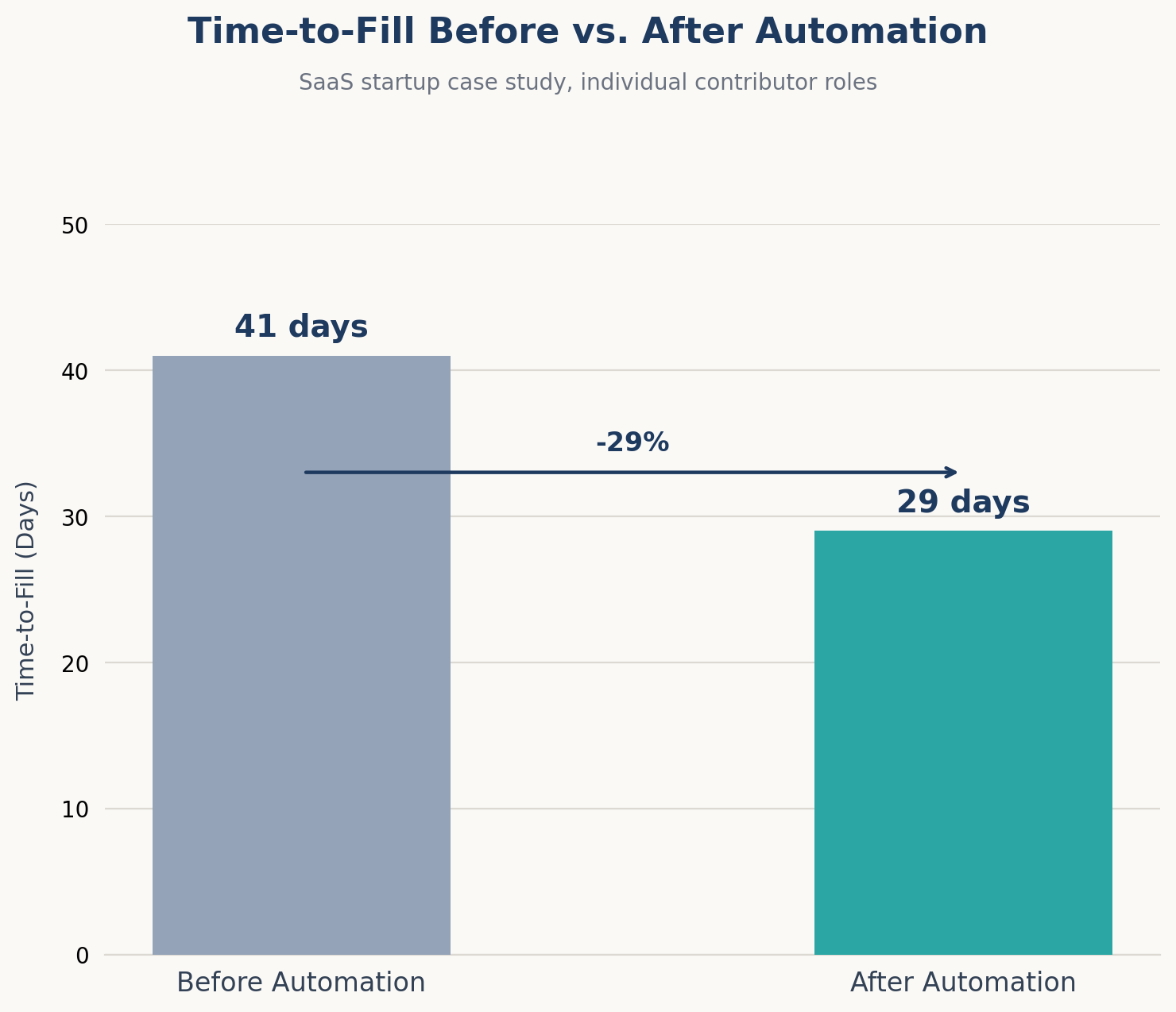
A 40-person SaaS startup hiring for eight roles simultaneously was manually screening roughly 1,200 applications a month across two recruiters. Screening alone was consuming an estimated 80 hours of combined recruiter time monthly, leaving almost no time for sourcing passive candidates or building relationships with hiring managers.
After automating resume screening and interview scheduling, screening time per role dropped from an estimated 10 hours to under 2, and average time-to-fill for individual contributor roles fell from 41 days to under 30 within two hiring cycles. The two recruiters redirected the reclaimed hours toward outbound sourcing, which had previously been the first task cut whenever volume spiked.
A 15-person recruiting team at a mid-market services company automated status emails, reminders, and rejection notices as a single triggered workflow rather than three separate tools. Candidate ghosting complaints on the company’s employer review pages dropped noticeably within one quarter, and the team recovered an estimated 10–12 hours per recruiter per week that had previously gone to manual candidate communication.
Notably, the team reported no measurable drop in candidate satisfaction scores after switching from individually written emails to templated, stage-triggered ones the templates had been edited for tone before launch, which the team credited as the reason the switch didn’t feel impersonal to candidates.
Comparison: Manual Process vs. Workflow Automation vs. Full ATS Automation
Not every team needs to automate all seven tasks at once, and not every automation approach delivers the same result. The table below compares the three common setups teams land in, since the difference between them explains most of the variation in outcomes across the case studies above.
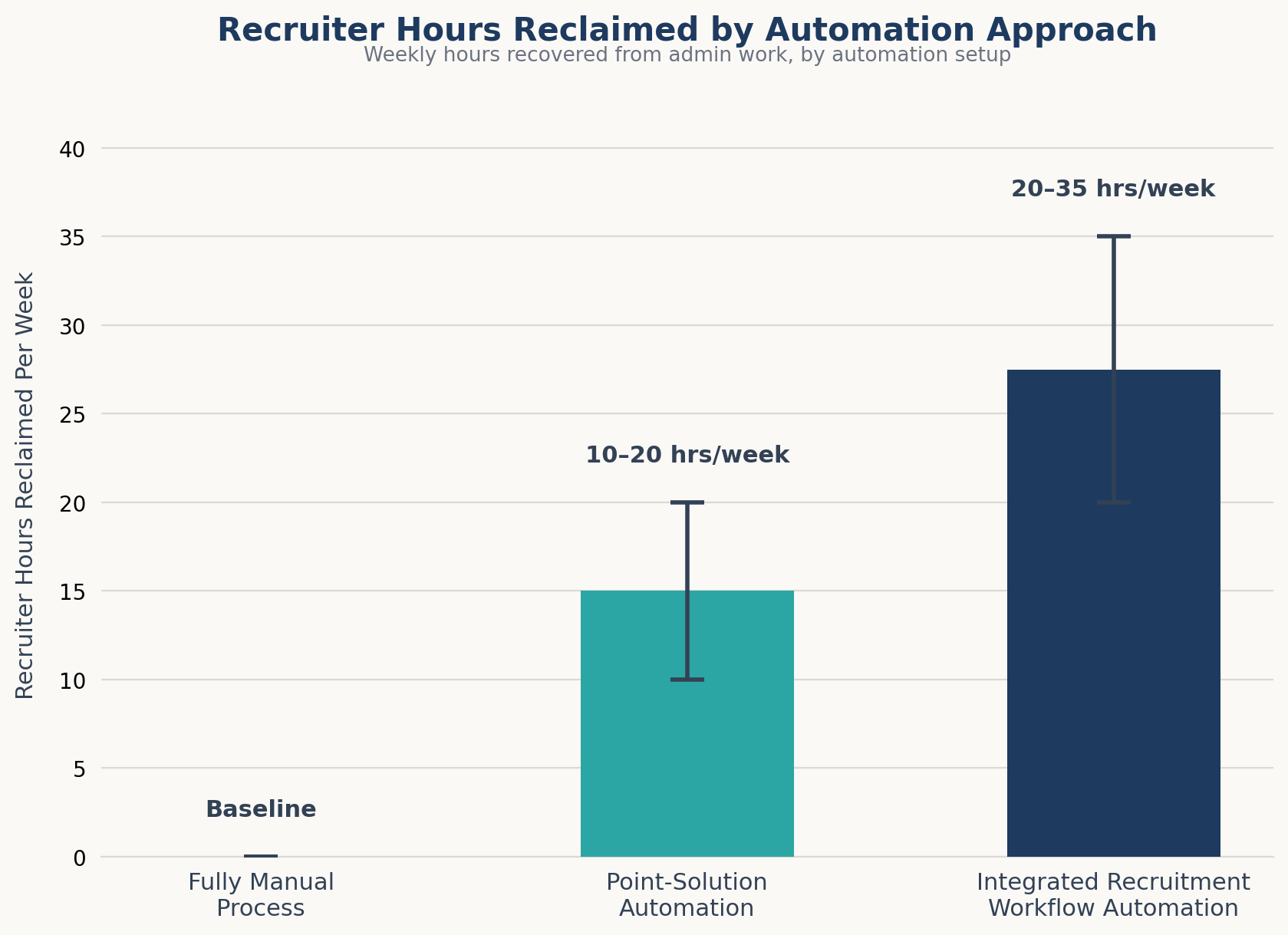
| Approach | Time Cost per Week | Candidate Experience | Best Fit |
| Fully manual | 25–40+ hours on admin alone | Inconsistent, delay-prone | Very low volume (1–2 open roles) |
| Point-solution automation (scheduling tool only, email tool only) | 10–20 hours saved, gaps remain between tools | Improves in the automated step, inconsistent elsewhere | Teams testing automation before committing |
| Integrated recruitment workflow automation (screening + scheduling + emails + reporting in one system) | 20–35+ hours saved | Consistent across every stage | Startups and SMBs scaling hiring volume |
Point solutions solve one bottleneck and leave the rest of the pipeline manual. Integrated automation inside a single job posting software and ATS platform removes the handoff gaps between tools, which is usually where the remaining manual hours are hiding. Teams moving from row one to row three directly, rather than stopping at row two, consistently report the largest time recovery because they never rebuild the same manual bridge between disconnected tools.
What Most Teams Get Wrong
Most teams treat automation as a feature they’ll “turn on later,” not a process they need to design. The most common mistake isn’t choosing the wrong software, it’s buying automation-capable tools and never configuring the workflows inside them, which is functionally the same as not having automation at all.
The second mistake is automating candidate-facing communication without checking the tone. A status update or rejection notice that reads like a form letter does more brand damage than a slightly slower manual one. Templates need editing before they go live, not after candidates start replying to complain.
The third, less obvious mistake: automating reporting before automating the pipeline stages that feed it. Analytics on a partially manual process just produce fast, confident numbers about a broken workflow. Fix the upstream steps first.
A fourth pattern worth naming: teams often automate the tasks that are easiest to automate rather than the ones costing the most hours. Reminders are simple to set up and get automated first; screening, which usually carries the largest time cost, gets pushed to “phase two” because it feels riskier to hand off.
The self-assessment above exists specifically to redirect that instinct to rank tasks by hours saved, not by setup difficulty, and the highest-impact automation usually turns out to be resume screening or interview scheduling, not the reminder emails teams reach for first.
Where to Start
If your team is scoring 0–3 on the self-assessment above, the fastest path forward isn’t a full platform migration; it’s picking the one or two tasks costing you the most hours (usually screening and scheduling) and automating those first before touching reporting or onboarding.
Setup Tips for Rolling Out Recruitment Workflow Automation
A few practical steps make the rollout smoother regardless of which platform a team chooses:
- Start with one job requisition, not the whole pipeline. Configure screening and scheduling rules against a single active role, confirm the shortlist quality, then extend the same rules to other open reqs.
- Write the job requirements before turning on AI screening. Automated shortlists are only as accurate as the must-have criteria fed into them.
- Sync every interviewer’s calendar before enabling self-service scheduling. A single unsynced calendar undermines confidence in the whole system within the first week.
- Edit the default email and rejection templates for tone before launch. Generic templates are the fastest way to make automation feel impersonal to candidates.
- Turn on reporting last, once the upstream stages are stable, so the dashboards reflect a working process rather than a partially manual one.
In Hirium’s setup flow specifically, these steps map to configuring the job’s screening criteria first, connecting calendars during onboarding, and reviewing the default candidate-facing templates before a role goes live, a sequence most teams complete in under a day for a single req.
Hirium’s workflow automation covers all seven tasks above AI screening, self-service scheduling, triggered status and rejection emails, and real-time reporting inside one candidate database, with a free-forever plan and no recruiter fees. If you’re evaluating where to start, the self-assessment above is a reasonable first step before comparing vendors.
FAQ
What recruiting tasks can actually be automated?
Resume screening, interview scheduling, candidate status updates, reminders, reporting, rejection notices, and onboarding handoff are the seven tasks with the clearest automation payback. Sourcing and final hiring decisions generally still require human judgment, though AI tools can support both.
Is recruitment workflow automation worth it for a small team hiring for just 2–3 roles?
Yes, though the return scales with volume. A team hiring for one role a quarter will see modest time savings from recruitment workflow automation; a team running 5+ concurrent reqs will typically recover 20+ hours a week, which is closer to adding another recruiter’s worth of capacity.
How much time does automation actually save recruiters?
Documented ranges across screening, scheduling, and candidate communication put total savings between 20 and 55 hours per week for a small-to-mid-size recruiting team, depending on applicant volume and how many of the seven tasks are automated.
What’s the difference between an ATS and workflow automation?
An ATS stores and tracks candidate data. Workflow automation is the layer that acts on that data triggering emails, scheduling interviews, and generating reports without manual input. A modern ATS should include both, not just the database.
Does automating recruiting hurt the candidate experience?
Not when it’s configured well. Automated status updates and rejection notices generally improve candidate experience because candidates hear back faster and more consistently than they would from manual, ad hoc communication. The risk is templated messages that sound robotic that’s a tone problem, not an automation problem.
How do I know if my hiring process needs automation?
Score yourself against the seven-task self-assessment above. A score of 0–3 means most of your recruiting week is going to admin work rather than recruiting itself, which is the clearest sign automation is overdue.
Can free tools handle recruitment workflow automation, or do I need an expensive platform?
Several ATS platforms, including free-tier options, now include AI screening, scheduling, and automated candidate communication without additional recruiter fees. Cost is no longer the main barrier to automating these tasks; configuration time is.
How long does it take to fully automate a hiring workflow?
Automating one or two high-impact tasks, like screening and scheduling, typically takes a few days of setup once job requirements and calendars are configured correctly. Automating all seven tasks end to end, including reporting and onboarding handoff, usually takes 2–4 weeks for a small team to fully roll out and refine.