10 Recruitment Email Templates Every Recruiter Should Save (Free to Copy)
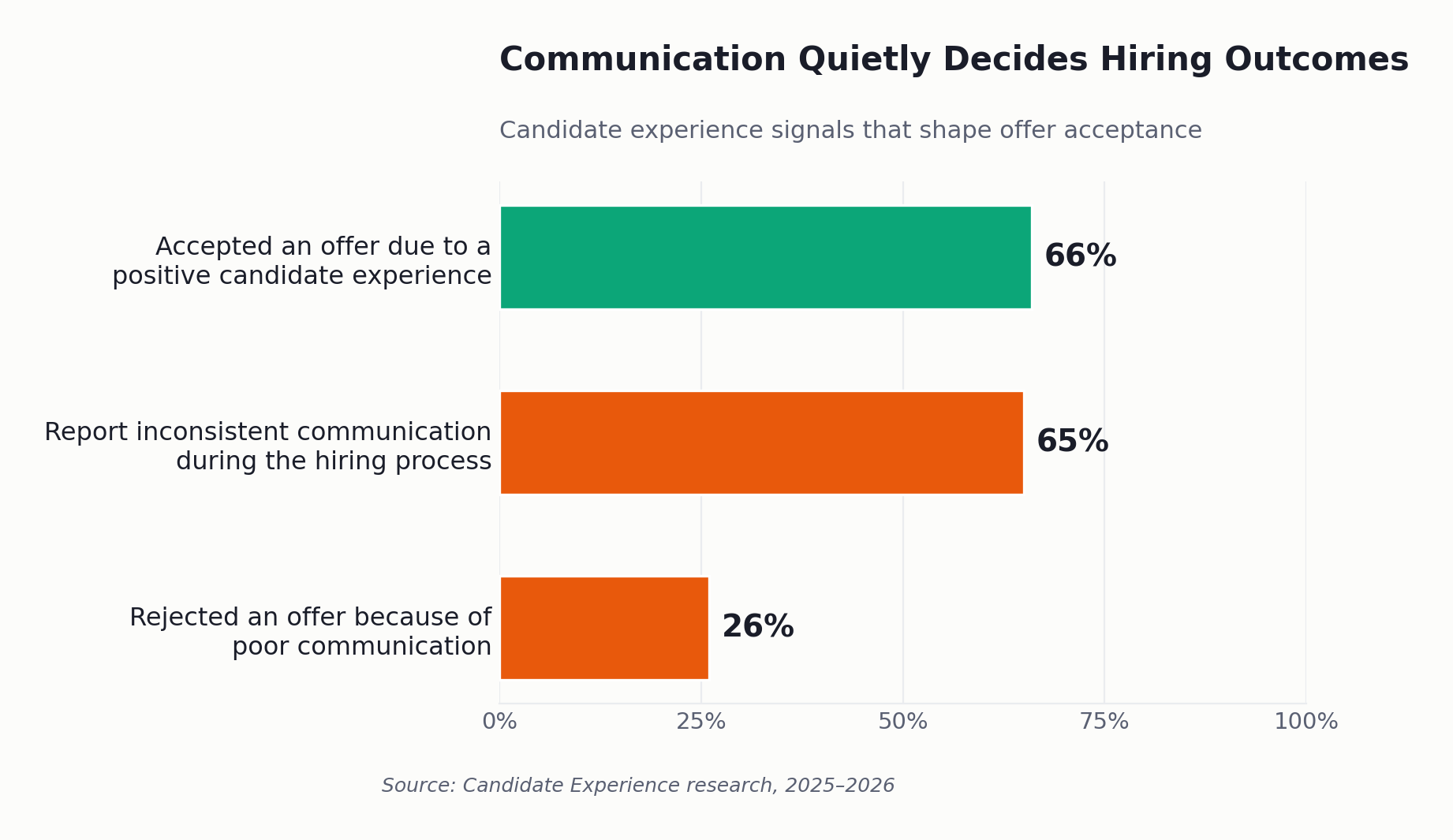
Twenty-six percent of candidates who turn down a job offer do so for a reason that has nothing to do with salary, title, or the company itself they walk away because of how they were communicated with. The email that arrived three days late, the interview confirmation that never came, the silence after a final round: each of those is a hiring decision made for you by default. Strong recruitment email templates exist precisely to close those gaps, and most teams either don’t have them or never bothered to standardize the ones they do.
That single statistic reframes the entire conversation. Communication is not a courtesy layered on top of hiring; it is a measurable lever on offer acceptance. And the recruiters who win that lever are rarely the most eloquent writers. They are the ones who never start from a blank screen, who have a tested message ready for every stage, and who let software fire the routine ones automatically.
The latest data makes this clear: according to Candidate Experience Statistics 2026, 65% of candidates report not receiving consistent communication during the hiring process making it one of the biggest reasons for drop-offs.
This guide gives you ten of those messages, written for real recruiting scenarios: high screening volume, fast-moving pipelines, and the time-to-hire pressure that defines startup and SMB hiring. Copy them, adapt the tone to your brand, and wire the repetitive ones into your workflow so no candidate ever falls through a crack again.
What Are Recruitment Email Templates?
Recruitment email templates are pre-written, reusable message frameworks that recruiters use to communicate with candidates at each stage of the hiring process from application acknowledgment through interview scheduling, rejection, offer, and onboarding. They standardize tone, reduce manual writing time, and ensure consistent, timely communication across every candidate in the pipeline.
The value is not the wording alone. It is the combination of a reliable structure with the discipline to send something at every stage, every time. Used well, recruitment email templates turn an inconsistent, memory-dependent process into a predictable one.
The Real Cost of Inconsistent Candidate Communication
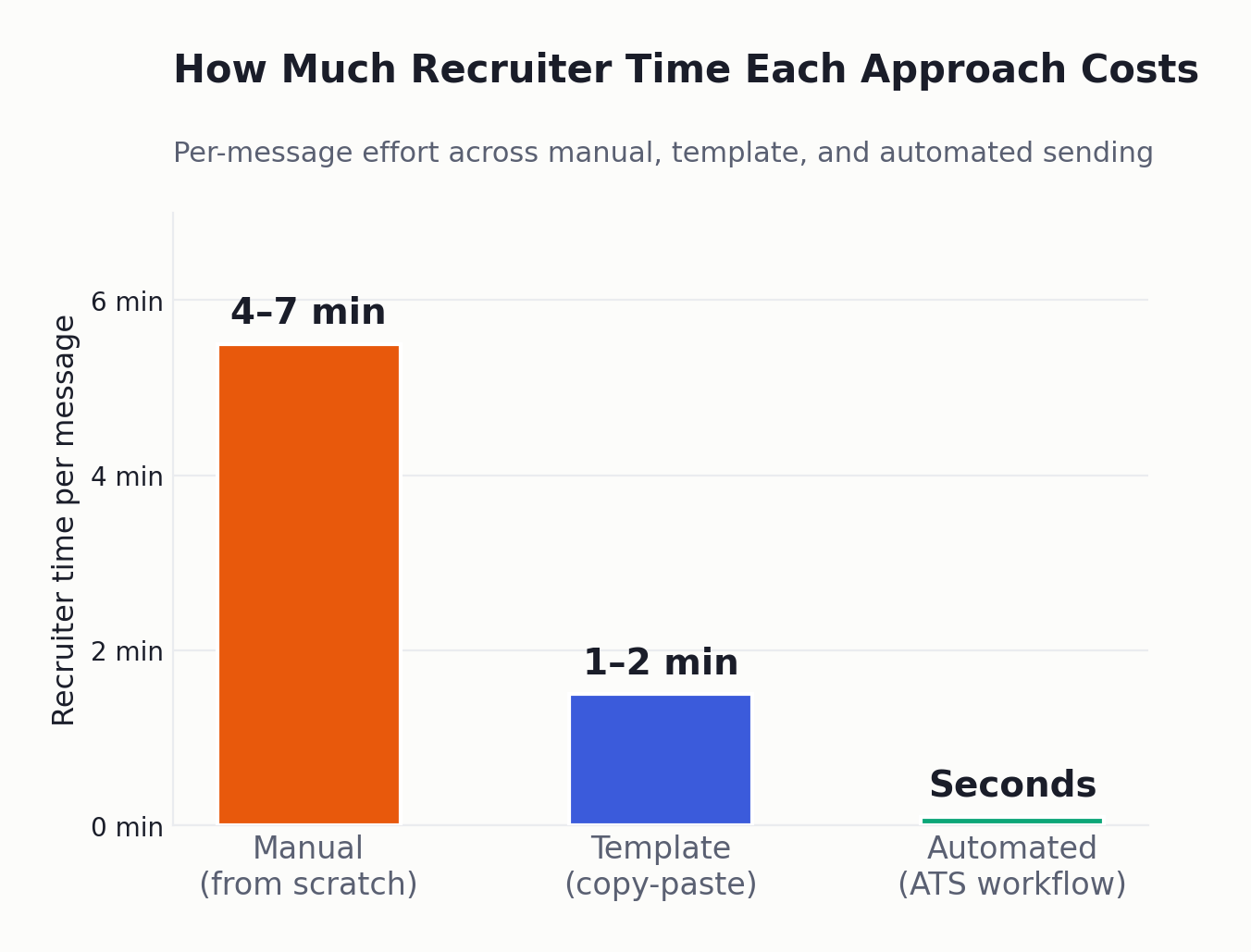
Most recruiting teams underestimate their communication debt by a wide margin. A single open role at a growing company can generate 150–250 applications, and a recruiter juggling 8–12 reqs is suddenly responsible for 1,500–3,000 candidate touchpoints a month. Written from scratch, each thoughtful email takes 4–7 minutes. The math turns ugly fast.
When that volume outpaces capacity, the first thing to break is the unglamorous middle of the funnel: the status update, the polite “not this time,” the nudge to a candidate who went quiet. Those are exactly the messages that shape candidate experience and, by extension, your offer acceptance rate and exactly the messages that recruitment email templates exist to protect.
The downstream costs are concrete. Post-interview ghosting by employers has climbed year over year and is now the most damaging communication failure a team can commit, because it happens after a candidate has invested hours. Every silent rejection also erodes your talent acquisition brand. rejected candidates talk, leave reviews, and decline to refer others. Slow, inconsistent follow-up directly lengthens time-to-hire, and in a competitive market a 10–14 day lag is often the difference between a signed offer and a “I’ve accepted elsewhere.”
The fix is not a heroic effort. It is a small library of strong messages plus a system that sends them on schedule. Reusable recruitment email templates are the cheapest, fastest lever a growing team has, because they convert good intentions into a repeatable process. The teams that scale hiring without scaling burnout are almost always the ones that standardized their recruitment email templates early, before volume forced the issue.
The 10 Recruitment Email Templates Every Recruiter Should Save
This is the core of your communication system. Each template below is ready to copy, uses simple merge fields like [First Name] and [Role], and is built to be sent in seconds rather than drafted from scratch. Together they cover the full candidate journey, and they work just as well pasted into Gmail as they do loaded into an ATS. After the templates, you’ll find tone-customization tips and a step-by-step process for automating them by stage.
A quick rule before you copy anything: the best recruitment email templates do three things: they tell the candidate exactly where they stand, what happens next, and by when. Hold every template to that test.
1. Application Acknowledgment
Of all ten recruitment email templates here, this is the one most worth automating. Sent within minutes of an application, it sets expectations and buys you goodwill before a human has even reviewed the resume.
Subject: We’ve received your application for [Role]
Hi [First Name],
Thanks for applying for the [Role] position at [Company]. Your application is now with our team, and we review every submission carefully.
Here’s what to expect: you’ll hear from us within [X business days] about next steps, whether or not we move forward. If your background matches what we’re looking for, we’ll reach out to schedule an initial conversation.
We appreciate the time you put into applying.
Best, [Recruiter Name], [Company] Talent Team
2. Interview Invitation
This is your best interview invitation email template for candidates clear, specific, and low-friction. Vagueness here is what stalls scheduling, so name the format, the people, and the time commitment up front.
Subject: Let’s talk [Role] interview with [Company]
Hi [First Name],
We were impressed by your application for [Role] and would love to move you to the interview stage.
- Format: [Video call / Onsite / Phone]
- With: [Interviewer Name, Title]
- Length: [30–45 minutes]
- Focus: [e.g., your experience with X and a few role-specific questions]
Please pick a time that works for you here: [scheduling link]. If none of those fit, reply with two or three windows and we’ll make it work.
Looking forward to it, [Recruiter Name]
3. Interview Reschedule
Schedules slip on both sides. A clean reschedule note protects the relationship and keeps momentum instead of letting a cancellation become a quiet exit.
Subject: Rescheduling your [Role] interview
Hi [First Name],
We need to move your interview originally set for [date/time]. Apologies for the change we want to give your conversation the attention it deserves.
Could you grab a new slot here: [scheduling link]? If it’s easier, send me a couple of times that suit you and I’ll confirm within the hour.
Thanks for your flexibility, [Recruiter Name]
4. Candidate Rejection
If you want to know how to write a recruitment rejection email that protects your brand, the answer is speed, respect, and zero false hope. You don’t owe detailed feedback to every applicant, but you do owe a timely, human close.
Subject: Update on your [Role] application
Hi [First Name],
Thank you for the time you invested in applying and [if applicable] interviewing for [Role] at [Company]. After careful review, we’ve decided to move forward with other candidates for this position.
This was a genuinely competitive process, and the decision wasn’t easy. We’d like to keep your profile on file for future openings that fit your background, if you’re open to that.
We wish you the best in your search and hope our paths cross again.
Warm regards, [Recruiter Name], [Company]
5. Job Offer
The offer email is the highest-stakes of all recruitment email templates: it should remove ambiguity and reduce the friction between “yes” and a signature. Lead with enthusiasm, then make the logistics effortless.
Subject: Your offer from [Company] [Role]
Hi [First Name],
We’re delighted to offer you the [Role] position at [Company]. The team was genuinely excited after meeting you, and we think you’ll do great work here.
The key details:
- Title: [Role]
- Compensation: [salary + any variable/equity]
- Start date: [proposed date]
- Reporting to: [Manager Name]
Your full offer letter is attached. I’m happy to jump on a quick call to walk through anything comp, benefits, start date, all of it. Could you let us know your decision by [date]?
Congratulations, and welcome (almost) aboard, [Recruiter Name]
6. Reference Check Request
A short, well-structured reference request gets faster replies. Make the task specific and the response easy.
Subject: Quick reference request for [Candidate Name]
Hi [Reference Name],
[Candidate Name] is in the final stages for the [Role] position at [Company] and listed you as a reference. Would you have 10–15 minutes this week for a short call, or would you prefer a few questions by email?
I’d mainly love your perspective on how they performed in [relevant area] and what it was like working with them.
A couple of windows that work for me: [options]. Thanks so much for your time.
Best, [Recruiter Name]
7. Post-Application Follow-up
Pipelines stall when candidates aren’t sure whether they’re still in the running. A mid-process follow-up keeps strong candidates warm, a measurable boost to candidate engagement when competing offers are circulating.
Subject: Still very much interested [Role] update
Hi [First Name],
A quick note to keep you in the loop. Your application for [Role] is still active, and we’re finalizing the next round of interviews this [week/timeframe].
You’re a candidate we’re keen to keep moving forward. Expect to hear from me by [date] with concrete next steps. In the meantime, reply here if anything has changed on your end or if you have questions.
Talk soon, [Recruiter Name]
8. Post-Interview Thank-You
Among recruitment email templates, this one delivers the highest return per second spent. Sent within a day of the interview, it signals respect and reinforces interest, and meaningfully shifts how a candidate weighs your offer against others.
Subject: Thanks for meeting with us, [First Name]
Hi [First Name],
Thank you for taking the time to interview for [Role] today. We enjoyed the conversation, especially [specific details about a project, an answer, a question they asked].
Here’s what’s next: we expect to make a decision by [date] and will be in touch either way. If anything else comes to mind that you’d like us to know, just reply here.
Thanks again, [Recruiter Name]
9. Candidate Ghosting Nudge
A candidate ghosting follow-up email is your second (and usually final) attempt to re-engage someone who went quiet after expressing interest. Keep it light, give them an easy out, and set a clear deadline so the silence resolves either way.
Subject: Checking in on [Role] are you still interested?
Hi [First Name],
I reached out last week about next steps for [Role] and haven’t heard back, so I wanted to check in once more.
Totally understand if priorities have shifted or you’re no longer available a quick “not right now” is genuinely helpful and frees up the slot. If you are still interested, just grab a time here: [link].
I’ll assume the timing isn’t right if I don’t hear back by [date]. Either way, thanks for considering us.
Best, [Recruiter Name]
10. Onboarding Welcome
The hiring process doesn’t end at acceptance; it ends when the new hire feels confident on day one. The last of these recruitment email templates bridges the awkward gap between signature and start date and reduces pre-boarding drop-off.
Subject: Welcome to [Company], [First Name]!
Hi [First Name],
We’re thrilled you’re joining us as [Role], starting [date]. The whole team is looking forward to working with you.
To make day one smooth, here’s what to expect:
- Start time & location: [details / video link]
- First-day contact: [Name, how to reach them]
- Before you start: [any forms, equipment, or reading]
Anything you need in the meantime, reply here, consider me your point of contact until you’re settled.
Welcome aboard, [Recruiter Name]
Customizing Tone Without Rewriting Everything
Tone is where templates earn or lose their credibility. The fastest way to personalize without rewriting is to standardize the structure and vary three things: the greeting warmth, one specific detail per candidate, and the sign-off. A seed-stage startup can run these in a casual, first-name voice; a regulated SMB might prefer slightly more formal phrasing. Effective email personalization is rarely about long custom paragraphs; a single concrete reference to the candidate’s background or interview answer outperforms three sentences of generic praise. Build two or three tonal variants of your recruitment email templates: one warm, one neutral, one formal and the whole team can match brand voice without reinventing each message.
How to Automate Recruitment Emails by Stage
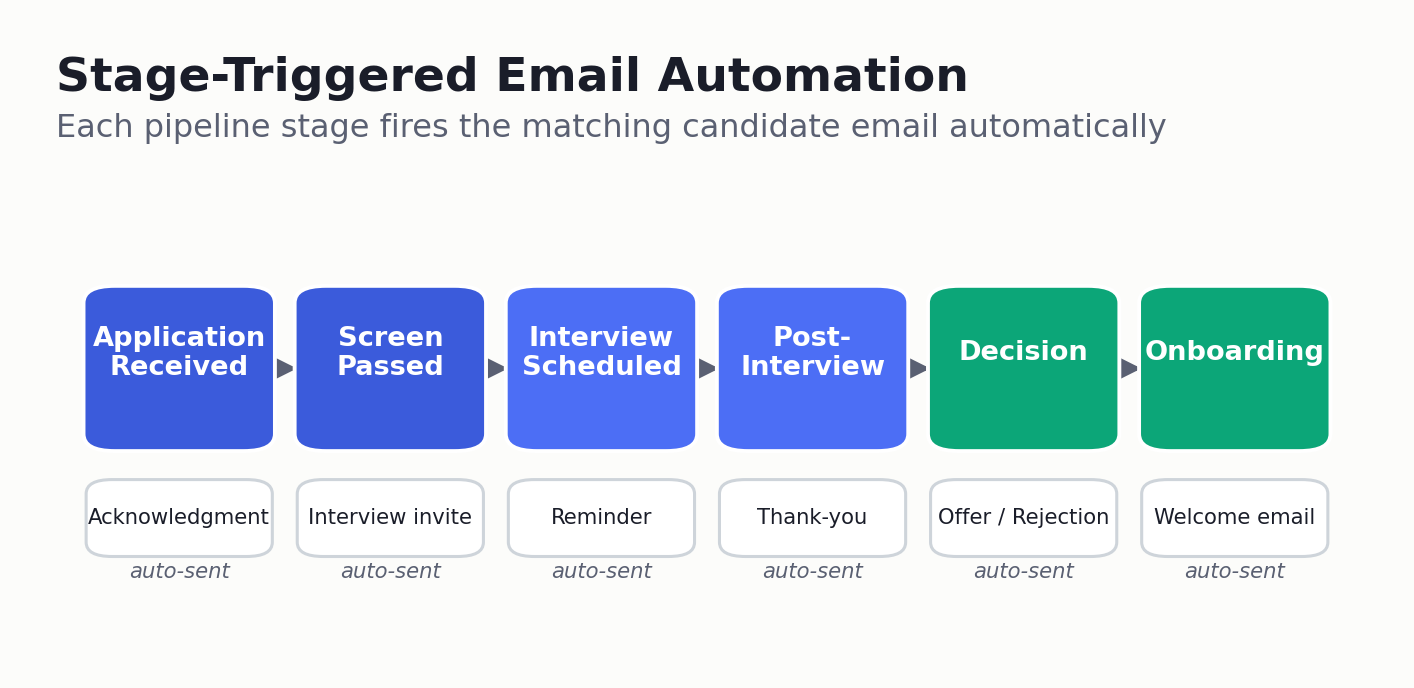
Strong templates only scale when a system sends them. Modern recruitment automation ties each message to a pipeline event so timing never depends on a recruiter remembering. Standalone recruitment email templates in a shared document still rely on human effort; the leap in productivity comes from connecting them to the pipeline. Here is the process that wins back the most recruiter hours:
- Map every email to a pipeline stage application received, screen passed, interview scheduled, post-interview, decision, offer, onboarding.
- Store the templates centrally so the whole team uses one approved, consistent version.
- Set status triggers when a candidate moves stages, the matching email fires automatically.
- Insert personalization tokens for name, role, interviewer, and timing.
- Define SLA and timing rules e.g., acknowledgment within 5 minutes, rejection within 48 hours of a decision.
- Route exceptions to a human so sensitive or senior conversations stay personal.
- Track opens and replies in your analytics to see which messages actually move candidates.
This is where a purpose-built applicant tracking system changes the economics of hiring. Recruitment Status Update Software built into a modern ATS sends stage-based updates the moment a candidate advances, while AI Interview Scheduling removes the back-and-forth of finding a time entirely the candidate self-books from real availability. Connected this way, your recruitment email templates stop being a checklist and become a self-running layer of the hiring process. Hiram wires the templates above into automated, stage-triggered workflows so the routine 70% of candidate communication runs itself, and recruiters spend their time on the conversations that need a human.
Real-World Application
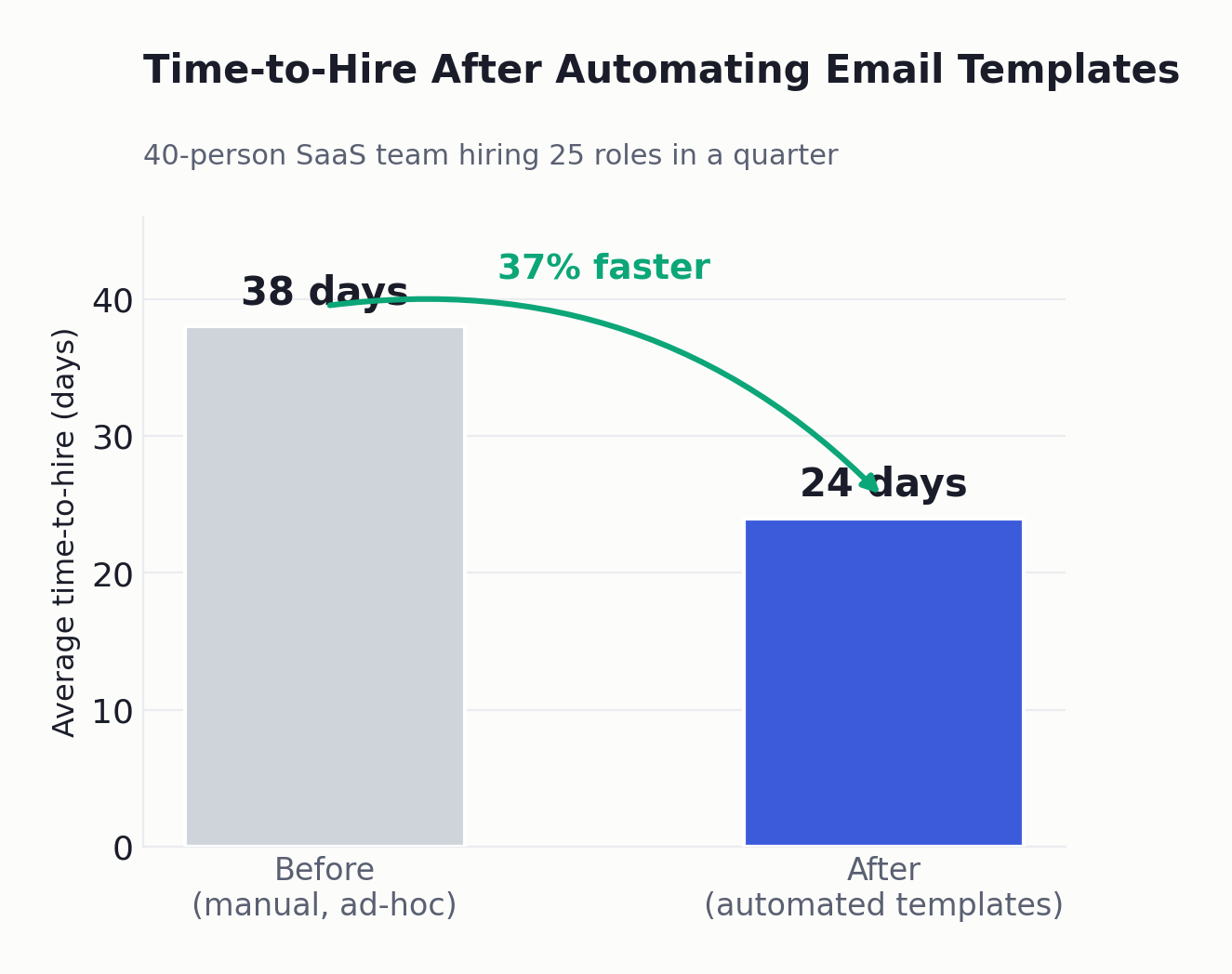
A 40-person SaaS startup hiring 25 roles in a quarter. Before standardizing templates, the team wrote acknowledgments and rejections ad hoc and frequently skipped status updates under load. After moving all ten message types into stage-triggered automation, their time-to-hire dropped from 38 days to 24, and candidate complaints about silence effectively disappeared. The recruiter handling the heaviest req load reported reclaiming roughly a full day each week.
An SMB staffing team processes 1,200 applicants a month. High screening volume meant rejections and follow-ups were the first tasks to slip. Automating the application acknowledgment, rejection, and ghosting-nudge templates and using AI to surface the strongest profiles first cut the team’s manual email time by an estimated nine hours per week and lifted their offer acceptance rate as candidates stopped going cold mid-pipeline.
Neither outcome required more headcount. Both came from pairing a tested message library with software that handled the repetitive sends. The lesson generalizes: when recruitment email templates are connected to the pipeline rather than living in a forgotten document, the candidate experience improves and recruiter time is freed in the same move.
Manual Emails vs. Automated Workflows: How to Decide
Most teams don’t need to choose between “all manual” and “fully automated.” The smarter question is how to deploy recruitment email templates across three tiers of effort. They need to decide which messages are safe to automate and which deserve a human touch. The framework below clarifies it.
| Criteria | Manual, written from scratch | Template library (copy-paste) | Automated ATS workflow |
| Time per message | 4–7 min | 1–2 min | Seconds (auto-sent) |
| Consistency across team | Low | Medium | High |
| Best for | Senior / sensitive cases | Mid-funnel, low volume | High-volume, repetitive stages |
| Risk of candidates falling through | High | Medium | Very low |
| Personalization effort | High but inconsistent | Moderate, controllable | Token-based, scalable |
The practical rule: automate acknowledgments, status updates, scheduling, and standard rejections; keep offers, sensitive declines, and executive outreach human. Most teams find that two-thirds of their recruitment email templates belong in the automated tier. Centralized Candidate Profile Management makes the handoff seamless; the same profile data that triggers an automated update is right there when a recruiter wants to personalize the next message.
What Most Teams Get Wrong
The mistake isn’t bad writing. It’s treating email templates as a one-time document instead of a living system tied to the pipeline. Teams paste a few templates into a shared doc, feel organized, and then quietly stop using them the first busy week because copy-pasting still depends on a human remembering to do it under pressure. Recruitment email templates that aren’t wired to trigger decay within a month; the document exists, but nobody opens it when the queue is full.
The second mistake is over-automating the wrong messages. Sending a candidate a robotic, untokenized rejection after a final-round interview does more brand damage than no email at all. The line is simple: automate your recruitment email templates for timeliness, personalize them for weight. The application acknowledgment should be instant and machine-sent; the post-final-round outcome should carry a recruiter’s name and a real detail.
The third, and most expensive, mistake is ignoring the data. AI Candidate Insights and basic recruitment analytics tell you which messages get opened, which stages leak candidates, and where your recruitment pipeline stalls. Teams that never look at this keep optimizing tone when the real problem is timing. The best recruiters treat their recruitment email templates the way a growth team treats email campaigns measured, iterated, and never static.
Put These Templates to Work
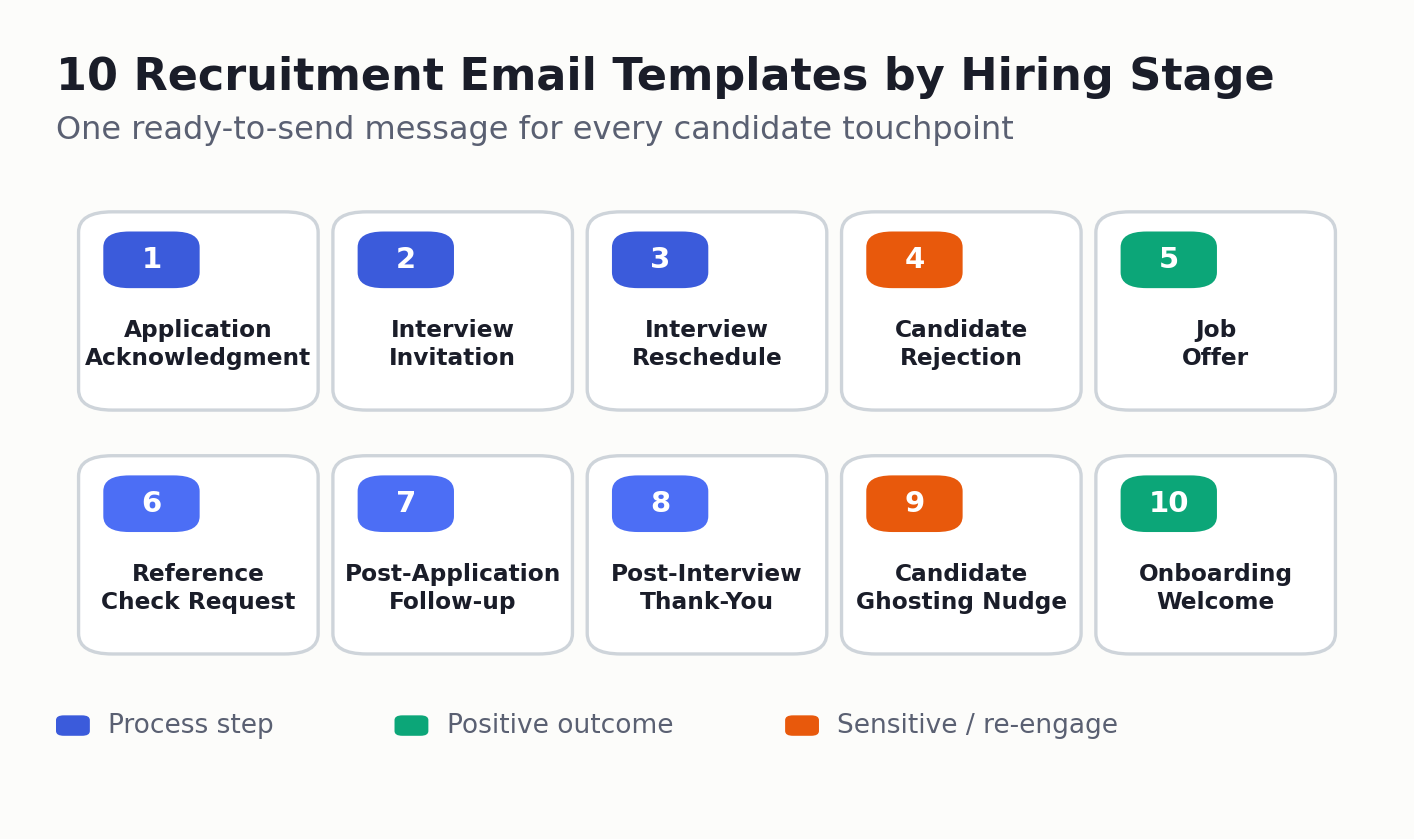
If you’re standardizing candidate communication and want to pressure-test your approach before it breaks under volume, start with the ten recruitment email templates above, copy them, adapt the tone, and map each one to a stage in your pipeline. The teams that hire fastest aren’t writing better emails on the fly; they’ve simply made sure the right message goes out at the right moment without anyone having to remember.
When you’re ready to stop copy-pasting and let the routine messages send themselves, an ATS like Hirium turns this library of recruitment email templates into automated, stage-triggered workflows with self-booking scheduling, real-time status updates, and a forever-free plan to start. Take the templates first. Automate the moment manual sending starts costing you candidates.
Frequently Asked Questions
What should a recruitment email include?
Every recruiting email should answer three questions for the candidate: where they stand right now, what happens next, and by when. Add a clear subject line, a personalized greeting, one specific detail relevant to that candidate, and a single obvious action: a scheduling link, a reply request, or a decision deadline. Good recruitment email templates bake all of that in so the structure is consistent and only the details change. Brevity and clarity beat length every time.
How do you write a professional interview invitation email?
State the role, the format (video, phone, or onsite), who they’ll meet, the expected length, and what the conversation will cover. Then make booking frictionless with a self-scheduling link or two to three concrete time windows. Send it within 24–48 hours of deciding to advance the candidate, while their interest is still high.
How do you politely reject a candidate by email?
Be prompt, be respectful, and be honest without over-explaining. Thank them for their time, state clearly that you’re moving forward with others, and where appropriate offer to keep their profile on file. Send it within 48 hours of the decision. Speed and a human tone matter far more than lengthy feedback, which you can reserve for candidates who reached late stages.
Should recruiters automate candidate emails?
Yes, selectively. Automate high-volume, time-sensitive messages acknowledgments, status updates, scheduling, and standard rejections so they’re never late. Keep offers, sensitive declines, and senior outreach personnel. Loading your recruitment email templates into an ATS lets you draw that line cleanly: routine stages fire automatically, while flagged exceptions wait for a recruiter. The goal isn’t to remove humans; it’s to free recruiter time for the conversations where a human genuinely changes the outcome.
How do you follow up with a candidate who stops responding?
Send one light, low-pressure nudge that gives them an easy way to opt out and a clear deadline. Reaffirm your interest, acknowledge that priorities shift, and state when you’ll assume the timing isn’t right. Keep a ghosting-nudge variant in your recruitment email templates so the message is ready the moment someone goes quiet. A single well-crafted follow-up re-engages more candidates than repeated chasing, which usually backfires.
What is the best time to send recruitment emails?
Mid-morning on Tuesday through Thursday tends to see the strongest open and response rates, while Monday mornings and Friday afternoons underperform. That said, for transactional messages like acknowledgments and scheduling, immediacy beats timing optimization and sends them the moment the trigger occurs. Reserve send-time tuning for outreach and follow-ups, not stage-based confirmations.
Are free recruitment email templates good enough for startups?
For most startups and SMBs, a well-structured library of free, customizable templates covers the overwhelming majority of candidate communication. The differentiator isn’t paying for the words, it’s whether the templates are tied to your pipeline so they actually get sent on time, every time. The best recruitment email templates for startups are the ones your ATS fires automatically.