How to Schedule 50 Interviews a Week Without Losing Your Mind: AI Interview Scheduling Playbook
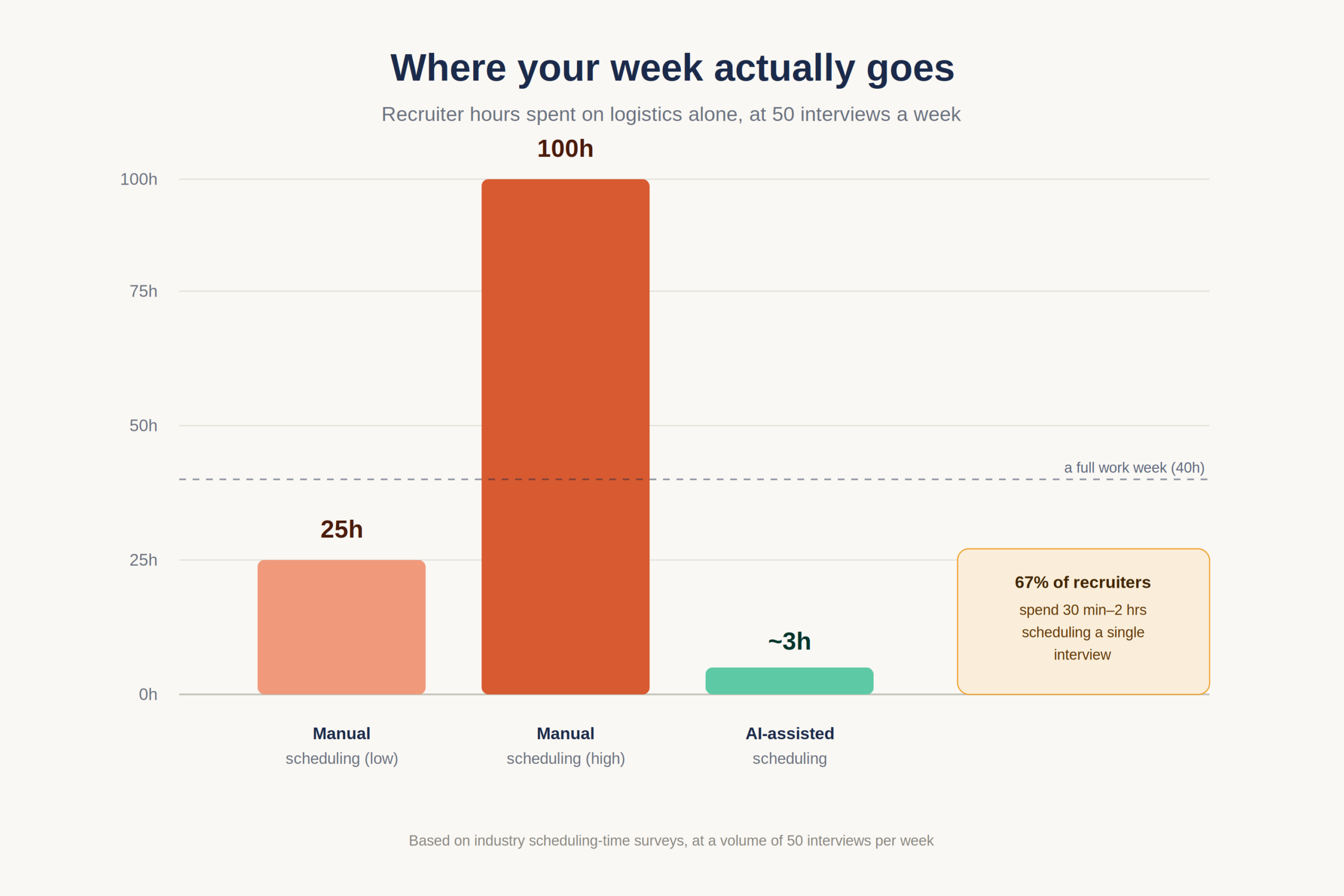
Coordinating a single interview can eat 30 minutes to two hours of a recruiter’s time. Scale that to 50 interviews a week and the arithmetic turns brutal: somewhere between 25 and 100 hours of pure logistics calendar Tetris, timezone math, and reminder-chasing burned before a single hiring decision gets made.
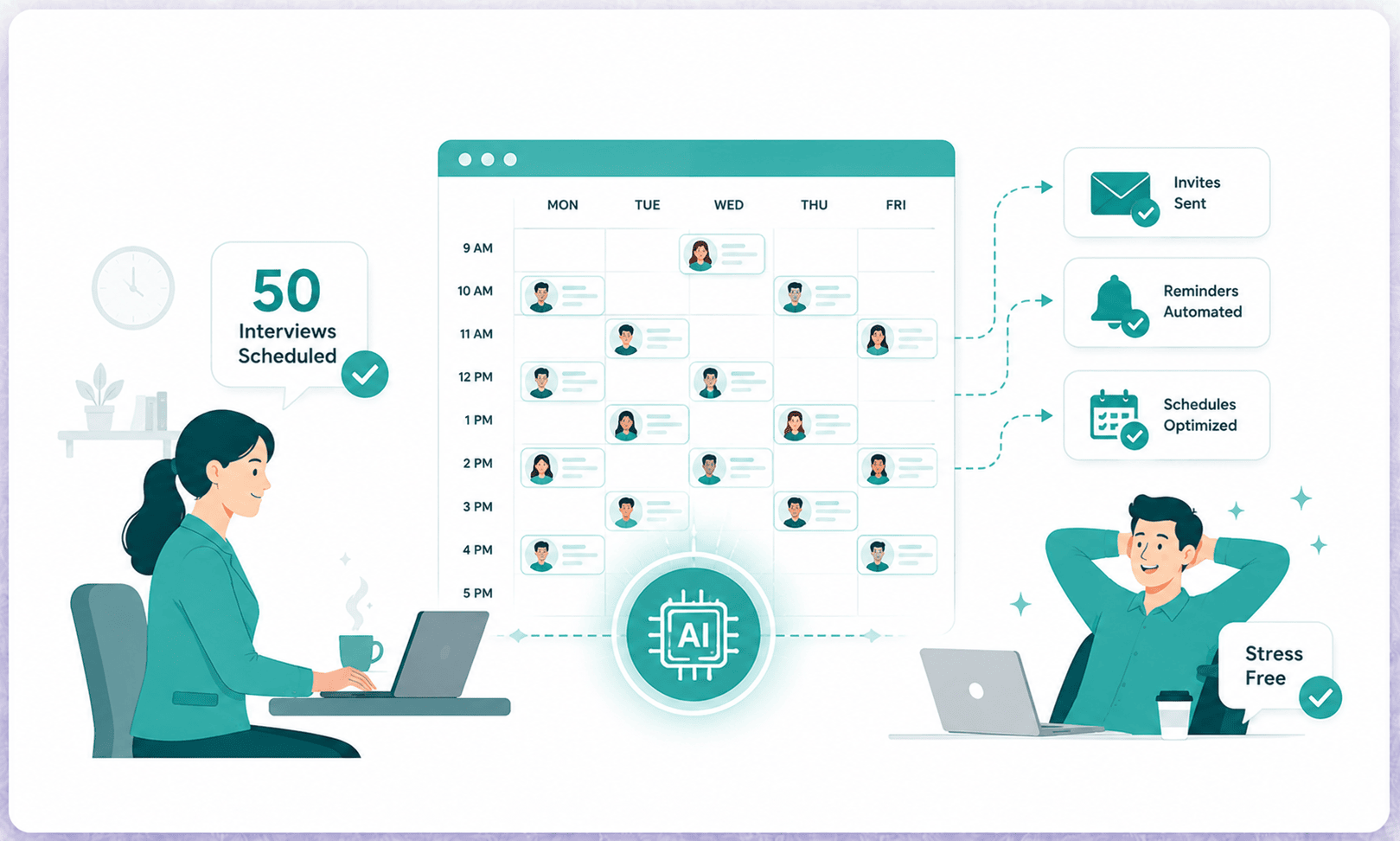
That gap is exactly what a new category of tooling exists to close. AI Interview Scheduling replaces recruiters-acting-as-human-routers with software that matches availability across calendars, books slots, handles reschedules, and fires reminders without anyone copying time zones into an email. The recruiter stops being a switchboard and goes back to judging talent.
The stakes are not abstract. The interview stage is the single biggest drop-off point in most hiring funnels, and scheduling friction is a leading cause. Industry research from Cronofy’s Candidate Expectations work found that roughly 42% of candidates have walked away from a process specifically because scheduling an interview took too long meaning slow coordination loses you the exact people you worked hardest to attract.
Candidates expect rapid, frictionless scheduling to stay engaged. Nearly 40% of job seekers want interviews arranged within days of applying. Slow coordination with recruiters and back-and-forth emails lead to significant candidate drop-off, forcing companies to adopt automated scheduling software and AI solutions.
This playbook is built for the team running real volume: a startup hiring 12 engineers in a quarter, an SMB filling 30 frontline roles before peak season, a talent lead juggling 15 open requisitions at once. It breaks down where 50-interview weeks fall apart, how to wire up self-scheduling and calendar sync, a copy-able weekly workflow, and the reminder cadence that actually kills no-shows. The goal is simply to make scheduling something your stack does, not something your week is about.
What Is AI Interview Scheduling?
AI Interview Scheduling is the use of software that automatically coordinates interview times across candidates, recruiters, and interview panels reading live calendars, matching open slots, sending self-booking links, generating video links, and triggering reminders so interviews are arranged in minutes instead of through manual email threads.
In practice it sits inside or alongside an applicant tracking system, turning a fragmented manual task into a repeatable, automated step in the hiring pipeline.
The Core Problem: Where 50 Interviews a Week Falls Apart
Most teams underestimate scheduling load by 3–4x. They budget for “sending a calendar invite” and forget that each interview is really a negotiation between three to six busy calendars, often across cities and time zones.
Three bottlenecks do the damage. The first is timezone conflicts: a recruiter in Bengaluru lining up a candidate in Berlin with a hiring manager in New York is solving a puzzle that email was never designed for, and a single mistyped offset means a missed call and a re-do. The second is panel interview coordination. Once you need three interviewers in the same 45-minute window, the number of viable slots collapses, and finding one time that works for everyone is consistently ranked as recruiters’ single hardest scheduling task.
The third is interview no-shows. When candidates wait days for confirmation or get one easily-buried email, attendance suffers. High-volume teams routinely see no-show rates of 20% or higher, and every no-show is a slot that could have advanced a real hire.
Now stack the volume. Industry surveys show 67% of recruiters spend 30 minutes to two hours scheduling a single interview. At 50 interviews a week, that is 25 to 100 hours of coordination more than a full-time job’s worth of work that produces zero candidate evaluation. That is the recruiter workload problem in one line: the most expensive people on the team spend the bulk of their week on logistics that AI Interview Scheduling is designed to absorb.
The cost compounds in a way that rarely shows up on an invoice. A role left open while scheduling drags is a role producing no work and with median time-to-fill near 44 days, a process bottlenecked at the interview stage can add a week or more of vacancy per hire. Multiply that across 15 open requisitions and the slowdown quietly becomes one of the largest line items in the recruiting budget, even though no one ever wrote a cheque for it.
The AI Interview Scheduling Workflow, Step by Step
This is the part most guides skip. Knowing that automation helps is useless without the actual wiring. Below is how high-volume teams set up AI Interview Scheduling end to end the components, the configuration order, and the reasoning behind each choice.
Self-Scheduling Links, Explained
The single highest-leverage move is the self-scheduling link. Instead of proposing times, the recruiter sends the candidate a link showing only the interviewer’s genuinely open slots. The candidate picks one, the calendar event is created instantly for everyone, and the video link is auto-attached.
This works because it removes the slowest leg of the relay, the email round-trip entirely. Candidates book on their own time, often within minutes of receiving the link, which is why surveys show a majority of candidates prefer an automated system over back-and-forth coordination. For the recruiter, one templated send replaces a five-message thread.
The non-obvious benefit is fairness and speed at volume: 50 candidates can each receive a link in a single bulk action, and 50 interviews can self-populate the calendar overnight without the recruiter touching a single slot.
Calendar Sync Setup Steps
Calendar sync is the engine under self-scheduling, and getting the setup right is what separates a system that quietly works from one that double-books your VP of Engineering. The goal is two-way calendar integration; the tool must both read live busy/free status and write new events back.
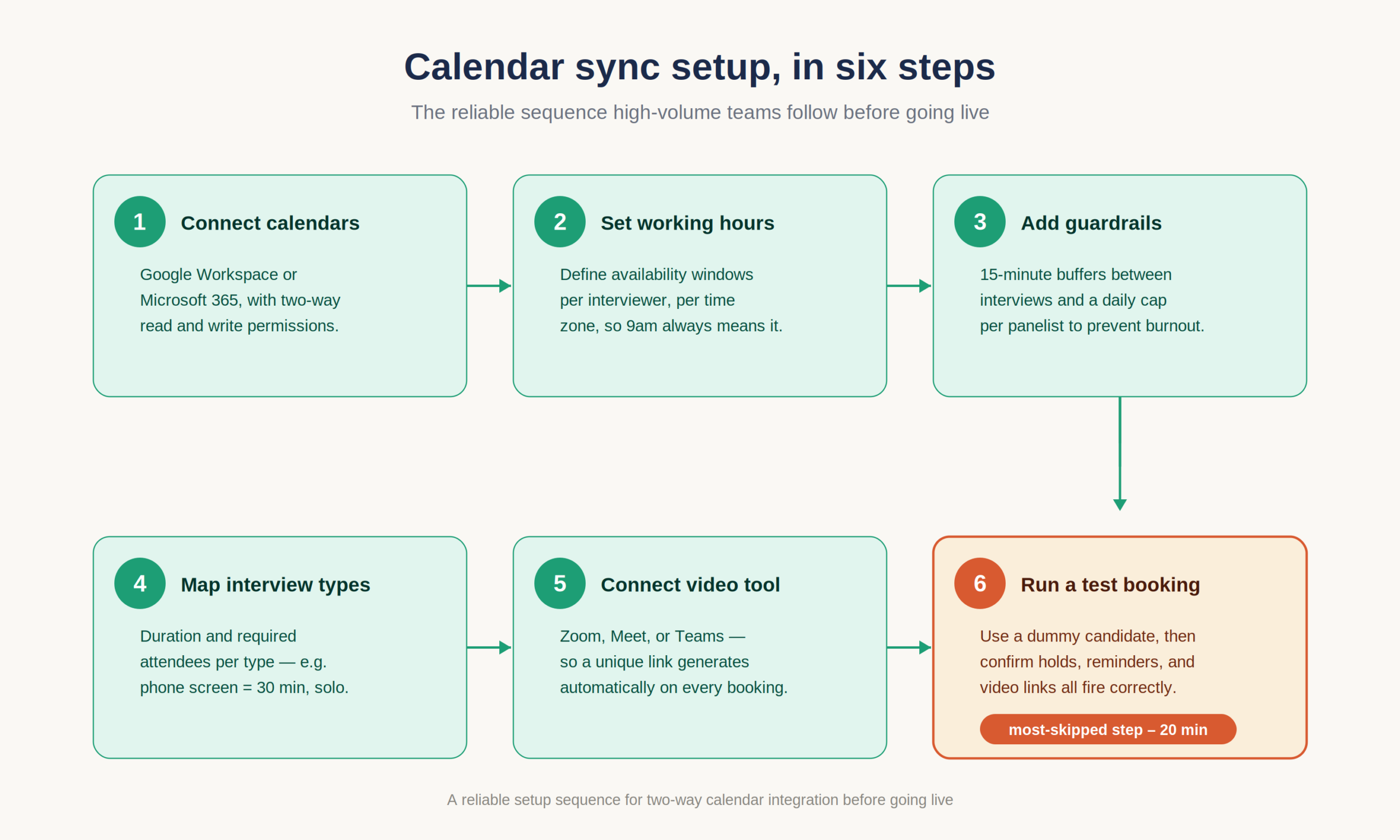
A reliable setup sequence:
- Connect each interviewer’s primary calendar (Google Workspace or Microsoft 365) with two-way permissions so the system reads availability and writes confirmed events.
- Define working hours and availability windows per interviewer and, critically, per time zone so a 9 a.m. slot always means their 9 a.m.
- Set guardrail rules: minimum 15-minute buffers between interviews, and a daily cap (for example, no more than three interviews per panelist per day) to prevent burnout.
- Map each interview type to a duration and a required-attendee list (phone screen = 30 min, recruiter only; technical = 60 min, two engineers).
- Connect the video conferencing tool (Zoom, Google Meet, or Teams) so a unique meeting link generates automatically on every booking.
- Run a test booking with a dummy candidate before going live, then check that holds, reminders, and video links all fire correctly.
Skipping step 6 is the most common reason a launch goes sideways. Spend 20 minutes.
Coordinating Panel Interviews Across Time Zones
Panels are where manual scheduling dies. The fix is letting the system compute the intersection of multiple availability windows rather than asking a human to. Good tools find the slots where all required panelists are simultaneously free, present only those to the candidate, and handle the time-zone conversion invisibly on both ends.
For distributed teams, this is non-negotiable. A recruiter should never be the failure point between a candidate’s 6 p.m. and an interviewer’s 8:30 a.m. the next day the software should surface only valid overlaps and label everything in each party’s local time.
A Sample Weekly Scheduling Workflow
Here is a repeatable cadence that lets one recruiter sustainably run roughly 50 interviews a week without living in their inbox:
- Monday morning Review the shortlist (AI-ranked or manual), approve who advances to interview.
- Monday midday Bulk-send self-scheduling links to all approved candidates in one action.
- Monday–Tuesday Candidates self-book; calendar holds and video links create automatically as they do.
- Throughout Automated reminders fire at T-48h, T-24h, and T-2h, each carrying a reschedule link.
- Wednesday–Thursday Panel and technical rounds run from slots the system pre-validated.
- Continuously Stage changes auto-update the record and trigger the right candidate email (advance or decline).
- Friday Review analytics: no-show rate, average time-to-schedule, and stage-to-stage conversion. Adjust caps and templates for next week.
The point of writing it down is consistency. A documented loop means the process survives a recruiter taking a day off the system keeps moving the recruitment pipeline forward.
Build, Buy, or Integrate?
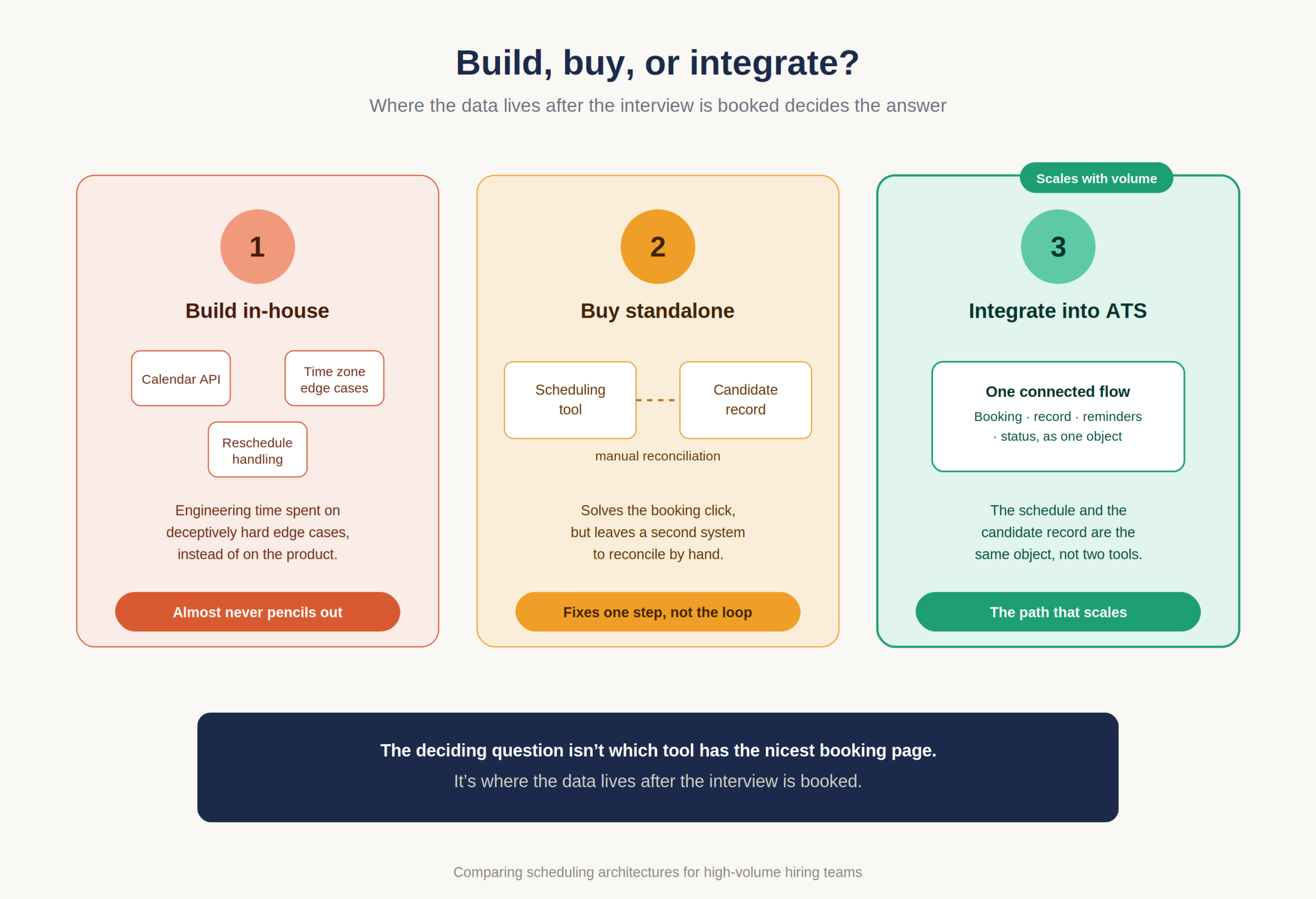
Once the workflow is clear, the architecture choice follows. Building scheduling logic in-house almost never pencils out for a startup or SMB calendar APIs, time-zone edge cases, and reschedule handling are deceptively hard, and the engineering time is better spent on the product. Buying a standalone scheduler solves the booking click but leaves a second system to reconcile with your records. Integrating AI Interview Scheduling into the applicant tracking system you already use is the path that scales, because the booking, the record, the reminders, and the status updates are one connected flow rather than four tools held together with manual effort.
The deciding question is not “which tool has the nicest booking page.” It is “where does the data live after the interview is booked.” If the answer is anywhere other than your candidate record, you have bought yourself reconciliation work.
Reminder-Email Cadence and Recruitment Email Templates
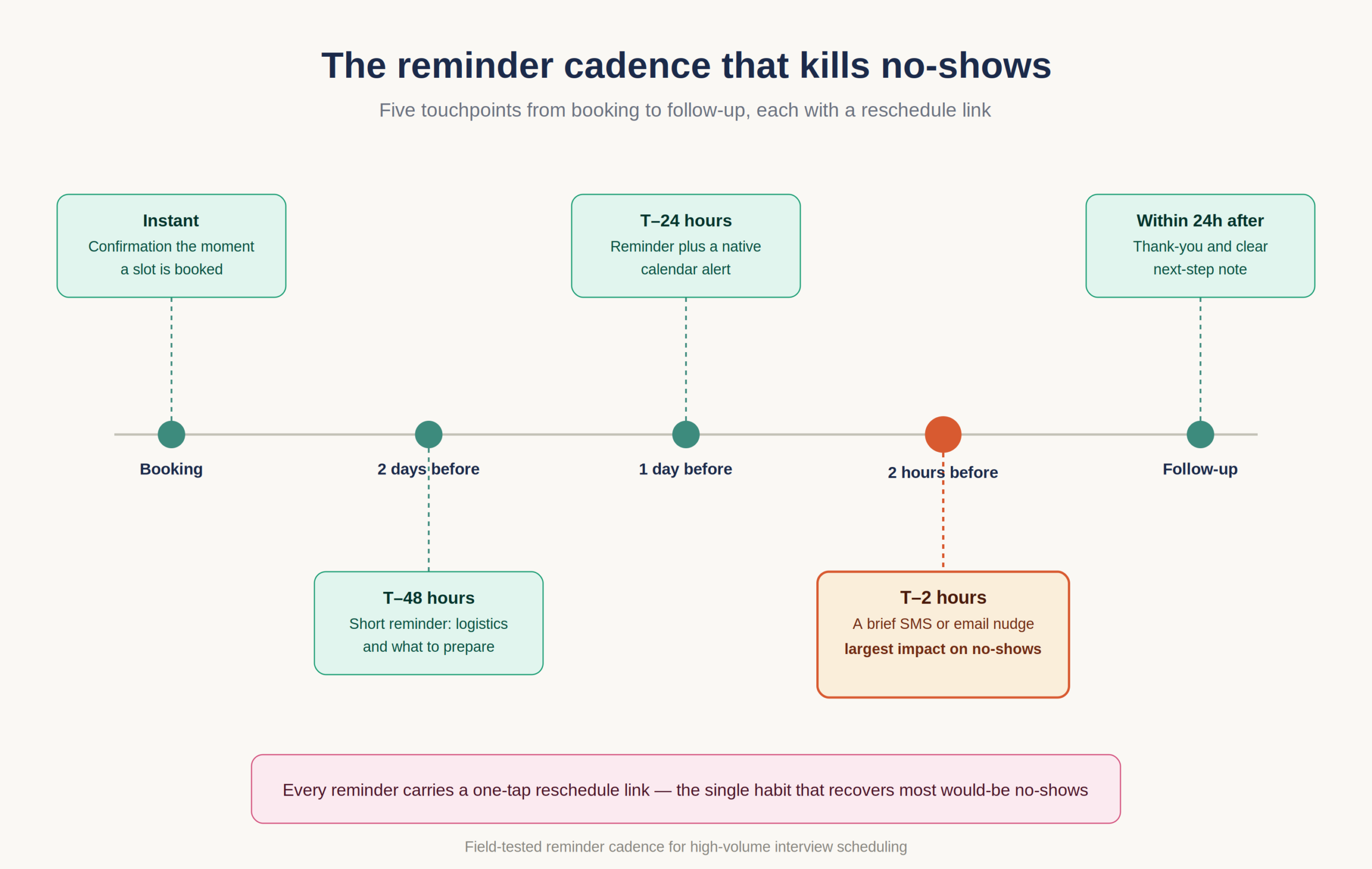
Recruitment Email Templates are where scheduling quietly wins or loses candidates, because the reminder cadence is your main lever against drop-off. The aim is enough touchpoints to keep the interview top-of-mind without nagging.
A field-tested cadence:
- Instant confirmation the moment a slot is booked, with the date, joining details, and a one-tap reschedule link.
- T-48 hours: a short reminder restating logistics and what to prepare.
- T-24 hours: reminder plus a native calendar alert.
- T-2 hours: a brief SMS or email nudge this single message has the largest measured impact on cutting interview no-shows.
- Within 24 hours after: a thank-you and clear next-step note, which protects candidate experience even for candidates you decline.
Two rules make templates work at scale: always embed the reschedule link (a candidate who can self-reschedule in two taps almost never becomes a no-show), and personalize only the fields that matter: name, role, interviewer so the system can send hundreds without sounding like a robot.
Workflow Automation Software and the Connected Hiring Stack
Workflow Automation Software is what turns scheduling from an isolated trick into a closed loop because a booked interview should not be the end of a process, it should be an event that updates everything downstream automatically. Scheduling that lives in a standalone calendar tool, disconnected from your records, simply relocates the manual work to data entry.
The connected version looks different: a candidate books a slot, and that single action updates their stage, notifies the panel, schedules the reminder sequence, and queues the right follow-up email with no recruiter intervention. This is where running AI Interview Scheduling inside an applicant tracking system like Hirium pays off, because the schedule and the record are the same object, not two systems you reconcile by hand.
Candidate Database Management as the Single Source of Truth
Candidate Database Management is the foundation the whole loop stands on, because automation is only as trustworthy as the data underneath it. When every interview, note, stage change, and email lives against one centralized record, the scheduler always knows who is at which stage and which interviewer they have already met.
A centralized database also prevents the classic high-volume failure: two recruiters scheduling the same candidate, or a candidate getting a screening invite after they have already cleared three rounds. One source of truth makes 50-a-week volume auditable instead of chaotic.
Recruitment Status Update Software Keeps Everyone Aligned
Recruitment Status Update Software removes the most thankless manual task in volume hiring telling people where things stand. When a candidate is booked, advanced, or declined, the right status update should post automatically: the candidate gets their email, the hiring manager sees the move, and the dashboard reflects reality in real time.
This matters for speed and for trust. Candidates who get prompt, automatic status communication rate the process far higher, and hiring managers stop pinging recruiters for updates that the system could surface on its own. Automated status flow is what makes a fast scheduling engine feel organized rather than frantic.
Cost, Integration, and Compliance Considerations
Before committing to any setup, three practical questions decide whether it survives a real hiring quarter: what it costs in total, what it connects to, and whether it keeps you compliant.
What It Actually Costs
Standalone scheduling tools typically run $3,000–$12,000 a year for a mid-sized team, and the payback is fast; most teams recover within a few weeks of reclaimed recruiter hours, since automation removes roughly 10–15 hours of weekly calendar work. But the subscription is the wrong number to optimize. The real cost is recruiter salary spent on coordination plus the vacancy cost of a slow pipeline: with vacancy costs often exceeding four times cost-per-hire, shaving even a week off scheduling-driven delay usually dwarfs any tool fee.
There is also a hidden cost in tool sprawl. A scheduler that does not write back to your records creates a second system to maintain, and reconciliation quietly eats the time the tool was meant to save. Integrated AI Interview Scheduling avoids that by making the schedule and the candidate record the same object which is also why flat, predictable pricing matters more than a low headline rate when you are scaling volume.
Integration and Compliance Realities
On integration, the question is depth, not whether a logo appears on a “connects with” page. You want genuine two-way calendar integration with Google and Microsoft, native video-link generation, and a write-back path into your applicant tracking system so status changes propagate on their own. Shallow one-way connections recreate the manual work you were trying to remove.
On compliance, scheduling touches candidate personal data names, emails, sometimes phone numbers and location-revealing time zones so it falls under data-protection rules such as GDPR and India’s DPDP Act. In practice that means knowing where candidate data is stored, being able to delete a record on request, and keeping an audit trail of who scheduled, rescheduled, or contacted each candidate. A centralized record with built-in logging makes this straightforward; a sprawl of personal inboxes and calendars makes it nearly impossible to prove.
Case Studies: Scheduling at Real Volume
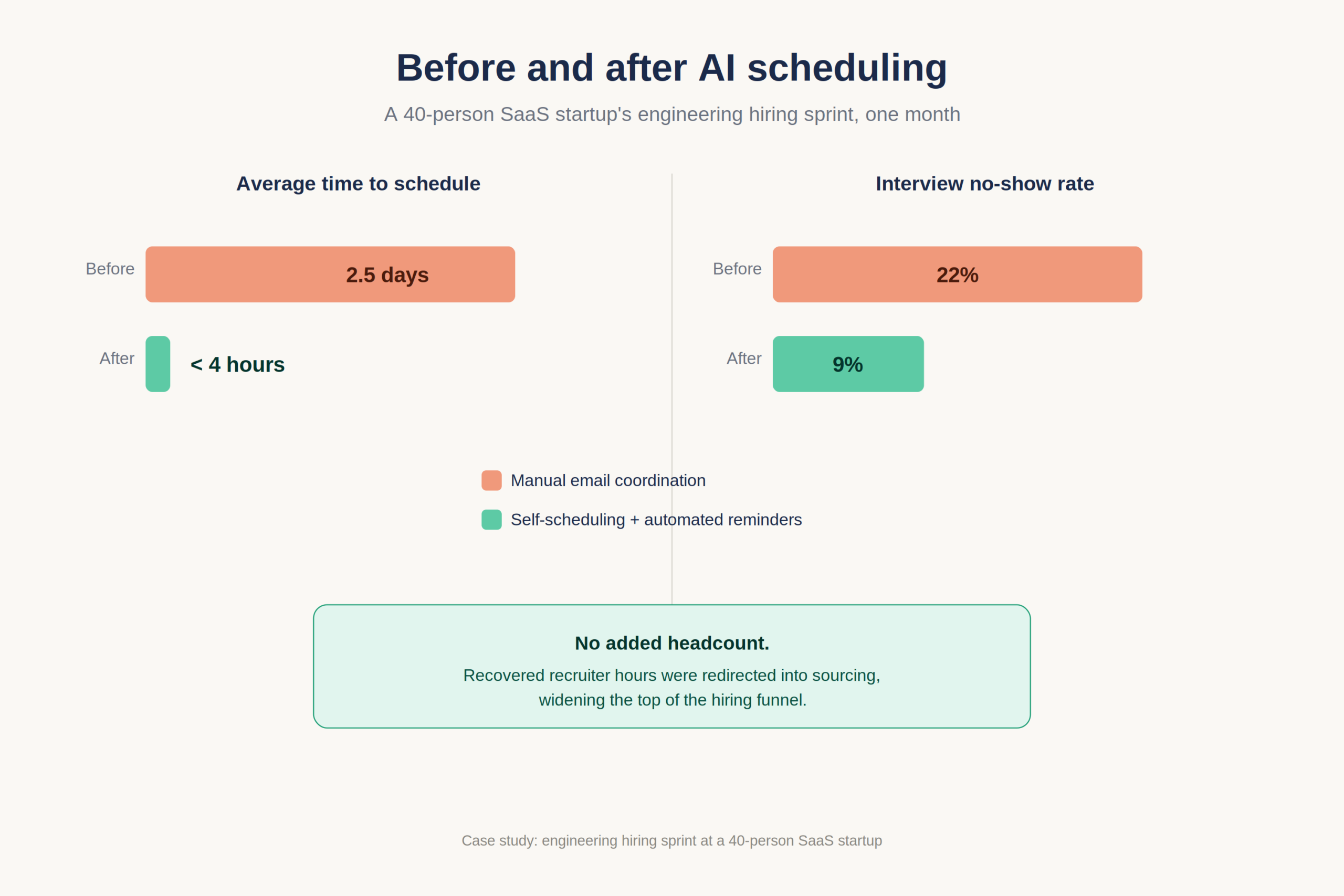
A 40-person SaaS startup running an engineering hiring sprint needed one recruiter to handle roughly 50 first-round screens a week. After switching from email coordination to self-scheduling links with automated reminders, average time-to-schedule fell from about 2.5 days to under four hours, and the no-show rate dropped from 22% to 9% within a month without adding headcount. The recruiter redirected the recovered hours into sourcing, which widened the top of the funnel rather than just speeding the middle.
A regional SMB hiring for seasonal frontline roles faced a different shape of the same problem: high application volume, short hiring windows, and candidates who ghosted slow processes. Moving panel and screening coordination into an automated workflow cut recruiter coordination time by roughly 70% and pulled overall time-to-hire down close to 30%, letting the team fill its peak-season roster before the rush rather than during it. Just as importantly, automatic status updates meant hiring managers stopped interrupting recruiters for progress checks.
Both outcomes came from the same shift: stop spending recruiter hours arranging interviews, and spend them evaluating people instead.
Comparison: How to Evaluate Your Scheduling Approach
If you are deciding between approaches, the differences sharpen fast once you account for 50-interview-a-week volume rather than the occasional hire.
| Dimension | Manual email/phone | Standalone scheduling tool | AI scheduling inside an ATS |
| Time to schedule one interview | 30 min–2 hrs | 5–10 min | Near-instant (candidate self-books) |
| Scales to 50/week | No breaks down | Partially | Yes |
| No-show handling | Manual reminders | Basic reminders | Automated multi-touch cadence |
| Synced to candidate record | No | Rarely | Yes single source of truth |
| Panel coordination | Painful | Limited | Multi-calendar overlap matching |
| Status updates | Manual | Manual | Automatic |
The pattern is clear: standalone tools fix the booking step but leave you reconciling data; an integrated AI Interview Scheduling approach automates the booking and everything it should trigger.
What Most Teams Get Wrong
The most common mistake is treating scheduling as a tooling decision when it is really a workflow decision. Teams buy a calendar-link app, bolt it onto a disconnected process, and wonder why their week still disappears because they automated the easy 10% (the click to book) and left the hard 90% (data entry, status updates, reminders, reschedules) manual.
The second mistake is over-indexing on the recruiter’s convenience and ignoring the candidate’s. Scheduling exists to protect candidate experience, not just to save recruiter clicks. The teams that win treat the self-scheduling link, the reminder cadence, and the speed of confirmation as part of the candidate’s first impression of the company.
The third, and most expensive, mistake is tolerating no-shows as a cost of doing business. They are not. No-shows are almost always a symptom of a slow or thin reminder process, and they are the cheapest problem in the entire funnel to fix. A reschedule link in every reminder and a T-2h nudge will recover most of them.
A fourth pattern shows up specifically at scale: teams configure AI Interview Scheduling once and never tune it. They set buffers, caps, and templates on day one, then ignore the analytics that would tell them what to adjust. A no-show rate creeping up week over week, a particular interviewer who is always the scheduling bottleneck, a template with a low open rate these are signals, and the teams that review them on a Friday rhythm keep their throughput high while everyone else slowly regresses to chaos.
The contrarian takeaway: the best scheduling system is the one you notice least. If your recruiters can describe their interview scheduling workflow in detail, it is probably costing them too much attention.
Where to Start
If you are running real volume and weighing AI Interview Scheduling, start by auditing one number this week: how many recruiter-hours are going into arranging interviews versus evaluating people. That ratio tells you exactly how much capacity is recoverable.
From there, the highest-return move is consolidating scheduling, your candidate records, and your status updates into one connected workflow rather than stitching point tools together. Hirium runs this loop for thousands of startup and SMB hiring teams, and it offers a forever-free plan to test the workflow on live requisitions before you commit to anything. Map your current scheduling process against the seven-step weekly cadence above, find the manual step that hurts most, and automate that one first.
FAQ
What is AI interview scheduling?
It is software that automatically coordinates interview times by reading live calendars, matching open slots across candidates and panels, sending self-booking links, generating video links, and triggering reminders. It turns a manual email task into an automated step, so interviews get arranged in minutes rather than days and recruiters spend their time evaluating candidates instead of chasing availability.
How do you schedule interviews automatically?
You connect interviewer calendars with two-way sync, define each person’s working hours and buffers, map interview types to durations and attendees, then send candidates a self-scheduling link showing only valid open slots. The candidate picks a time, the event and video link create themselves, and reminders fire on a set cadence no manual back-and-forth required.
How do you reduce interview no-shows?
Send an instant booking confirmation, then reminders at T-48h, T-24h, and T-2h, and always embed a one-tap reschedule link. The two-hour nudge has the largest effect, and easy self-rescheduling converts would-be no-shows into kept appointments. High-volume teams routinely cut no-show rates by more than half using this cadence alone.
Does scheduling software sync with Google Calendar and Outlook?
Yes. Reputable tools support two-way integration with both Google Workspace and Microsoft 365, reading live busy/free status and writing confirmed events back. This is what prevents double-bookings and lets self-scheduling links display only genuinely open slots, even across multiple panelists and time zones.
How many interviews can one recruiter handle per week?
Manually, scheduling alone can consume 25–100 hours for 50 interviews effectively a full-time job before any evaluation happens. With automated self-scheduling, reminders, and status updates, a single recruiter can comfortably run 50 or more interviews a week while keeping most of their time for actual candidate assessment.
Is AI interview scheduling biased or impersonal?
Scheduling automation handles logistics availability matching, booking, reminders not evaluation, so it does not judge candidates. Done well, it improves the experience: faster confirmations, fairer access to slots, and respectful reminders. If you are weighing tools and want to pressure-test how automation fits your process before committing, that is a sensible thing to map out first.
How long does it take to set up AI interview scheduling?
Most teams live within a day. The work is connecting calendars with two-way sync, setting working hours and buffers, mapping interview types to attendees, and linking a video tool then running one test booking. If it plugs into an applicant tracking system you already use, candidate records and status flows are inherited rather than rebuilt, which is what makes a same-week launch realistic even mid-hiring-sprint.