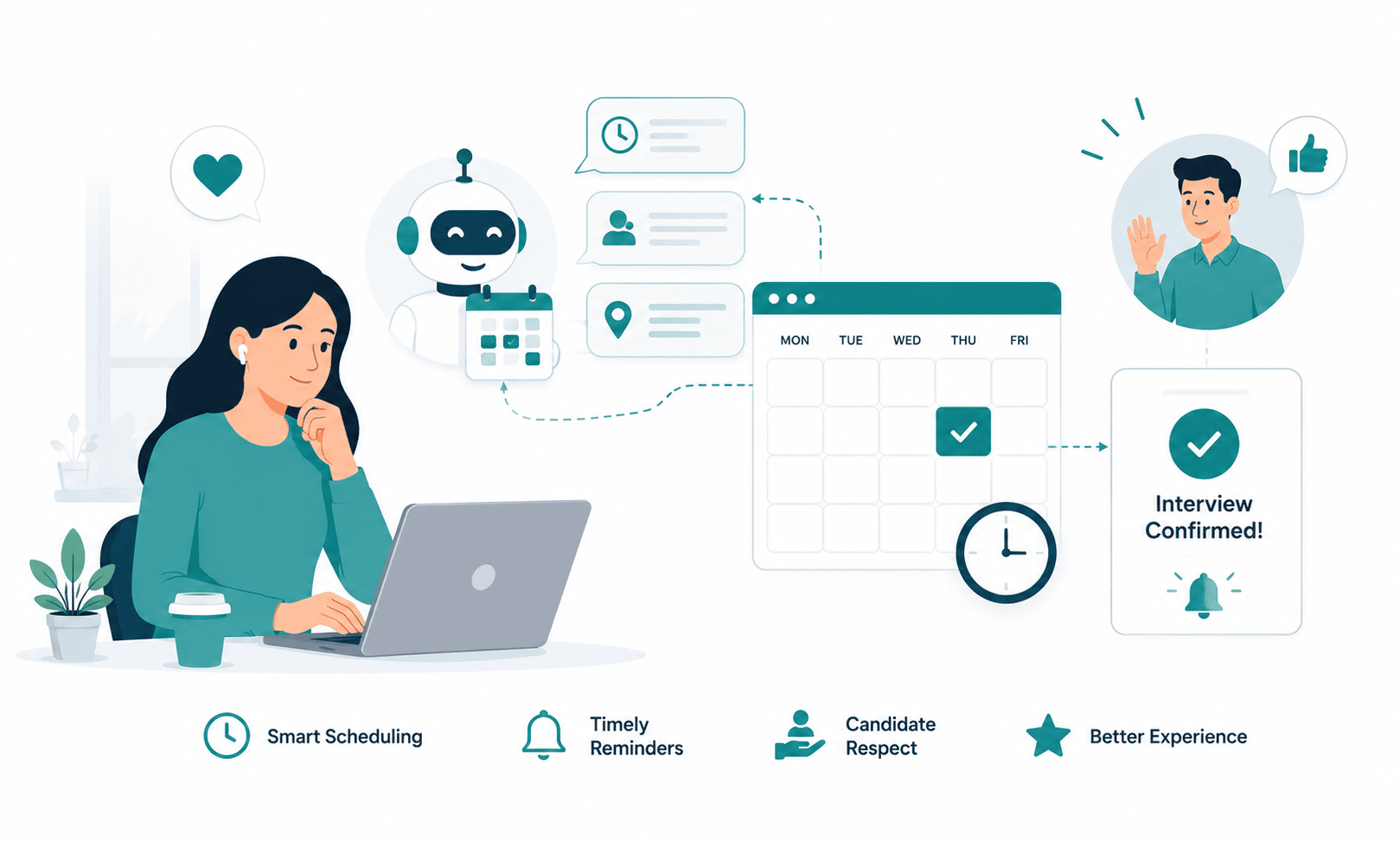
AI Interview Scheduling Etiquette: What Candidates Actually Expect in 2026
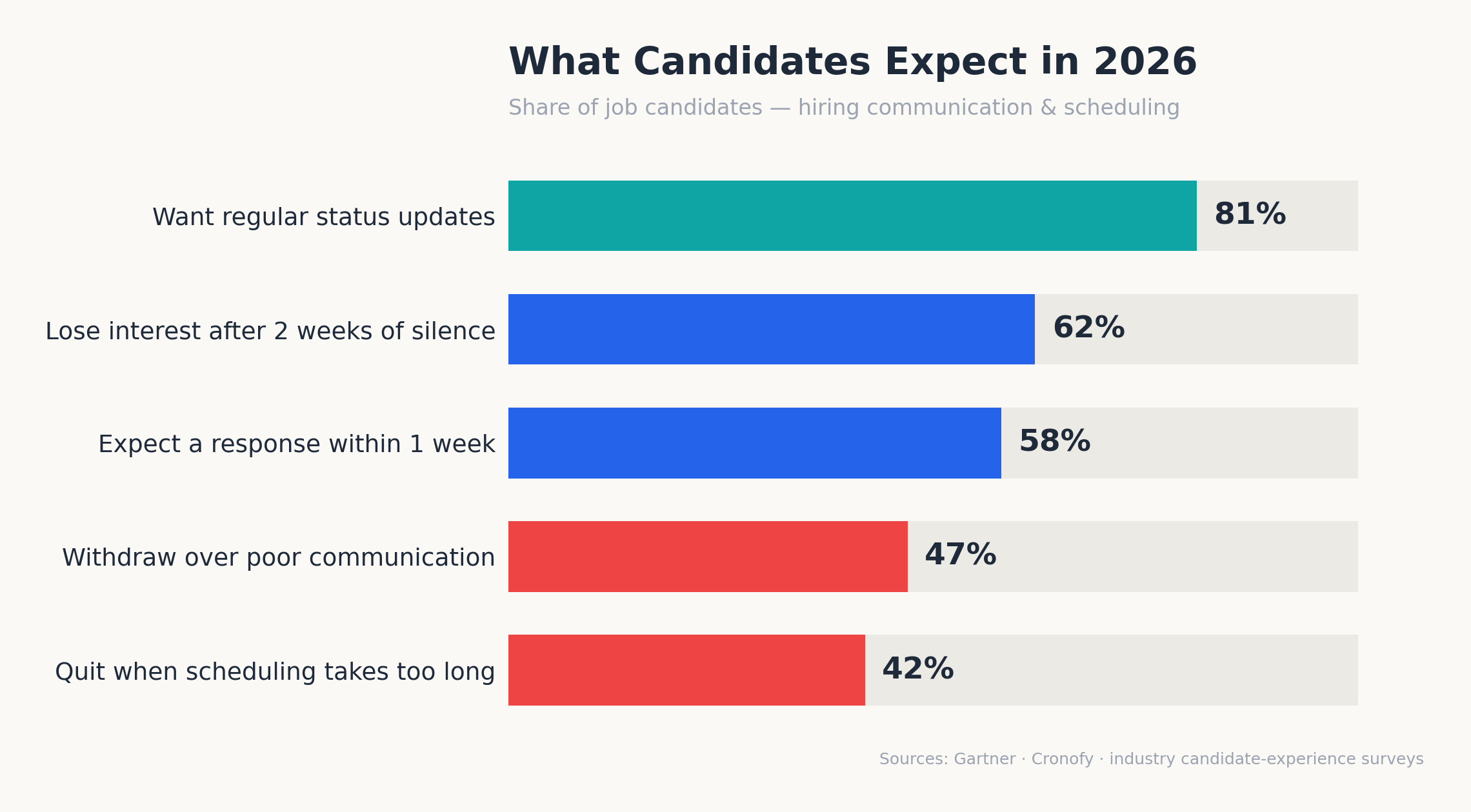
42% of candidates have withdrawn from a hiring process for one reason: scheduling took too long. Not compensation. Not the role. The calendar.
That single number should reframe how hiring teams think about automation. Most recruiting leaders treat scheduling as plumbing a back-office task to be compressed, batched, and forgotten. Candidates treat it as the first honest signal of how a company operates. A confirmation that arrives in 40 minutes says one thing about your organization. A reschedule request that sits unanswered for three days says another, and no employer branding budget can talk over it.
This is where AI interview scheduling etiquette becomes a genuine competitive discipline rather than a soft skill. In 2026, the majority of startups and SMBs hiring at any real volume have automated at least part of their interview coordination self-scheduling links, auto-confirmations, reminder sequences, status updates. The technology problem is largely solved. The etiquette problem is not. Teams are sending messages at machine speed with machine tone, and candidates are quietly opting out.
The stakes are measurable. 61% of candidates accept the first offer they receive, which means the company that schedules fastest without feeling like a vending machine frequently wins the hire outright. Meanwhile, 62% of candidates lose interest in a role after two weeks of silence following an interview. Speed and warmth are no longer trade-offs; candidates now expect both, simultaneously, from the same automated system.
This guide breaks down what candidates actually expect from automated scheduling in 2026 backed by response-time data along with the do’s and don’ts of automated messages, side-by-side examples of good versus robotic scheduling emails, and practical ways to keep automation feeling human at scale.
Only 26% of job candidates trust AI to evaluate them fairly, and 25% say they trust an employer less once they learn AI is involved in their hiring process, according to a Gartner survey of 2,918 job candidates.
That trust deficit is the backdrop for everything below. Candidates are not asking companies to stop automating. They are asking companies to automate with manners.
What Is AI Interview Scheduling Etiquette?
AI interview scheduling etiquette is the set of communication standards response speed, tone, transparency, and reschedule flexibility that govern how automated systems arrange interviews with candidates. It ensures AI-driven scheduling messages feel personal, respectful, and clear, so automation accelerates hiring without damaging candidate trust or employer brand.
The Core Problem: Automation Solved Speed and Broke Tone
Hiring teams did not adopt scheduling automation for fun. The average corporate role attracts roughly 250 applications, recruiters at growing startups routinely juggle 15–30 open requisitions, and 38% of recruiters still spend 1–2 hours per day on scheduling alone. With average time-to-hire sitting around 44 days, coordination delays are the single most fixable drag in the funnel.
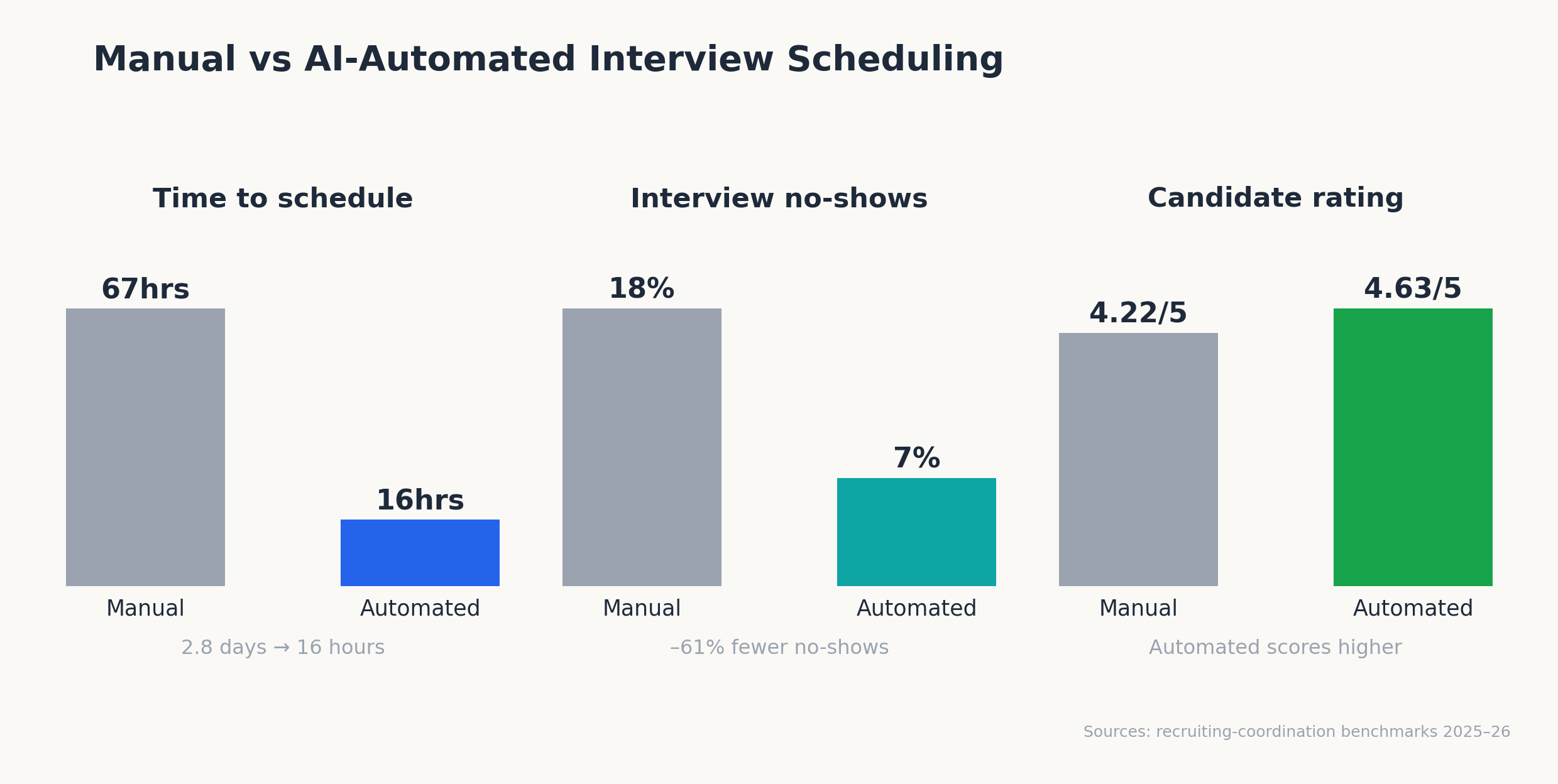
So teams automated. And the raw numbers improved: organizations using AI to schedule interviews report time savings of around 36% compared to manual coordination, and platforms tracking this closely have cut average time-to-schedule from 2.8 days to roughly 16 hours.
Here is the problem nobody budgets for: the same automation that fixed the speed metric frequently degrades the trust metric. Consider what candidates actually report in 2026:
- 58% expect a response within one week of applying, and 21% expect their interview scheduled within 2–6 days of that first contact.
- 47% say poor communication alone would make them withdraw from an active process.
- 81% say regular status updates would significantly improve their experience yet 65% report never receiving consistent communication.
- Only 24% describe themselves as satisfied with their overall interview process.
Read those together and the diagnosis is clear. Candidates are not receiving too few automated messages; they are receiving automated messages that ignore them as individuals. A reminder that misspells a name, a reschedule flow that dead-ends, a “Do not reply to this email” footer at the most anxious moment of someone’s professional month each is a small etiquette failure, and they compound. 83% of candidates say a negative interview experience changes their mind about a role they previously liked.
For startups and SMBs, this hits harder than it hits enterprises. A Series A company hiring 20 people this year cannot absorb a 25% interview-stage drop-off the way a 10,000-person firm can. Every ghosted candidate is a restarted search, and every restarted search adds 2–4 weeks to a role that operations needed filled last month.
Candidate Expectations in 2026: The Data on Speed, Flexibility, and Tone
Before fixing templates, hiring teams need a shared baseline. The expectations below are drawn from candidate-experience research across 2025–2026 and hold remarkably steady across industries and seniority levels.
How fast should recruiters respond to interview requests?
Speed expectations have tightened into concrete windows, and candidate experience now hinges on hitting them:
| Touchpoint | Candidate expectation (2026) | Etiquette benchmark to beat |
| First response after application | Within 7 days (58% of candidates) | Within 48 hours |
| Interview scheduled after first contact | Within 2–6 days (21%) to 1 week (29%) | Self-scheduling link same day |
| Confirmation after a candidate picks a slot | Immediate | Under 5 minutes, with calendar invite |
| Response to a reschedule request | Same business day | Under 4 hours, automated re-offer of slots |
| Post-interview status update | Within 2 weeks maximum | Within 5 business days |
Two of these deserve emphasis. First, confirmation latency: candidates who self-schedule and then hear nothing for hours begin doubting whether the booking “took,” and a meaningful share email the recruiter to check which erases the time automation saved. Second, the post-interview window: 40% of candidates currently wait more than two weeks for follow-up after a first interview, which is precisely when the 62% lose-interest cliff hits.
Reschedule flexibility is now table stakes
Interestingly, candidates in 2026 judge companies less on whether scheduling is automated and more on how gracefully the system handles change. Life happens: interviewer conflicts, candidate emergencies, time-zone confusion. Coordination data shows Mondays produce the highest volume of declines and reschedules of any weekday, as weekend changes pile up.
The etiquette standard: a reschedule should take a candidate one click and zero apologies. Any flow that forces a candidate to reply to an unmonitored inbox, explain themselves, or wait days for new slots fails the standard and interviewer-side delays are just as damaging, since manually declined interviewer invites sit for an average of 68 hours before anyone re-offers the slot.
Tone: candidates can smell a mail merge
In tone, the research converges on three candidate demands. Messages should be transparent (say what is automated and who to contact when it breaks), specific (role title, interviewer name, format, duration, prep expectations), and warm without pretending (a system that signs off as “Priya” but cannot answer a reply erodes more trust than one that honestly says “this is an automated confirmation from our recruiting team”).
That last point matters more than most teams realize. Given that only 26% of candidates trust AI to evaluate them fairly, an automated message caught impersonating a human confirms their worst suspicion. Honest automation outperforms fake humanity every time.
Building an Automated Scheduling Workflow Candidates Actually Like
Getting the architecture right matters more than wordsmithing any single email. Automated interview scheduling done well is a system design problem: which steps run without human touch, where humans stay in the loop, and how information flows between your calendar, your applicant tracking system, and the candidate.
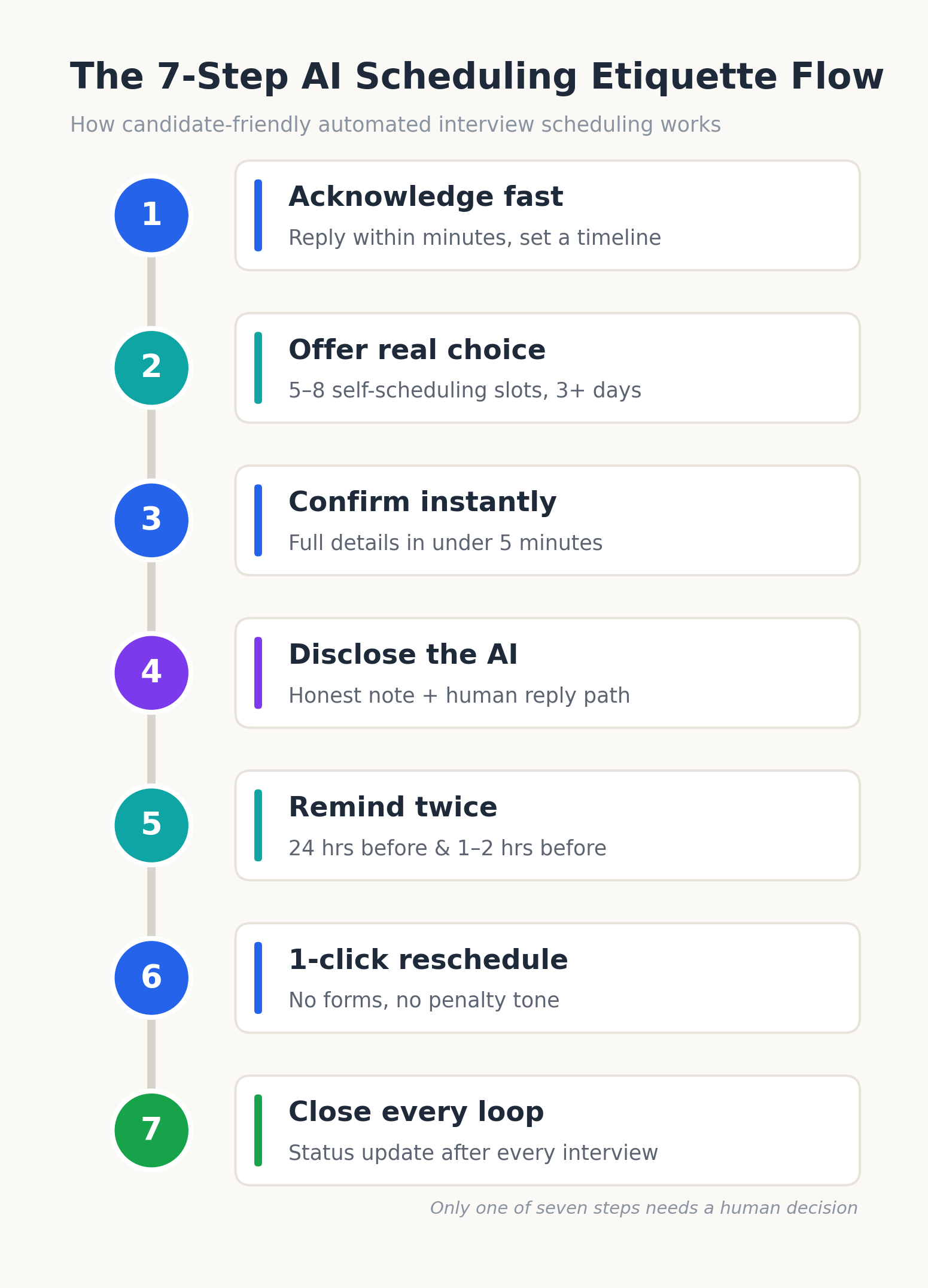
The 7-step etiquette-first scheduling process
Teams that consistently score well on candidate surveys run some version of this sequence:
- Acknowledge within minutes, not days. The instant a candidate is moved to the interview stage, an automated email confirms interest, names the role and next step, and sets a timeline expectation (“You’ll receive scheduling options within 24 hours”).
- Send a self-scheduling link with real choice. Offer at least 5–8 slots across a minimum of three business days, spanning morning and afternoon. Two take-it-or-leave-it slots is not flexible; it is an ultimatum with a calendar attached.
- Confirm instantly and completely. The confirmation should arrive within 5 minutes and contain everything: date, time with the candidate’s time zone, format (video link or address), interviewer name and title, expected duration, and what to prepare.
- Disclose the automation and provide a human escape hatch. One sentence says: “Scheduling is handled by our recruiting software; for anything it can’t solve, reply here and [Name] will jump in within a few hours.”
- Remember twice, never five times. One reminder 24 hours out, one 1–2 hours before. Include the join link in both so nobody digs through their inbox at 9:58 for a 10:00 call. Over-reminding reads as distrust.
- Make rescheduling one click. Every scheduling and reminder email carries a reschedule link that re-opens live availability. No forms, no justification field, no penalty tone.
- Close every loop automatically. After the interview, a status update goes out within a defined SLA advancing, holding, or rejecting. Silence is the etiquette violation candidates punish most, and it is the cheapest one to eliminate.
Notice that only one of those seven steps requires a human decision. The etiquette is encoded in the workflow, which is exactly the point: manners at scale must be systematized or they will not survive a week where the team screens 300 applicants.
Tool and architecture choices, with reasoning
For startups and SMBs, the build-versus-buy calculus here is short. Stitching together a calendar tool, a form builder, and an email sequencer technically works, but every integration seam is a place where a candidate falls through a booking that never syncs, a reminder that fires for a cancelled interview, a rejection email that goes to someone already hired. Coordination failures of this type are the origin story of most “we got ghosted by the company” reviews.
A modern recruitment automation stack keeps scheduling, communication, and pipeline state in one system, so a status change in the pipeline is the same event that triggers the candidate’s email. Platforms in this space Hirium among them pair scheduling automation with AI candidate insights, surfacing things like which candidates have gone quiet, which sources produce the most no-shows, and where in the funnel response times are slipping. That analytics layer is what turns etiquette from a good intention into a managed metric.
Cost implications are worth stating plainly. Recruiter time spent on manual coordination runs 5–10 hours per week per recruiter; at typical SMB recruiter salaries that is ₹15,000–₹30,000 (or $200–$400) of monthly labor per recruiter spent on calendar Tetris. Several ATS platforms now bundle scheduling automation into free or flat-rate plans, which puts the payback period for switching at effectively zero. The real cost is the one or two weeks of migration and workflow setup, and reputable vendors now handle migration from tools like Zoho Recruit at no charge.
Compliance and data considerations
Two constraints belong in the design conversation early. First, transparency regulation: jurisdictions including NYC (Local Law 144), Illinois, and the EU (under the AI Act’s hiring provisions) increasingly require disclosure when automated systems make or support employment decisions. Building disclosure into your scheduling templates now is cheaper than retrofitting it under a compliance deadline.
Second, candidate profile management discipline: automated messages are only as accurate as the data behind them. If the interview stage, preferred name, time zone, and role title live in five spreadsheets, your automation will eventually address “Ankit” as “Ankita” or invite a rejected candidate to a final round. A centralized candidate database is not an efficiency feature in this context, it is an etiquette prerequisite.
Good vs. Robotic: Scheduling Emails Side by Side
Recruitment email templates fail in predictable ways, which means they can be fixed in predictable ways. Below are the two highest-traffic messages in any hiring funnel, shown in the version candidates complain about and the version they respond to.
The interview invitation
Robotic version:
Subject: Interview Scheduled
Dear Candidate,
You have been selected to proceed to the next stage. Click the link below to select an interview slot. Failure to respond within 48 hours may result in removal from consideration.
DO NOT REPLY TO THIS EMAIL.
Human version:
Subject: Next step for the Senior Backend Engineer role pick a time that works
Hi Ankit,
Good news the team reviewed your application and we’d like to set up a 45-minute video conversation with Meera Shah, our Engineering Lead. You’d talk through your work on distributed systems and get your own questions answered.
Grab any slot that suits you here: [scheduling link]. All times will show in your time zone, and you can reschedule from the same link if anything changes.
This message was sent by our recruiting system, but a real person is behind it and I’ll reply anytime and I’ll get back to you within a few hours.
Rohan, Talent Team
The differences are structural, not cosmetic: a named interviewer, a stated duration and topic, time-zone handling, a visible reschedule path, honest automation disclosure, and zero threat language. Every one of those elements can live in a template variable, which means the “human version” scales exactly as well as the robotic one.
The reminder
Robotic version:
REMINDER: Interview tomorrow 10:00. Be on time.
Human version:
Hi Ankit, quick reminder that you’re speaking with Meera tomorrow at 10:00 AM IST (45 min, video). Join link: [link]. No prep needed beyond what we shared earlier. If something’s come up, reschedule in one click here: [link]. See you then!
Same information, ten seconds more effort in the template, and a completely different signal about what working at this company might feel like.
Do’s and don’ts for automated scheduling messages
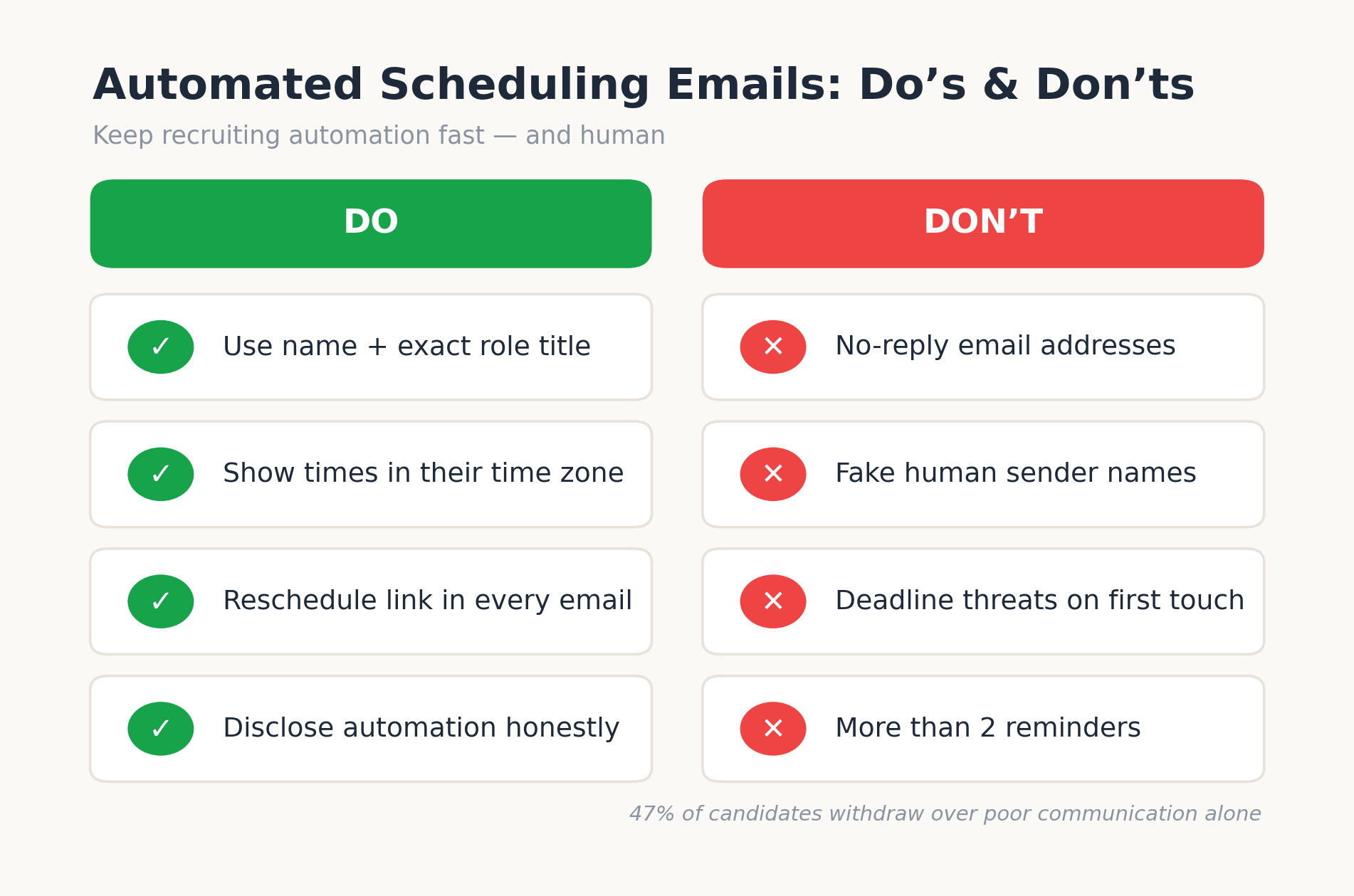
Do:
- Use the candidate’s first name and the exact role title in every message and validate the merge fields, because “Dear {first_name}” has ended more candidates than failed technical screens.
- State duration, format, interviewer name, and what to prepare in the invitation itself.
- Show all times in the candidate’s local time zone and say so explicitly.
- Include a reschedule link in every single scheduling touchpoint.
- Disclose automation once, plainly, with a monitored reply path.
- Set and honor a response SLA for anything the automation cannot handle.
Don’t:
- Send from a no-reply address. It converts every edge case into a dead end.
- Fake a human sender identity on a fully automated message.
- Use deadline threats (“failure to respond will result in…”) on a first touchpoint.
- Offer fewer than five slots and call it self-scheduling.
- Send more than two reminders per interview.
- Let any automated sequence run without a quarterly human read-through; templates rot as roles, names, and processes change.
Real-World Application: Two SMB Scenarios
A 90-person fintech startup hiring across 12 roles found that candidates who received a self-scheduling link within 24 hours of screening completed interviews at nearly twice the rate of candidates scheduled through back-and-forth email, and interview no-shows fell from 18% to 7% once a two-touch reminder sequence with embedded join links went live. Time-to-hire for engineering roles dropped by 11 days in a quarter.
A recruitment team at a 200-person services SMB processing about 1,200 applications per month automated status updates at every pipeline stage including rejections. Complaint emails asking “what’s happening with my application” fell by roughly 70%, freeing an estimated 6 recruiter-hours weekly, and the company’s rating on employer review platforms rose measurably within two quarters as “they actually communicated” began appearing in candidate feedback.
Neither team wrote better prose. Both re-architected when messages fire and what data feeds them.
Decision Framework: Choosing Recruitment Status Update Software
Evaluating recruitment status update software and scheduling automation comes down to five questions, because vendor feature lists in this category are nearly identical on paper. What differs is behavior at the edges.
| Evaluation criterion | What to ask the vendor | Red flag |
| Reschedule handling | Can a candidate reschedule in one click, with interviewer calendars re-checked live? | Reschedules create a manual task for a recruiter |
| Data unification | Do scheduling, pipeline stage, and communication history live in one candidate record? | Scheduling tool syncs to the ATS “every few hours” |
| Tone control | Can every template be edited, and can automation disclosure be standardized? | Locked templates or per-template fees |
| Failure visibility | Are bounced emails, unopened invites, and stalled candidates surfaced automatically? | You discover failures when candidates complain |
| Cost structure | Flat pricing, or per-seat/per-hire fees that punish growth? | Pricing requires a sales call to disclose |
Run the same three test scenarios in every demo: a candidate reschedules twice, an interviewer declines an hour before the slot, and a candidate replies to an automated email with a question. How the system behaves in those three moments predicts your candidate experience far better than any feature matrix. Teams that want a low-risk trial should note that free-forever plans with no credit card requirement now exist in this category, which makes running a live pilot on one requisition a reasonable evaluation step.
What Most Teams Get Wrong About Scheduling Automation
The consistent pattern across hundreds of SMB implementations: teams obsess over the wrong failure mode. Leadership worries that automation will feel cold, so they under-automate keeping humans in loops where humans add nothing but latency and the result is the worst of both worlds: slow and impersonal, because the overloaded recruiter falls back on terse two-line emails anyway.
Candidates do not experience “a human scheduled this” as warmth. They experience speed, clarity, and follow-through as warmth. A machine that confirms in 4 minutes with complete information beats a human who confirms in 2 days with half of it, in every candidate survey that has examined the question. The data point most teams refuse to believe: in coordination benchmarks, recruiter screens, the most automated, self-scheduled step in the funnel, score the highest candidate satisfaction (4.63/5), while hiring-manager rounds, the most manually coordinated step, score the lowest (4.22/5).
The second miss is treating rejection as outside the etiquette perimeter. 94% of candidates want feedback and only 41% get any; a same-week automated rejection with even generic guidance outperforms the industry default of eternal silence by such a margin that it functions as employer branding. Your rejected candidates outnumber your hires 50-to-1. They are the majority of people forming an opinion about your company, and most hiring workflow designs ignore them completely.
The third miss is set-and-forget. Automation etiquette decays: interviewers change, role titles change, the office moves, the video platform switches. The teams that stay sharp assign an owner and audit every automated candidate communication quarterly, a 90-minute task that prevents the “we invited candidates to an office we left in March” class of failure.
Put Your Scheduling Experience to the Test
The gap between “we automated scheduling” and “candidates love our scheduling” is measurable: response latency, reschedule friction, reminder cadence, and loop closure. If you run the self-audit above and find silence gaps or dead-end flows, the fix is rarely more effort from your recruiters; it is a workflow where confirmations, reminders, status updates, and reschedules fire automatically from a single candidate record.
Hirium’s free-forever plan (no credit card, flat pricing, free migration from tools like Zoho Recruit) lets you rebuild your scheduling flow on one live requisition and compare candidate response rates against your current process within two weeks used by 5,000+ businesses and rated 4.5/5 on G2. Run the pilot, keep whichever process your candidates reward.
Frequently Asked Questions
What is proper etiquette for AI interview scheduling?
The core rules: respond within 48 hours of application, offer genuine slot choice through self-scheduling links, confirm bookings within minutes with complete details, disclose that automation is involved, provide a monitored human reply path, send exactly two reminders, and make rescheduling one click. Proper AI interview scheduling etiquette treats speed, transparency, and flexibility as a package dropping any one of the three undermines the other two.
How quickly should an interview be scheduled after a candidate applies?
Half of candidates expect a first response within one week, and the strongest performers move faster: screening decision within 48 hours, scheduling link the same day a candidate advances, and the interview itself within 2–6 days of first contact. Given that 61% of candidates accept the first offer they receive, every day shaved off scheduling compounds directly into offer acceptance rates.
Do candidates dislike automated scheduling emails?
No candidates dislike bad automated emails. Self-scheduled recruiter screens actually earn the highest satisfaction scores of any interview stage in coordination benchmarks. What candidates reject is automation that removes their agency: no-reply addresses, take-it-or-leave-it slots, generic salutations, and dead-end reschedule flows. Automation that adds speed and choice consistently outperforms manual coordination in candidate ratings.
How do you humanize automated recruitment emails?
Use merge fields for first name, role title, interviewer name, and time zone; write templates in the voice of a specific person on your team; state duration and prep expectations; disclose the automation honestly; and route replies to a monitored inbox with a stated response window. Humanizing is less about warm adjectives and more about specificity; a message with five concrete details always reads as more human than one with five pleasantries.
Should candidates be told that AI is handling their interview scheduling?
Yes, both ethically and practically. With only 26% of candidates trusting AI to evaluate them fairly, discovered automation damages trust far more than disclosed automation, and regulations such as NYC Local Law 144 and the EU AI Act are steadily formalizing disclosure requirements for automated hiring tools. One plain sentence “our recruiting software handles scheduling; a person reads every reply” satisfies candidates and auditors alike.
How many interview reminders should you send a candidate?
Two: one 24 hours before and one 1–2 hours before, each containing the join link, time in the candidate’s time zone, and a reschedule option. One reminder leaves early-morning interviews exposed to no-shows; three or more reads as distrust. Teams using this two-touch pattern report no-show rates falling from the 15–20% range to under 8%.
What’s the fastest way to audit whether our scheduling process meets 2026 expectations?
Apply to one of your own open roles with a personal email address and time every touchpoint: first response, scheduling options, confirmation, reminders, and post-interview update. Then compare against the benchmarks in this article. Most teams find 2–3 gaps in under an hour and if the audit reveals your current ATS can’t close them, that is the moment to trial a platform where the etiquette is built into the workflow rather than bolted on.