
AI Resume Screening for Non-Tech Roles: Does It Work for Sales, Ops, and Support Hiring?
Hiring for non-technical roles brings a different kind of challenge volume without clarity. Sales, operations, and support roles often attract hundreds of applicants, but evaluating them goes beyond simple keyword matching.
That’s where resume screening for non-tech roles becomes more complex. Unlike technical hiring, where skills are clearly defined, non-tech resumes vary widely in language, making it harder for traditional screening tools to identify the right candidates.
The gap is becoming more visible: according to the LinkedIn Future of Recruiting Report, 72% of recruiters say assessing soft skills is their biggest challenge, especially in roles where communication, adaptability, and experience matter more than hard skills.
In this guide, we break down whether AI resume screening actually works for non-tech roles, where keyword-based systems fail, and how to configure smarter screening criteria for sales, ops, and support hiring in 2026.
What Is Resume Screening for Non-Tech Roles?
Resume screening for non-tech roles is the process of evaluating sales, operations, and customer support candidates against criteria that go beyond technical certifications or coding skills. It weighs soft skills, shift availability, licensure, and communication signals, since these traits determine job performance far more than keyword density does in customer-facing and process-driven positions.
The Core Problem: Screening Logic Built for the Wrong Job
Engineering ATS rules are largely binary. A candidate has three years of React experience, or they don’t; they hold an AWS certification, or they don’t. Non-technical roles don’t compress that cleanly, and most teams underestimate the gap by 3–4x when they configure screening for sales, ops, or support requisitions using the same rule sets built for developer hiring.
Consider the practical mismatch. A sales development rep’s resume rarely states “cold-calling proficiency” or “objection handling” ; in those exact words it shows up as quota attainment percentages, tenure at quota-carrying roles, and industry vertical experience. A candidate profile management system tuned only for exact-match keywords will pass over a rep who exceeded 130% of quota for two years simply because the resume phrased it as “consistently surpassed sales targets” instead of matching a stored keyword string.
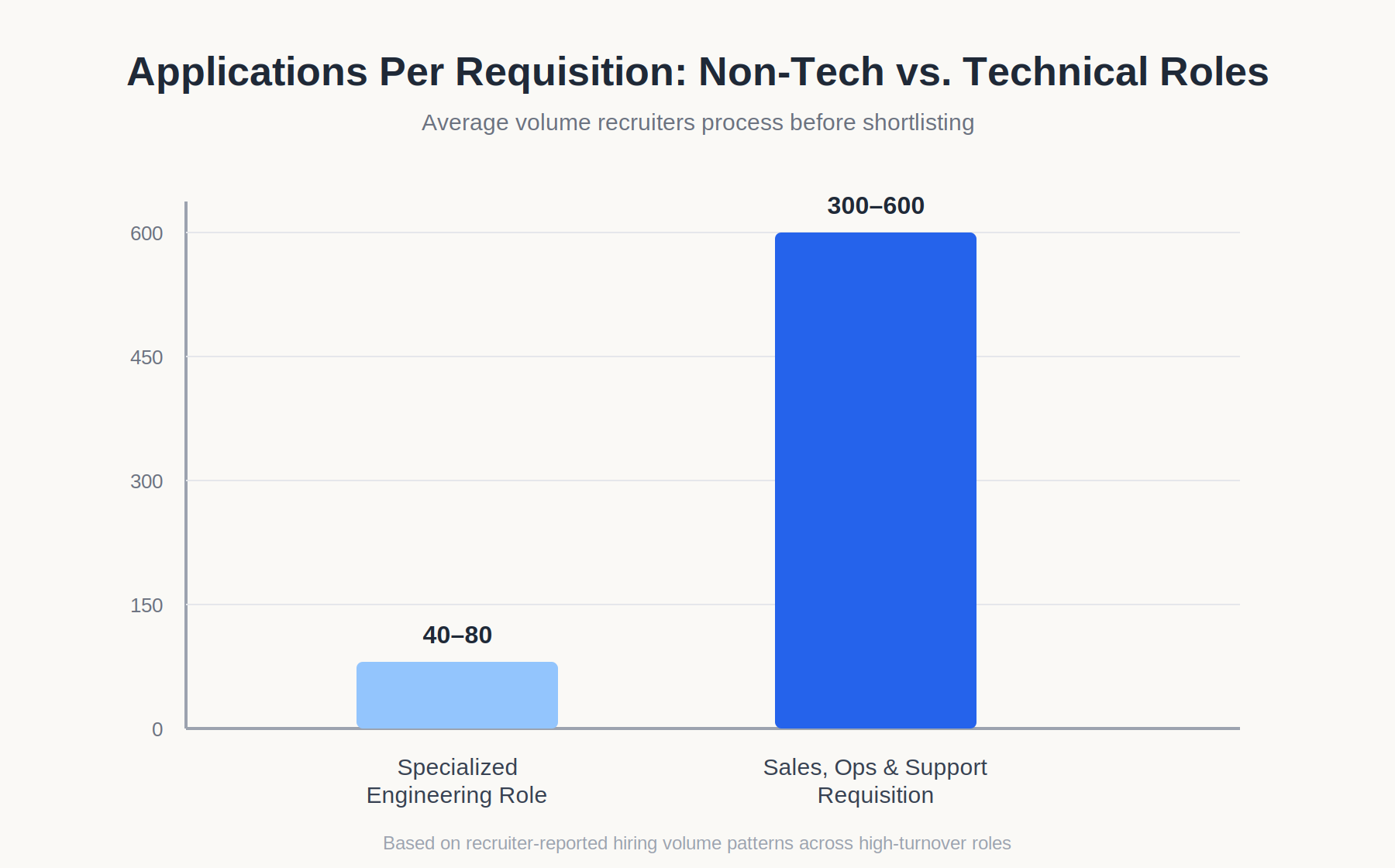
The volume problem compounds this. Recruiters filling high-turnover support and retail-adjacent roles routinely process 300–600 applications per requisition, compared to 40–80 for a specialized engineering role. At that scale, a resume screening for non-tech roles setup that filters on the wrong variables doesn’t just miss a few good candidates; it can eliminate 25–35% of qualified applicants before a human ever opens the file, based on patterns recruiters report when auditing rejected pools against later manual review.
Time-to-hire pressure makes the problem worse, not better. Talent teams under pressure to fill a 24-seat support center in 6 weeks tend to widen keyword lists rather than rebuild criteria logic, which increases noise without improving precision. The result is a familiar pattern: high application volume, poor shortlist quality, and recruiters manually re-screening the reject pile anyway which defeats the purpose of automated screening in the first place.
There’s also a data-quality problem specific to non-technical hiring. Engineering resumes tend to follow a fairly consistent format skills section, project history, tooling list which makes parsing straightforward. Sales, ops, and support resumes vary enormously by industry: a retail shift lead’s resume looks nothing like a call-center team lead’s, and a warehouse operations resume looks nothing like either. An AI resume parser trained primarily on structured technical resumes often misreads or drops fields entirely when it hits an unfamiliar format, which quietly degrades screening accuracy before a single rule even runs.
The compliance layer adds another dimension most technical hiring rarely touches. Non-technical roles more frequently involve union agreements, minimum-wage thresholds, background-check requirements, and location-specific licensing none of which show up in a typical technical job description. Screening rules that ignore these variables don’t just produce weaker shortlists; they can produce shortlists that violate local hiring regulations without anyone noticing until an audit. Multi-state operations and support hiring add a further wrinkle, since a criterion that’s compliant in one state’s employment law may not be in another, which means screening logic built once for a single region often needs a compliance review before it’s applied nationally.
Configuring Screening Rules for Sales, Ops, and Support: A Deep Dive
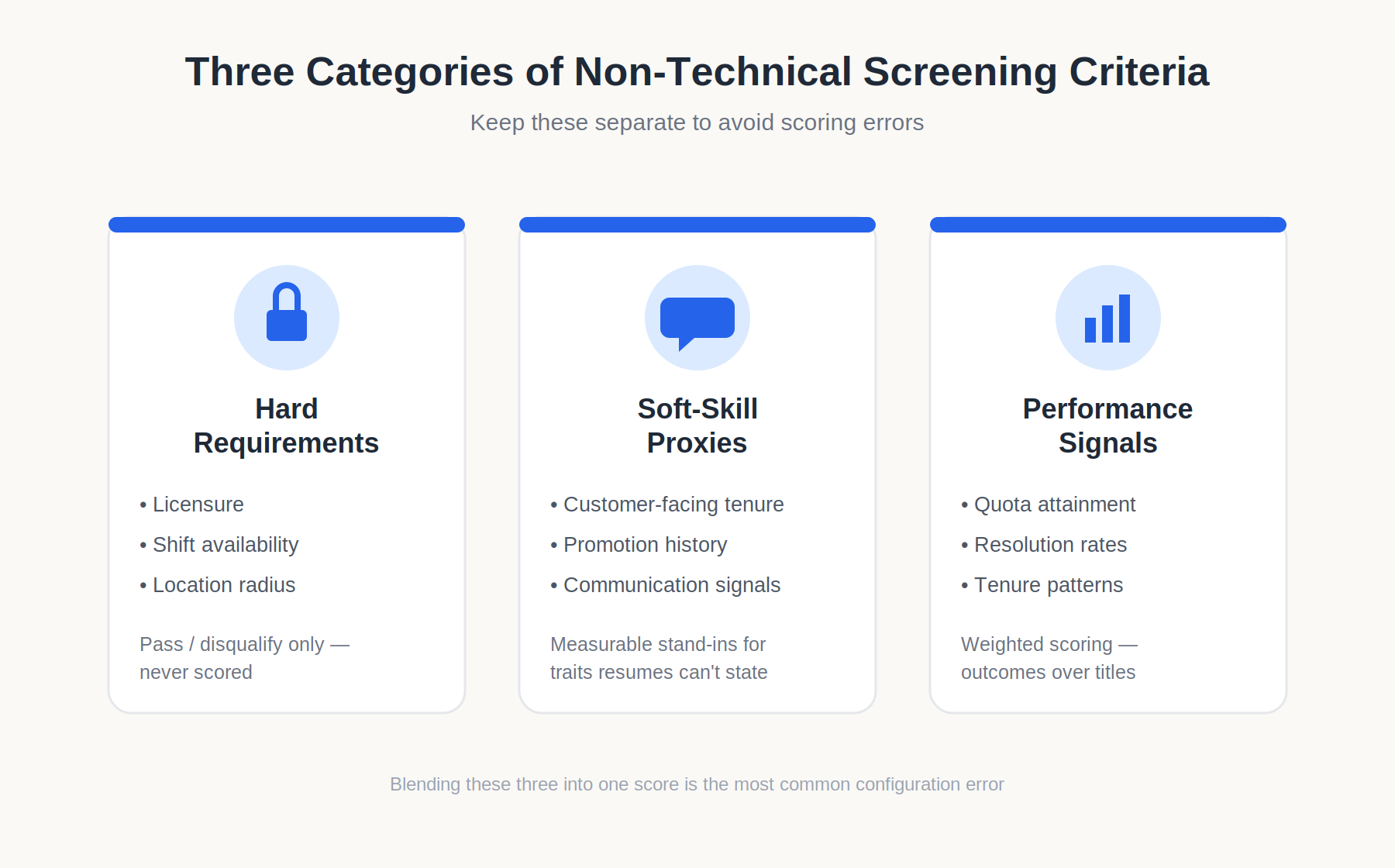
Technical screening and non-technical screening diverge at the architecture level, not just the keyword list. Building rules that actually work requires separating three categories of criteria: hard requirements (licensure, shift availability, location), soft-skill proxies (communication, adaptability, customer orientation), and performance signals (quota attainment, resolution rates, tenure patterns).
Getting this separation wrong is the single biggest driver of poor screening outcomes in sales, ops, and support hiring. Teams that blend hard requirements and soft-skill proxies into one weighted score end up in situations where a candidate who can’t legally work the required shift still scores well enough to reach a recruiter’s desk, simply because their performance metrics were strong elsewhere. Treating disqualifying criteria and scoring criteria as the same category is a structural error, not a minor tuning issue, and it’s usually the first thing worth auditing in an underperforming screening setup.
Why Keyword-Only Screening Fails Here
A standard AI resume parser built for technical roles extracts nouns, languages, tools, frameworks and matches them against a job description. Sales, ops, and support resumes carry meaning in verbs and numbers instead: “reduced average handle time,” “managed a territory of 40 accounts,” “cross-trained across three shift rotations.” Keyword-only logic misses this almost entirely, because the signal isn’t a static term but a pattern across multiple resume lines.
This is where AI candidate insights tools that use contextual parsing rather than exact-string matching start to outperform legacy filters. Contextual models can associate “cut escalation rate by 18% over two quarters” with a support-quality criterion, even though the phrase never contains the word “quality.” Keyword filters cannot make that connection; they need the literal term to appear.
The gap widens further with resumes that use industry-specific shorthand. A logistics candidate might list “OTIF” (on-time-in-full) performance without ever spelling it out, and a retail candidate might reference “shrink” without defining it as inventory loss. Keyword filters built around generic job-description language miss these entirely, while contextual models trained on domain-specific vocabulary can recognize the signal even when the phrasing is unfamiliar to a generalist reviewer.
Building Non-Technical Screening Criteria: A Process
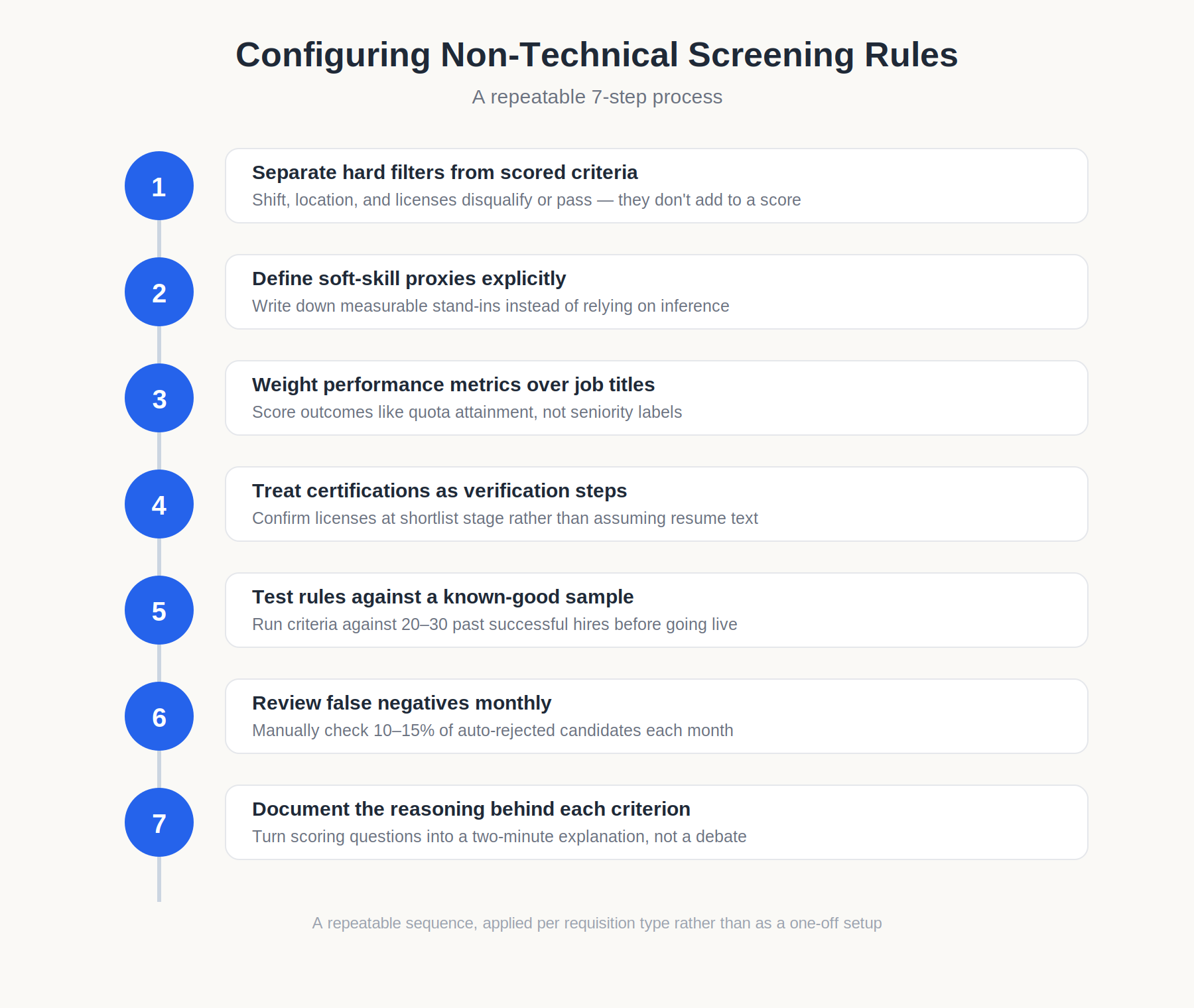
Configuring rules for non-tech requisitions works best as a repeatable sequence rather than a one-off setup per role:
- Separate hard filters from scored criteria. Shift availability, location radius, and required licenses (forklift certification, real estate license, RN licensure) should disqualify or not contribute to a weighted score, since a candidate either can work the shift or cannot.
- Define soft-skill proxies explicitly. Instead of screening for “strong communicator,” define measurable proxies: customer-facing tenure length, promotion into training or team-lead roles, or documented performance reviews referencing communication. Write these proxies down as part of the screening configuration, not as an implicit assumption the tool is expected to infer on its own.
- Weight performance metrics over job titles. A candidate who hit 120% of quota in a smaller account base often outperforms one with a more senior title but flat attainment; screening should score outcomes, not seniority labels alone.
- Set certification and compliance checks as verification steps, not assumptions. Licenses expire; resumes list expired credentials more often than teams expect, so verification should happen at the shortlist stage, not be inferred from the resume text alone.
- Test rules against a known-good sample before going live. Run the criteria against 20–30 resumes from past successful hires in the role to confirm the logic doesn’t exclude your own best past performers.
- Review false negatives monthly. Pull a sample of auto-rejected candidates each month and manually check 10–15% of them; if qualified candidates are consistently filtered out, the rule set needs adjustment, not the candidate pool.
- Document the reasoning behind each criterion. When a recruiter or hiring manager questions why a candidate was scored a certain way, having a written rationale for each weighted criterion turns a defensive conversation into a two-minute explanation.
Compliance and Cost Considerations
Non-technical hiring at volume especially in retail, hospitality-adjacent support, and field ops carries higher legal exposure than technical hiring, because these roles more frequently intersect with protected characteristics tied to age, disability, and scheduling accommodations. Screening rules that filter on “availability” without accounting for reasonable accommodation requests can create ADA exposure; rules that weight “years of experience” too heavily can create disparate impact on younger applicants.
Cost-wise, misconfigured non-technical screening is expensive in a way that’s easy to underestimate. A support hiring pipeline that requires manual re-screening of the reject pile because automated filters removed viable candidates adds back roughly 60–70% of the manual review time the automation was meant to eliminate, based on recruiter workload patterns reported across high-volume hiring teams. The tool isn’t saving time if a recruiter has to double-check its rejections.
Rule-Based vs. Contextual Scoring: Choosing the Right Architecture
Not every non-technical requisition needs the same screening architecture. A simple, low-volume role of a single office administrator opening with 30 applicants is usually well served by straightforward rule-based filters: required software, location radius, years of relevant experience. Building a full contextual scoring model for that volume is unnecessary overhead.
High-volume, multi-location roles are a different case. A retail chain filling 60 store-lead positions across a region benefits from contextual scoring that can weight performance signals shrinkage reduction, team retention under a candidate’s management, sales-per-labor-hour against each other, since a rule-based system can’t easily rank candidates who satisfy the same hard filters but differ meaningfully in outcomes. The cost of contextual scoring is higher setup time and the need for periodic auditing, but for volume hiring, the reduction in manual review time usually offsets that within one or two hiring cycles.
A hybrid approach of hard filters for disqualifying criteria, contextual scoring for everything else tends to work best for mid-volume sales, ops, and support hiring, since it avoids the false-negative risk of pure keyword matching without requiring the full overhead of a contextual model for every requisition.
Integrating Screening Rules Into the Broader Hiring Workflow
Screening criteria don’t operate in isolation; they feed directly into shortlist speed, interview scheduling, and candidate communication. When non-technical screening rules are built inside a candidate profile management system rather than as a standalone filter, recruiters can see why a candidate was scored the way they were, rather than treating the output as a black box.
This matters most at scale. A regional operations team hiring across 12 locations needs screening outcomes to trigger the right next step, automatically advance to phone screen, route to a location-specific recruiter, or flag for manual review because of an edge case like a partial certification match. Automated workflows that connect screening scores to these next steps cut the coordination overhead that otherwise falls on a single recruiter managing dozens of open requisitions simultaneously.
Recruitment Email Templates and Screening Outcomes
Screening accuracy affects more than the shortlist; it affects candidate experience through automated communication. Recruitment email templates tied to screening outcomes (auto-rejection, advance to interview, request for additional information) should reflect the actual reason a candidate was filtered, not a generic rejection. A candidate filtered for shift mismatch should receive different messaging than one filtered for missing certification, since the first might be a fit for a different opening and the second needs a clear, factual explanation.
Case Study: Two Non-Technical Hiring Scenarios
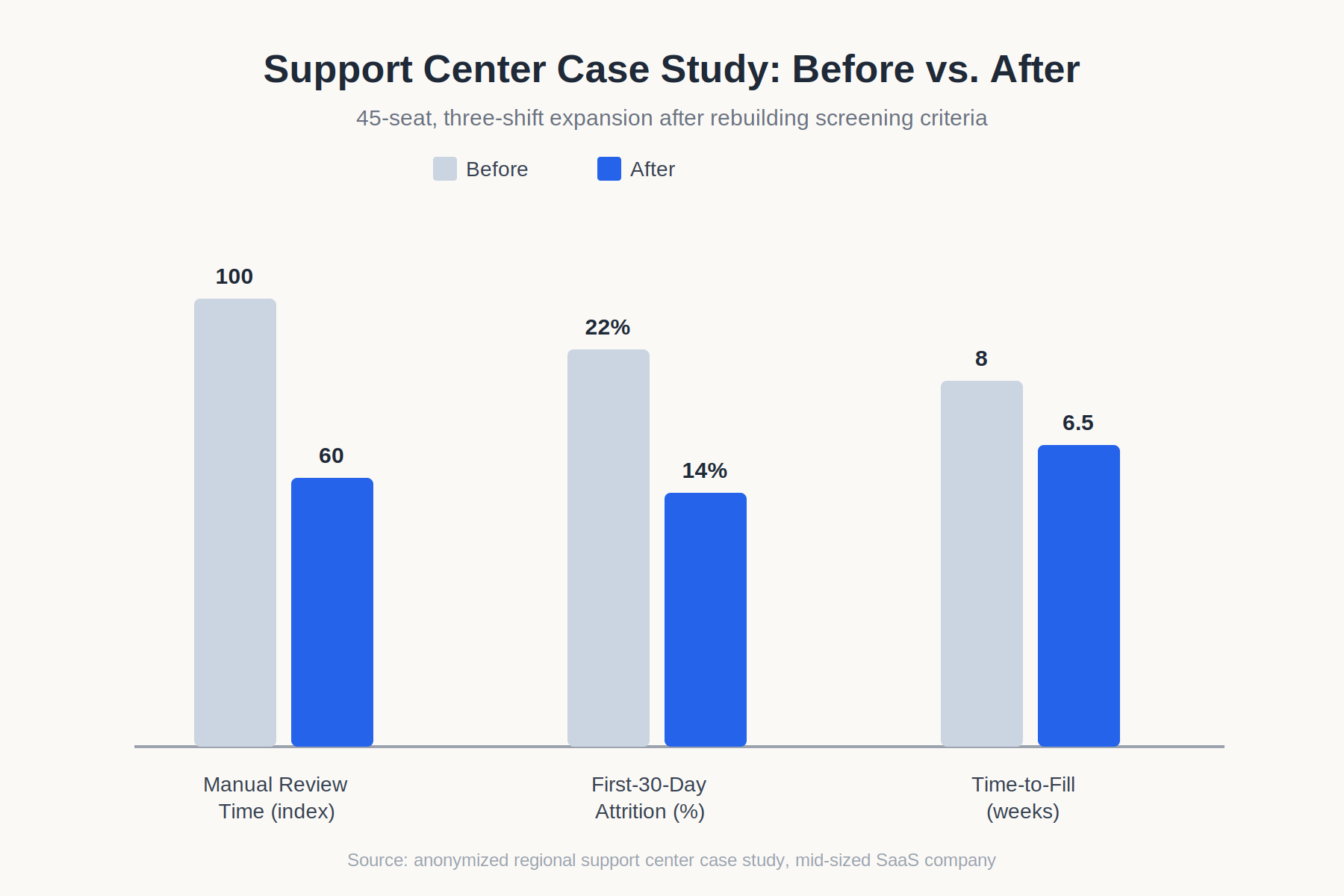
Regional support center, 45-seat expansion. A mid-sized SaaS company needed to fill 45 support roles across three shifts in eight weeks, receiving over 2,800 applications. The original screening setup used a shared keyword list borrowed from a technical support engineering req, which filtered heavily on tool names candidates rarely mentioned in exactly that format. After reconfiguring screening to separate shift-availability hard filters from a weighted score based on customer-facing tenure and prior CSAT-adjacent metrics, the recruiting team cut manual review time by roughly 40% and reduced first-30-day attrition among new hires from 22% to 14%, since shift mismatches were caught before offer stage rather than after. Time-to-fill for the full 45 seats came in at 6.5 weeks against an original 8-week target.
Field sales team, multi-state territory hiring. An industrial distributor hiring 18 field sales reps across five states found that keyword-only screening consistently favored candidates from larger, brand-name competitors while filtering out reps from smaller distributors who had stronger quota attainment relative to territory size. The original rule weighted “years at a recognized company” heavily, which skewed the shortlist toward tenure and brand recognition rather than results. Rebuilding the screening logic to weight quota-attainment percentage over company size and territory scope over job title produced a shortlist with three additional strong candidates who would previously have been auto-rejected, two of whom were hired within the cycle and both exceeded quota within their first two quarters.
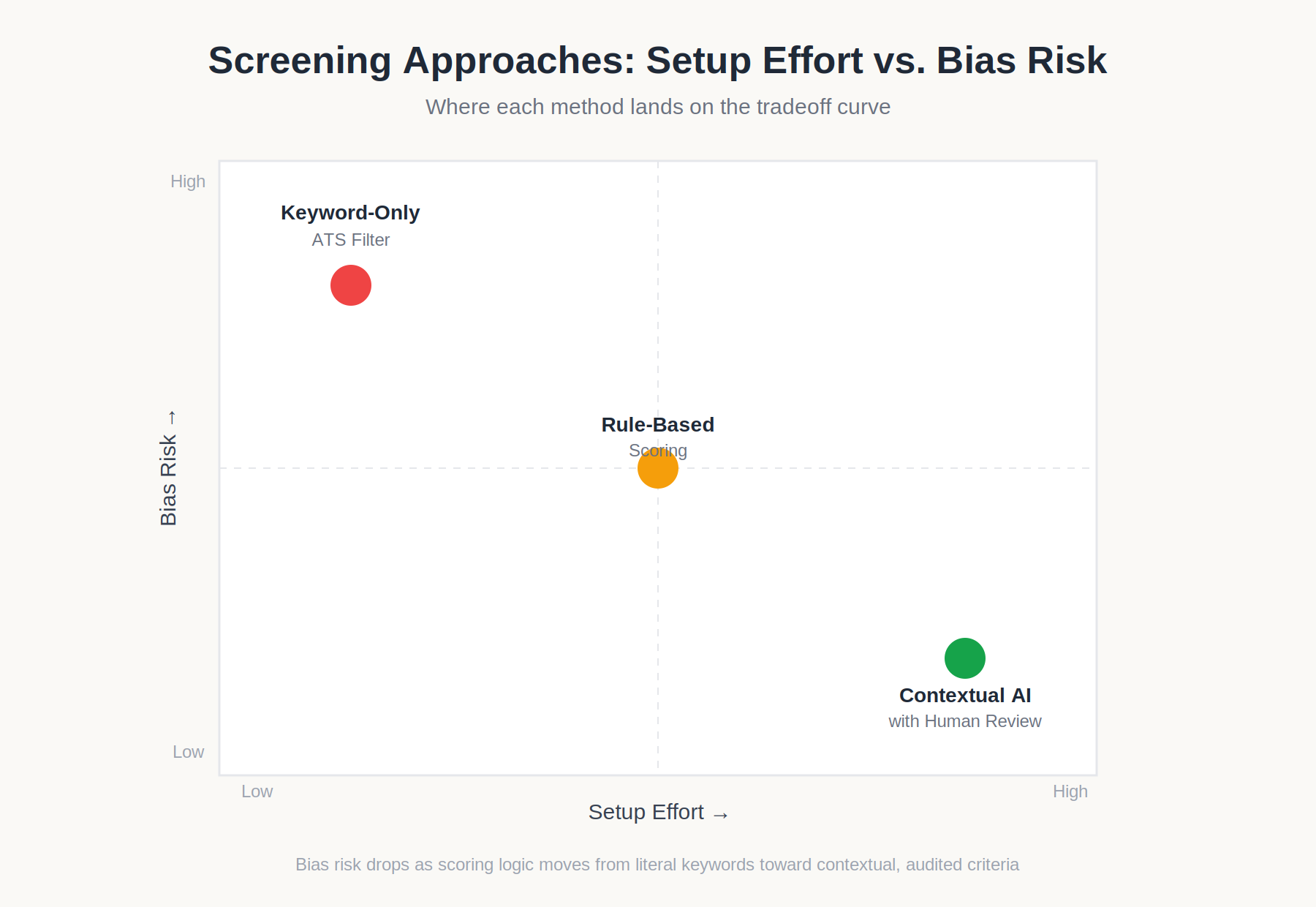
Comparison Framework: Screening Approaches for Non-Technical Roles
| Approach | Setup Effort | Bias Risk | Best Fit |
| Keyword-only ATS filter | Low | High (misses non-literal signals) | Low-volume, simple hard requirements |
| Rule-based scoring (hard filters + weighted criteria) | Medium | Medium (depends on criteria design) | Mid-volume sales, ops, support roles |
| Contextual AI candidate insights with human-reviewed thresholds | Medium-high | Lower, if audited regularly | High-volume, multi-shift, multi-location hiring |
Platforms like Hirium apply this contextual layer through AI shortlisting rather than raw keyword matching, though the underlying principle holds regardless of vendor: the further a role sits from purely technical criteria, the more screening logic needs to weight patterns and outcomes over exact-match terms.
Choosing between these approaches isn’t purely a budget decision; it depends on requisition volume and role complexity. A single-location retail hire with 30 applicants rarely justifies the setup time of contextual scoring; a multi-shift, multi-location support or ops rollout almost always does, since the manual review time saved compounds across every location running the same rules. Teams evaluating vendors for resume screening for non-tech roles should ask specifically how the underlying model handles non-literal signals, rather than accepting a general claim of “AI-powered recruitment” at face value.
What Most Teams Get Wrong
The most common mistake isn’t choosing the wrong tool, it’s importing engineering screening logic wholesale into sales, ops, and support requisitions without rebuilding the criteria. Teams copy a working technical rule set, swap in a few new keywords, and assume the structure still applies. It doesn’t, because the underlying signal type is different.
A second pattern: treating “years of experience” as a universal proxy for competence. In technical hiring, tenure often correlates loosely with skill depth. In sales and support, a candidate with 18 months of strong, measurable performance frequently outperforms one with five years of mediocre results, and screening rules that over-weight tenure systematically favor the wrong candidates.
Third, teams frequently assume soft skills can’t be screened at all and abandon the effort, routing everything to manual review. This creates the volume bottleneck the automation was supposed to solve. Soft skills can’t be keyword-matched, but they can be proxied through measurable resume signals, promotion history, tenure in customer-facing roles, and documented performance data if the criteria are built deliberately rather than skipped.
Finally, few teams revisit screening rules after initial setup. A rule set built for a support role six months ago may no longer reflect current shift patterns, compliance requirements, or the realistic candidate pool, yet it keeps running unchanged because nobody owns the review cycle.
There’s a related, quieter mistake: treating every non-technical role as interchangeable. Sales, ops, and support hiring get lumped together as “non-tech” and handed the same generic rule template, when the underlying signals differ substantially across the three. A sales screening model should weight quota and outcome data heavily; an ops model should weight process consistency and compliance signals; a support model should weight customer-facing tenure and communication proxies. Applying one template across all three produces mediocre results everywhere instead of strong results anywhere.
Getting Screening Criteria Right for Your Next Non-Technical Hire
If you’re actively rebuilding screening criteria for sales, ops, or support roles and want to pressure-test the logic before it runs across a live requisition, Hirium’s screening configuration supports the hard-filter-plus-weighted-criteria structure outlined above, along with candidate profile management and centralized tracking to audit false negatives over time. The goal isn’t to add another layer of automation on top of a broken rule set, it’s to make sure the criteria driving your shortlist actually reflect what makes someone succeed in the role. Reach out through Hirium to walk through your current criteria against a sample of past hires before your next hiring cycle starts.
Frequently Asked Questions
Can AI resume screening evaluate soft skills for sales or support roles?
Not directly, but it can proxy soft skills through measurable resume signals promotion into customer-facing leadership, tenure length in similar roles, or performance data tied to communication-heavy metrics like resolution rate or quota attainment. Direct soft-skill assessment typically requires a structured interview or an AI-assisted first-round screening step layered on top of resume parsing, since resume text alone can’t fully substitute for observed behavior.
Does resume screening actually work for sales hiring, or does it filter out strong candidates?
It works when criteria are weighted toward performance outcomes quota attainment, deal size, territory scope rather than company brand names or job titles alone. Keyword-only setups frequently filter out strong candidates from smaller companies whose achievements don’t match a stored term list, even when their metrics outperform candidates from larger, more recognizable employers on the same criteria.
What screening criteria matter most for customer support hiring?
Shift availability and location should function as hard filters, since a scheduling mismatch is disqualifying regardless of skill. Beyond that, prior customer-facing tenure, resolution-rate or CSAT-adjacent metrics if available, and communication-heavy role history matter more than generic keyword matches like “customer service” appearing on the resume, which say little about actual performance.
Is keyword-based screening effective for non-technical roles?
It’s effective only for hard, literal requirements licenses, certifications, location, specific software named in the job description. It’s ineffective for soft skills, performance quality, and role fit, since these rarely appear as exact-match terms and instead show up as patterns across multiple resume lines, which keyword filters can’t detect on their own.
How do you configure screening rules for shift-based or multi-location hiring?
Separate shift and location into hard, disqualifying filters rather than scoring criteria, since a candidate who can’t work the required shift isn’t a partial match; they’re not a match. Layer performance and soft-skill proxies on top of that filter, and verify certification or licensure requirements at the shortlist stage rather than assuming resume text is current or accurate.
Can AI verify certifications or licenses listed on a resume?
Parsing tools can flag when a certification is mentioned, but most cannot independently verify it’s current or valid that requires a separate verification step, either through a licensing database check or direct confirmation during the interview stage. Teams evaluating resume screening for non-tech roles with certification-heavy positions (healthcare, logistics, skilled trades) should treat AI parsing as detection, not verification.
Should our team run a pilot before rolling out non-technical screening rules across all requisitions?
Yes. Testing new criteria against a sample of 20–30 resumes from past successful hires before applying it to live requisitions catches false negatives before they cost you real candidates. Teams that skip this step tend to discover a broken rule set only after several hiring cycles show unexplained shortlist quality drops, at which point the cost of the mistake has already compounded across dozens of rejected applicants.
Do sales, ops, and support roles need separate screening models, or can one setup cover all three?
Separate models produce meaningfully better results. Sales screening should weight quota and outcome data heavily, operations screening should weight process consistency and compliance signals, and support screening should weight customer-facing tenure and communication proxies. A single generic “non-technical” template applied across all three tends to produce average results everywhere rather than strong results in any one category.