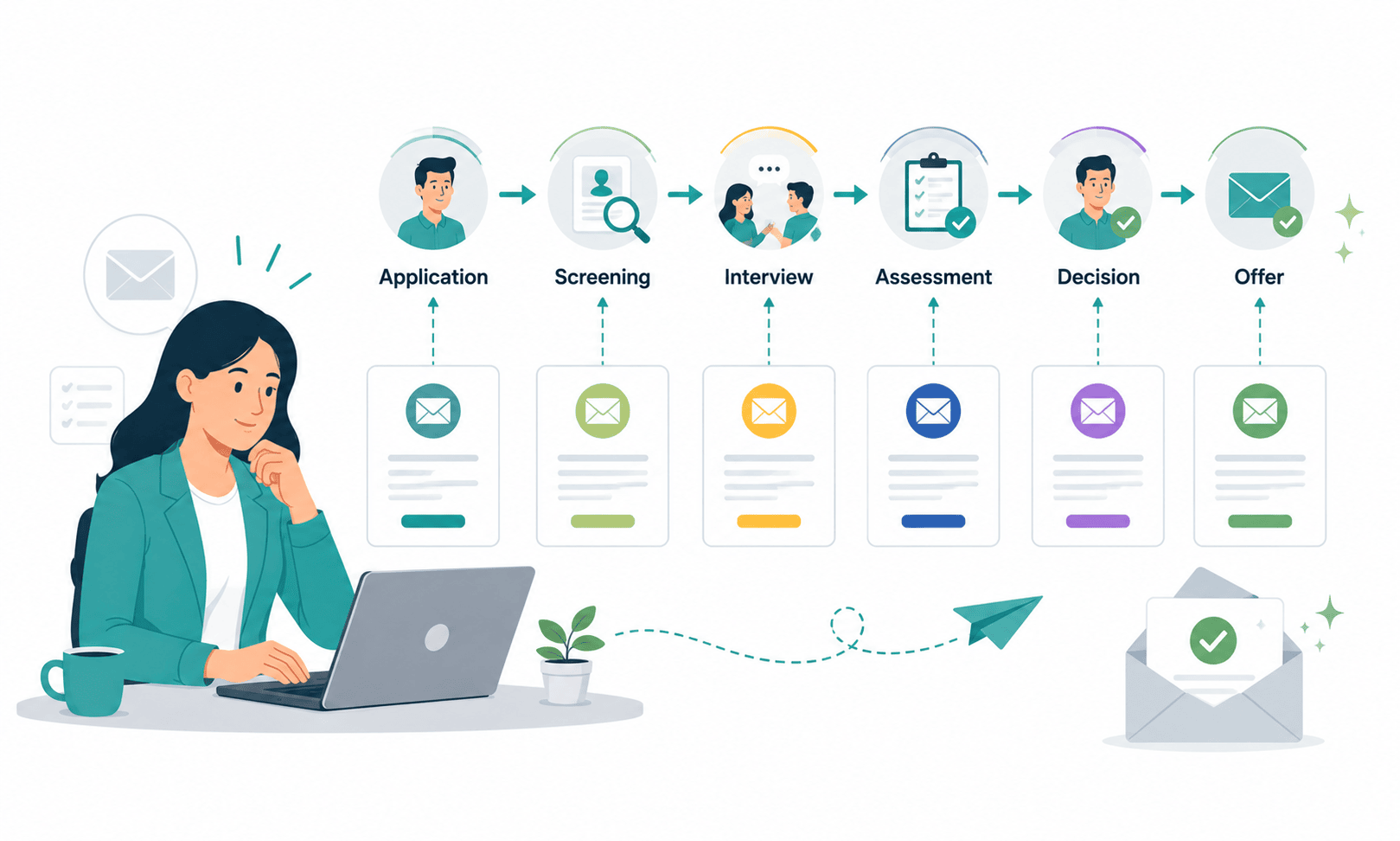
From Application to Offer: Mapping Recruitment Email Templates to Every Pipeline Stage
Candidates who apply to a startup or SMB hear back, on average, once the auto-acknowledgement and then nothing for 14 to 21 days. During that same window, the strongest 10–15% of those candidates receive interview invitations from two or three other companies. The math is unforgiving: a recruiter managing 8–12 open roles with 150–300 applicants per role cannot manually email everyone at every stage, so the emails that don’t get sent become the silent leak in the funnel.
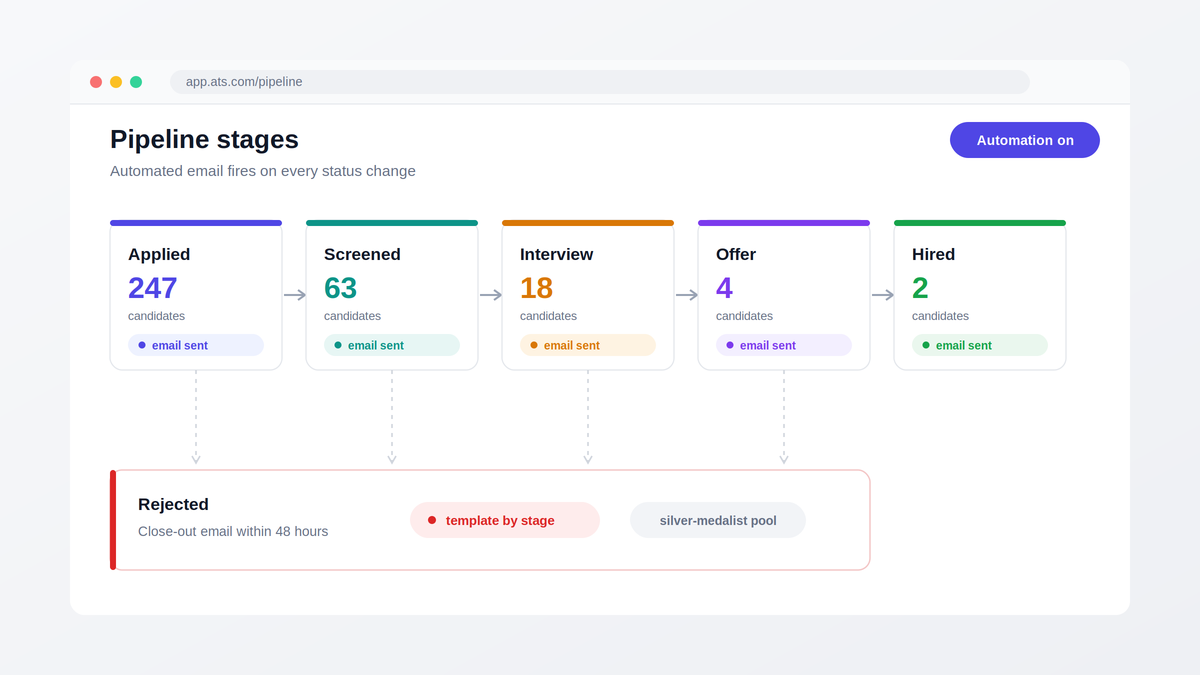
The fix is not “send more emails.” It is mapping Recruitment Email Templates by Pipeline Stage so that a specific, pre-approved message fires automatically the moment a candidate’s status changes applied, screened, interviewed, offered, rejected, or hired. Teams that build this map once stop rewriting the same five emails 40 times a week and stop losing candidates in the gaps between stages.
The difference shows up in hard numbers. Companies that respond to applicants within 48 hours convert candidates to interviews at roughly 2x the rate of companies that take a week. Offer acceptance climbs when candidates receive a structured sequence between verbal offer and signed letter. And rejected candidates who get a timely, respectful close-out email reapply and refer others at measurably higher rates than those who are ghosted.
This guide lays out the complete stage-by-stage map: which template fires at each transition, what triggers it, the tone each stage demands, and how to A/B test subject lines so the emails actually get opened. Everything here assumes a lean team of one to three recruiters, high application volume, and real time-to-hire pressure because that is where automated email mapping pays back fastest.
According to recent recruiting data, 62% of candidates say they lose interest in a job if they don’t hear back within two weeks, highlighting how gaps in communication directly impact hiring outcomes. To explore more data behind modern hiring trends, refer to latest recruiting statistics and benchmarks.
What Are Recruitment Email Templates by Pipeline Stage?
Recruitment email templates by pipeline stage are pre-written, trigger-based messages mapped to each phase of the hiring funnel application received, screening, interview, offer, rejection, and hire so that every candidate status change automatically sends the right email, with the right tone, at the right time, without manual effort from recruiters.
That 55-word definition is the whole concept. The execution of what fires when, how it sounds, and how you measure it is where most teams get it wrong, so the rest of this guide covers exactly that.
The Core Problem: Communication Gaps Compound at Volume
Every recruiter intends to keep candidates informed. Intent is not the bottleneck; arithmetic is. A single mid-sized role at a growing SMB draws 200–250 applications. A properly communicative process requires at minimum six touchpoints per candidate acknowledgment, screening update, interview invitation, interview reminder, decision email, and either an offer sequence or a rejection email. That is 1,200–1,500 emails for one role.
Multiply by eight open roles and a two-person talent team is theoretically responsible for 10,000+ emails per hiring cycle. Nobody sends those manually. What actually happens is triage: the 15–20 candidates actively interviewing get personal emails, and the other 95% of the talent pipeline gets silence.
The cost of that silence is specific and measurable. Candidates who hear nothing for 10+ days after applying disengage may accept interviews elsewhere before your screening email ever arrives. Interview no-show rates run 15–25% higher when no reminder is sent 24 hours before the slot. And in the offer stage, every day of silence between verbal offer and written letter gives competing offers room to land; teams routinely underestimate offer-stage drop-off by 3–4x because they only count formal declines, not the candidates who went quiet.
There is also a compounding brand cost. Ghosted candidates talk on Glassdoor, on LinkedIn, and to the exact peers you will want to recruit next quarter. For startups hiring repeatedly in the same niche talent market, poor candidate engagement in one cycle directly raises sourcing costs in the next.
The structural answer is not more recruiter hours, it is recruitment email templates by pipeline stage, wired to fire on status changes. That map is what the next section builds.
The Stage-by-Stage Map: Which Template Fires, When, and in What Tone
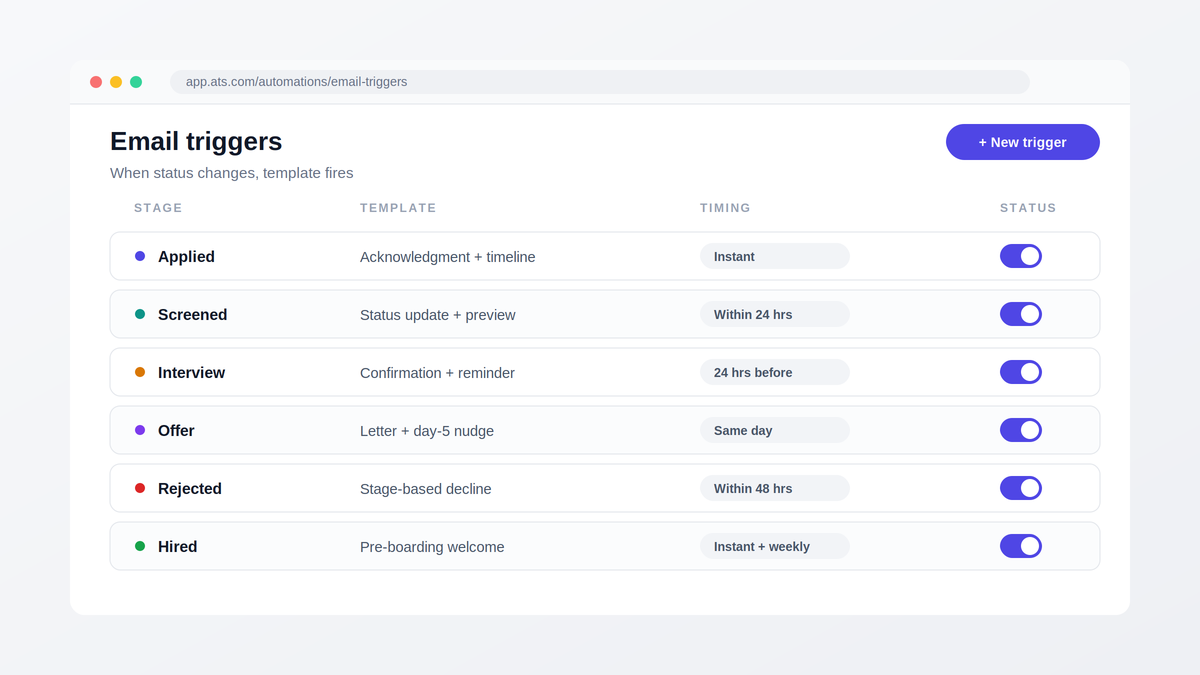
Before writing a single template, the pipeline itself needs clean stage definitions inside your applicant tracking system, because recruitment email templates by pipeline stage are only as reliable as the status changes that fire them. Modern workflow automation software builds automated email triggers on a simple rule: when a candidate’s status changes to X, send template Y after delay Z. If recruiters use stages inconsistently, some marking “screened” after a resume review, others after a phone call the automation misfires.
Here is the full visual-style map for a standard six-stage funnel:
| Stage | Trigger | Template That Fires | Send Timing | Tone |
| Applied | Application submitted | Acknowledgment + timeline expectation | Instant | Warm, informative |
| Screened | Status → “Screened / Shortlisted” | Status update + next-step preview | Within 24 hrs | Encouraging, specific |
| Interview | Interview scheduled | Confirmation + logistics; reminder | Instant + 24 hrs before | Clear, practical |
| Offer | Status → “Offer” | Verbal recap → formal letter → nudge | Same day, day 2, day 5 | Enthusiastic, personal |
| Rejected | Status → “Rejected” | Stage-appropriate decline | Within 48 hrs of decision | Respectful, human |
| Hired | Offer accepted | Welcome + pre-boarding sequence | Instant + weekly | Celebratory, structured |
The table is the skeleton. The judgment calls live inside each stage.
Stage 1 Applied: Set Expectations in the First Five Minutes
The acknowledgment email is the most-opened message you will ever send a candidate, which makes it the most wasted real estate in recruiting. The generic version “We received your application” confirms delivery and nothing else. The high-performing version does three things in under 120 words: confirms receipt, states a concrete timeline (“you’ll hear from us within 5 business days either way”), and sets the channel (“all updates will come from this address”).
The phrase “either way” is doing heavy lifting. It commits you to closing the loop with rejected candidates, and it signals to strong candidates that your process is organized a real differentiator when they are comparing you against companies that go dark. This template should fire instantly on submission; any delay reads as disorganization.
Stage 2 Screened: The Update Most Teams Skip Entirely
Somewhere between application and interview sits the stage where the most candidates are lost and where deciding which email template to send at each hiring stage matters most, because most teams send nothing here at all. When a candidate passes resume screening, an automatic status email should tell them so and preview what’s next: “Your background is a strong match. Our team is finalizing the interview shortlist this week; expect scheduling details by Friday.”
The tone here is encouraging but not committal; you are keeping candidates warm without promising an interview. For teams running AI resume screening, this email can fire the moment the shortlisting algorithm moves a candidate forward, which means top applicants get positive signals within hours of applying rather than weeks. That speed alone is a competitive weapon: the best candidates are off the market in about 10 days.
Candidates screened out at this stage get the rejection template (covered below) not silence.
Stage 3 Interview: Where AI Interview Scheduling Removes the Ping-Pong
Coordinating a single interview by email averages 5–8 back-and-forth messages and 1–3 days of elapsed time. AI interview scheduling collapses that to one email containing a live booking link synced to interviewer calendars; the candidate picks a slot and confirmation fires instantly. For teams also running an AI interviewer for first-round screens, the invitation can include an on-demand link the candidate completes on their own schedule removing coordination entirely from round one.
Two templates matter here, and both should be automated:
The confirmation email fires the moment a slot is booked. It must contain everything a candidate needs in one place: date and time with timezone, format and link (or address and parking), interviewer names and roles, expected duration, and any prep materials. Practical completeness is the tone candidates rate “I knew exactly what to expect” among the strongest drivers of positive candidate experience scores.
The reminder email is one of the highest-ROI interview reminders you can automate fires 24 hours before the slot with a shortened restatement of logistics and a one-click reschedule link. The reschedule link is counterintuitive but critical: making it easy to move an interview converts would-be no-shows into rescheduled conversations. Teams that add the 24-hour reminder typically cut no-shows by half.
On timing more broadly, the data on the best time to send interview confirmation emails is consistent: send the confirmation instantly on booking (delays create doubt the booking worked), and send reminders mid-morning local time, when open rates peak.
Stage 4 Offer: A Three-Email Sequence, Not a Single Letter
The offer stage is the only place in the funnel where under-automation and over-automation both fail. A fully robotic offer reads as cheap exactly when the candidate is deciding whether you value them; a purely manual process introduces the fatal delays described earlier.
The working pattern is a three-part sequence with human checkpoints:
- Same-day verbal recap (semi-automated draft, personalized by the recruiter): congratulations, headline terms, and the promise of the formal letter within 48 hours.
- Formal offer letter (template-generated, human-reviewed): full compensation, benefits, start date, and a clear acceptance deadline 5 business days is standard and keeps momentum without pressure.
- Day-5 nudge (automated, warm): a short check-in offering a call to discuss questions, triggered only if the offer remains unsigned.
Tone across all three: enthusiastic and personal. This is the one stage where templates should feel least like templates merge fields for role, manager name, and a specific line about why the team was impressed. Measured well, this sequence is where your offer acceptance rate is won or lost; teams that compress verbal-to-letter time from a week to 48 hours routinely see acceptance climb 10–15 percentage points.
Stage 5 Rejected: The Template That Determines Your Reputation
Rejection emails carry open rates of 70%+ candidates want closure which means this is the template your employer brand is most often judged by. The rules: send within 48 hours of the decision, never on Friday evening, and calibrate depth to the stage reached. An applicant screened out on resume review gets a brief, kind, no-feedback note. A candidate who completed two interview rounds gets a longer message, ideally with one concrete piece of feedback and an explicit invitation to apply for future roles.
That invitation is not a platitude if your system backs it. Rejected-but-strong candidates flagged into a silver-medalist pool become your cheapest future hires; teams that re-engage this pool fill 10–20% of subsequent roles from it at near-zero sourcing cost.
Stage 6 Hired: The Sequence That Prevents First-Day Ghosting
Signed offers still fall through renege rates in competitive markets run 5–10%, concentrated in the gap between signing and day one. A pre-boarding email sequence closes that gap: an immediate welcome email, a week-out logistics email (start time, equipment, first-day agenda), and a two-days-out note from the hiring manager. All three can fire automatically off the start date field, with only the manager note requiring a personal touch.
How to A/B Test Recruiting Email Subject Lines
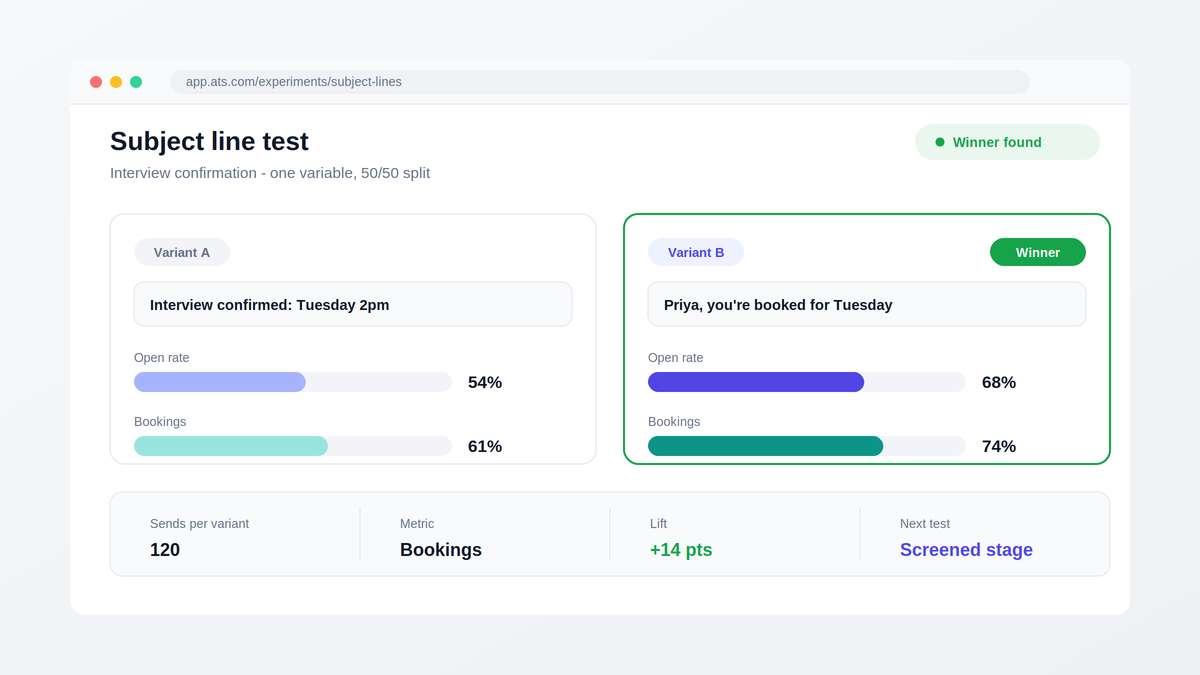
Templates decay. A subject line that opened at 68% in January drifts down as candidates see the same pattern from every company, which is why learning how to A/B test recruiting email subject lines belongs in the map itself, not as an afterthought. The process:
- Pick one stage and one variable. Test subject lines only with the same body, same send time. Testing two variables at once tells you nothing.
- Write two variants with a real hypothesis. For example, interview confirmation: “Interview confirmed: [Role] at [Company], Tuesday 2pm” vs. “[FirstName], you’re booked here’s everything for Tuesday.” Hypothesis: logistics-forward vs. name-personalized.
- Split 50/50 at meaningful volume. You need roughly 100+ sends per variant for directional confidence; below that, run the test across multiple roles.
- Measure the metric that matters for that stage. Opens for acknowledgments and updates; reply/booking rate for interview invitations; signed-offer rate for offer nudges. Note that Apple Mail privacy inflates raw open rates, so compare variants against each other, not against absolute benchmarks.
- Promote the winner, archive the loser, log the result. Then test the next stage. One test per stage per quarter is a sustainable cadence for a small team.
Patterns that consistently win in recruiting specifically: 5–7 word subject lines, the candidate’s first name as a merge token, and the role title stated plainly. Patterns that consistently lose: “exciting opportunity,” all-caps urgency, and vague teasers that hide which company is writing.
Real-World Results: Two Teams That Mapped the Funnel
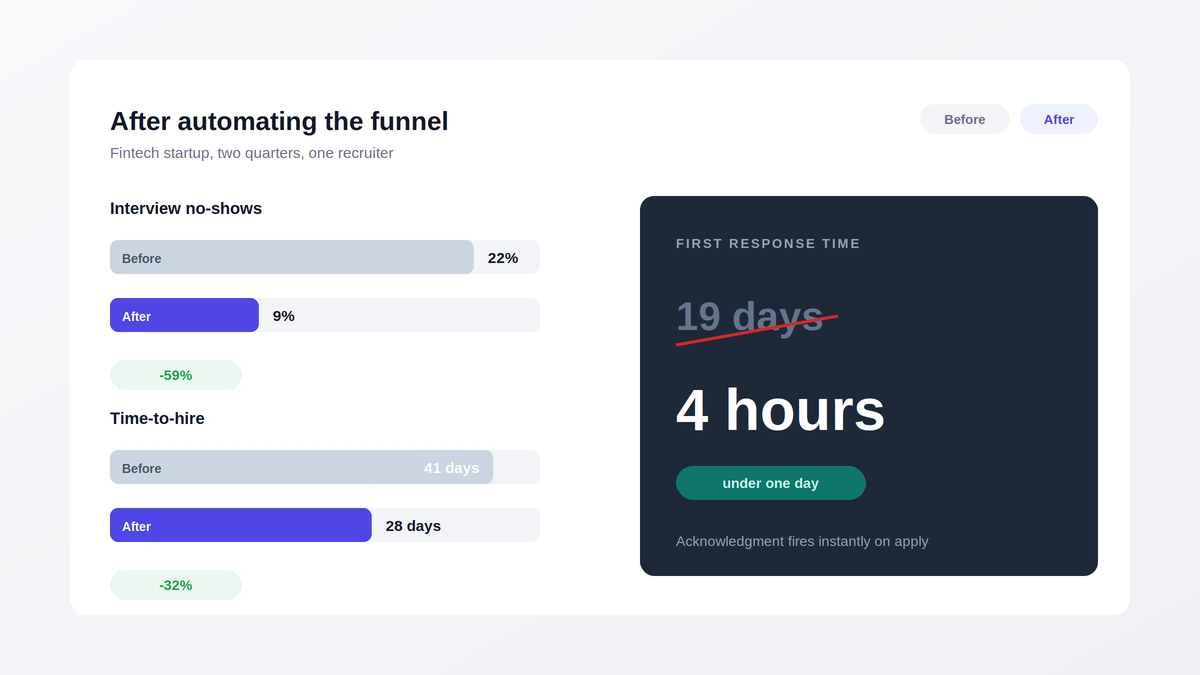
A 40-person fintech startup hiring 12 engineering and ops roles per quarter had one recruiter and a 19-day average gap between application and first contact. After mapping recruitment email templates by pipeline stage across all six statuses inside their ATS, first-response time dropped to under 4 hours, interview no-shows fell from 22% to 9% after the 24-hour reminder went live, and time-to-hire shrank from 41 to 28 days across two quarters.
A 15-location staffing-heavy retail SMB faced the opposite problem: 1,800 applications a month and a rejection backlog so large that 70% of applicants never heard back. Automating stage-based status and rejection emails cleared the backlog in one cycle; within four months, their reapplication rate from previously rejected candidates rose 3x, and Glassdoor interview-experience ratings climbed from 2.9 to 4.1.
Choosing the Tooling: A Decision Framework for Recruitment Status Update Software
The stage map is tool-agnostic, but execution is not and evaluating recruitment status update software for recruitment email templates by pipeline stage comes down to five capabilities, not feature-list length. Score any vendor, including a spreadsheet-plus-email-tool stack, against these:
| Criterion | What “Good” Looks Like | Why It Matters |
| Trigger granularity | Emails fire on any status change, with per-stage delay rules | The whole map depends on this primitive |
| Template + merge fields | Role, name, interviewer, dates auto-populate; branded sender domain | Personalization at volume without manual edits |
| Scheduling integration | Calendar-synced booking links inside emails | Removes the 5–8 message coordination loop |
| Analytics per template | Open, click, and reply rates by stage and variant | Without this, A/B testing is guesswork |
| Pipeline data hygiene | Single candidate record across stages, duplicate detection | Misfired emails almost always trace to dirty data |
That last row deserves emphasis, because strong Candidate Database management is the unglamorous foundation under everything else: if the same candidate exists as three records across three roles, your automation will send them three conflicting emails, and no template quality survives that. Centralized candidate records with real-time candidate tracking are prerequisites, not nice-to-haves.
On cost: standalone email automation tools run $50–150 per recruiter per month and still leave you stitching together scheduling and pipeline data. An integrated AI-powered ATS that bundles screening, scheduling, and stage-triggered email costs less than the stitched stack in most SMB scenarios and several, including Hirium, offer forever-free entry plans with flat pricing, which changes the evaluation from “can we afford tooling” to “which map do we build first.”
Migration friction is the other hidden cost line. If you are moving off an incumbent system, ask vendors directly whether migration is supported and free; how to automate candidate status update emails on a new platform matters far less if six months of candidate history gets stranded in the old one.
What Most Teams Get Wrong
The most common failure with recruitment email templates by pipeline stage is not bad templates, it is automating the wrong stages first. Teams instinctively automate outbound sourcing emails because that is where effort feels visible, while the acknowledgment, screening-update, and rejection emails with 60–90% open rates and direct brand impact stay manual and therefore unsent. Automate the funnel’s back half first. Sourcing can stay artisanal; status communication cannot.
The second failure is confusing automation with volume. A mapped funnel sends fewer total emails than a panicked manual process, because every message is load-bearing. If your sequence includes a “just checking in” email that carries no new information, delete it; recruiting-email data consistently shows that each follow-up must add something: a timeline, a decision, a next step or it trains candidates to ignore you.
Third: teams write templates in the company’s marketing voice instead of a recruiter’s voice. Candidates respond to emails that read like they came from a person with a name and a calendar, not a brand. Send from a real recruiter address, sign with a real name, and reserve polish for the offer letter.
Finally, almost no one closes the measurement loop. The template map gets built, launched, and never revisited, while recruitment analytics sit unread. The teams that outperform review stage-level email metrics monthly open rate by template, booking rate on invitations, acceptance rate on offers and treat every drop as a test hypothesis. The map is not a document; it is a system you tune.
Build the Map Before the Next Role Opens
The full template map six stages, roughly ten templates, trigger rules, and one A/B test per quarter takes a focused afternoon to build and configure in a modern ATS in under a week. The alternative is another hiring cycle where your best applicants hear from a competitor before they hear from you.
If you want to pressure-test your stage map against how 5,000+ startups and SMBs run theirs, start with the free funnel audit above, wire the six triggers into your system, and measure the first month of open and booking rates against your manual baseline. The gap is usually the entire business case.
Frequently Asked Questions
What emails should be sent at each stage of recruitment?
Six templates cover the standard map of recruitment email templates by pipeline stage: an instant application acknowledgment, a screening status update, an interview confirmation plus 24-hour reminder, a three-part offer sequence (verbal recap, formal letter, nudge), a stage-calibrated rejection, and a pre-boarding welcome series. Each fires automatically on a candidate status change, with only offer-stage messages requiring a human personalization pass.
How do you automate recruitment emails without sounding robotic?
Use merge fields beyond the first name role title, interviewer name, specific dates and send from a named recruiter address rather than a no-reply alias. Keep automated messages under 150 words, write them in first person, and reserve fully manual writing for the two moments candidates scrutinize most: post-interview rejections and offers.
What is a good open rate for recruitment emails?
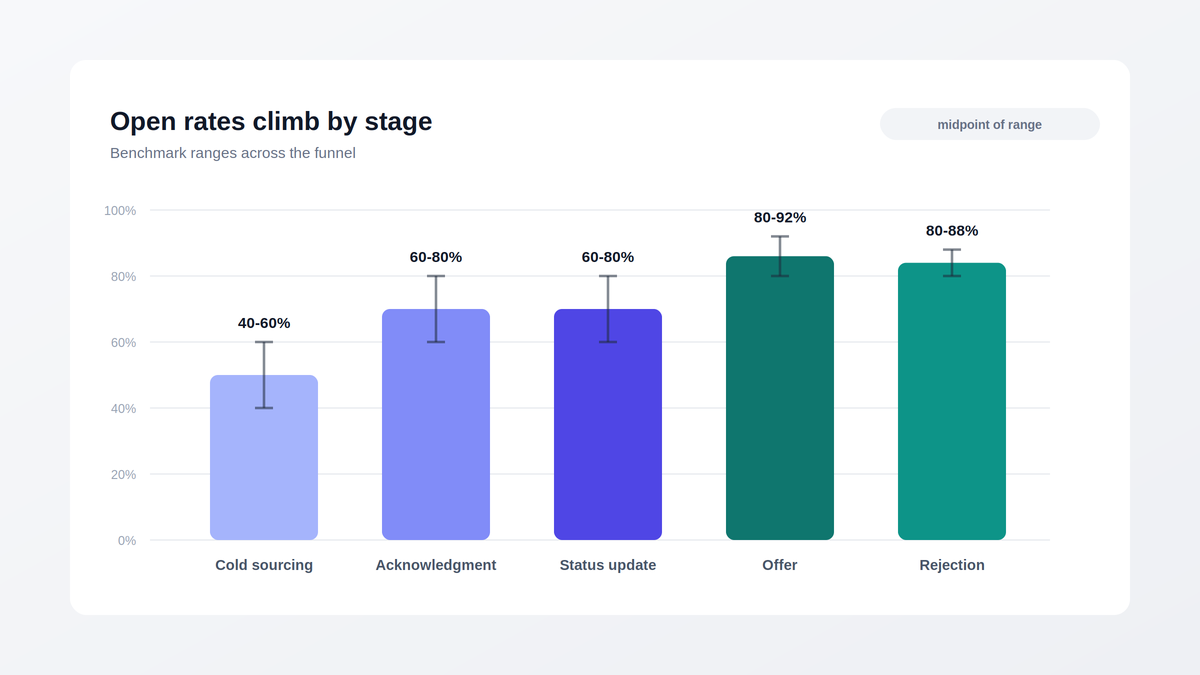
Benchmarks vary sharply by stage. Cold sourcing outreach averages 40–60% opens, application acknowledgments and status updates reach 60–80%, and offer or rejection emails often exceed 80% because candidates are awaiting a decision. Judge each template against its own stage benchmark and its own historical baseline, not against a single blended number.
How do you write a rejection email that protects your employer brand?
Send it within 48 hours of the decision, address the candidate by name, state the outcome plainly in the first two sentences, and scale warmth to investment brief and kind for resume-stage declines, feedback and a reapply invitation for finalists. Never use “unfortunately” as the opening word of the subject line, and never let rejections batch up for weeks.
Should recruitment emails be automated or personalized?
It is a false choice at every stage except the offer. Acknowledgments, updates, confirmations, reminders, and early-stage rejections should be fully automated with merge-field personalization, because speed beats hand-crafting there. Offers and final-round rejections warrant genuine human writing layered on a template skeleton. The practical rule: automate the trigger and timing everywhere; personalize the content where stakes peak.
How many follow-up emails should recruiters send to candidates?
For sourcing outreach, three to four touches spaced 3–6 days apart capture the large majority of eventual replies sequences that beat single sends by more than 2x. Inside an active pipeline, follow-ups should be event-driven rather than counted: one reminder before each interview, one nudge five days into an unsigned offer, one re-engagement when a matching role opens.
How do I know if my current process needs this, or if it’s overkill for my team size?
Run one diagnostic: pull ten random candidates from your last closed role and count the days between each of their status changes and the email (if any) they received about it. If more than two candidates have a gap over five days or received nothing at all the map will pay for itself on the next roll. Most platforms in this category, Hirium included, will run that funnel audit with you on a free plan before you commit to anything.