Workflow Automation Software Checklist: 12 Questions to Ask Before You Buy
At least 50% of automation and AI-driven software projects are abandoned after the proof-of-concept stage, not because the technology failed outright, but because of poor data quality, unclear business value, and requirements nobody pressure-tested before signing.
That failure pattern isn’t unique to large enterprise AI rollouts. It shows up just as often when a 30-person startup buys workflow automation software for recruiting, picks the vendor with the slickest demo, and discovers three months in that the tool can’t handle a multi-step approval chain or doesn’t integrate with the calendar system the team actually uses.
Most of these mismatches are preventable. They surface in a demo if you know which questions to ask, and most buyers don’t ask them, because the sales demo is designed to showcase strengths, not surface limitations.
A workflow automation software checklist exists to shift that dynamic: instead of reacting to what a vendor shows you, you’re directing the conversation toward what actually determines whether the tool works for your team six months from now.
This piece walks through 12 questions worth asking before you sign, covering trigger types, integration depth, customization limits, reporting, support, and pricing, plus the red flags that show up in demos when a vendor is dodging one of them.
It closes with a simple scoring framework so the answers turn into a comparable decision, not just a page of notes from separate demo calls.
What Is a Workflow Automation Software Checklist?
A workflow automation software checklist is a structured set of evaluation questions covering trigger logic, integrations, customization, reporting, support, and pricing used to compare automation vendors against actual operational requirements rather than demo polish. It shifts vendor selection from a feature comparison to a fit assessment.
The Core Problem: Most Evaluations Test the Wrong Thing
Most software evaluations focus on the feature list: does it have automated emails, does it have status triggers, does it have a dashboard?
That list rarely differentiates vendors, because nearly every workflow automation tool on the market claims all of it.
The real differentiation shows up in three places that a feature checklist doesn’t capture: how deep the automation logic actually goes before it breaks, how well the tool integrates with systems already in use, and what happens when a team’s process doesn’t match the vendor’s default workflow templates.
Teams that skip these questions typically discover the gap 60 to 90 days post-purchase, after data migration, after team training, and after the renewal clock has already started.
At that point, switching costs (re-migrating candidate records, retraining recruiters, rebuilding integrations) are high enough that many teams stay with an underperforming tool rather than restart the evaluation.
Most teams underestimate this risk by 3 to 4x, because a demo environment is built to succeed. Vendors populate demo data that flows cleanly through every automation trigger, a condition that rarely matches a live account with edge cases, incomplete records, and process exceptions.
There’s a structural reason this happens repeatedly: the person running the evaluation is usually not the person who will use the tool daily six months later.
A founder or HR lead often makes the purchasing decision based on a 30-minute demo, while the recruiter who inherits the day-to-day workflow discovers the gaps only after onboarding is complete.
A workflow automation software checklist closes that gap by forcing the evaluation to cover the operational details a demo skips past not because the vendor is being dishonest, but because a sales demo is optimized for breadth of features shown, not depth of any single one.
The cost of getting this wrong compounds. A tool that can’t handle conditional logic forces a recruiter back into manual status updates, which defeats the reason the software was purchased in the first place.
A reporting dashboard that can’t be filtered by source means nobody can tell which job boards are actually producing hires, so budget keeps flowing to channels nobody’s validated.
None of these are catastrophic on day one they accumulate quietly until someone asks why the “automation” tool still requires as much manual work as the spreadsheet it replaced.
The 12-Question Checklist
The questions below are grouped into six categories: trigger types, integration depth, customization limits, reporting, support, and pricing model. Each one is designed to surface a limitation before it becomes a live-account problem.
Trigger Types
1. What actually triggers an automated action: status changes only, or also time-based and conditional logic?
Basic tools trigger automation off a single event, like a status change from “Applied” to “Screened.” Stronger platforms support time-based triggers (send a reminder if no action in 3 days) and conditional logic (trigger only if a candidate also passed a knockout question). Ask the vendor to demo a multi-condition trigger live, not from a slide.
2. Can triggers chain into multi-step sequences, or does each automation run independently?
A single-step trigger “send email when status changes” is table stakes. What separates real workflow automation software is whether one trigger can kick off a sequence: update status, notify the hiring manager, schedule a follow-up reminder, and log the action, all from one event.
Consider a candidate who passes a screening call. In a single-step tool, that outcome requires three separate manual actions: update the status, email the hiring manager, and set a reminder to follow up if there’s no response in 48 hours. In a platform with true sequence chaining, one status update triggers all three automatically, which is the difference between automation that saves time and automation that just moves the same manual steps into a different interface.
Integration Depth
3. Which systems does it integrate with natively, and which require a third-party connector like Zapier?
Native integrations are maintained by the vendor and tend to be more reliable. Third-party-connector integrations add a dependency, a monthly cost, and a second point of failure.
Ask specifically about calendar tools (Google Calendar, Outlook), communication tools (Slack, email), and any HRIS or payroll system already in use.
4. Does the integration sync data in both directions, or only push one way?
A one-way integration (data flows out of the ATS into a calendar, for example) is common and often sufficient. But if a scheduling change made in the calendar tool needs to reflect back in the candidate record, one-way sync creates silent data drift that nobody notices until a candidate shows up to a canceled interview.
5. Is there a documented API, and what’s the realistic timeline for a custom integration?
For teams with a homegrown ATS extension or a specific HRIS requirement, an open, documented API matters more than the list of pre-built integrations. Ask for a realistic build timeline from the vendor’s own integration team, not a marketing estimate, and ask to speak with a customer who’s built a custom integration.
Integration depth also determines whether recruitment email templates and communication tools stay in sync with candidate status. If a rejection email template lives inside the ATS but the team’s actual outbound email runs through a separate tool without a synced integration, recruiters end up maintaining two records of the same conversation, which is exactly the duplicated effort automation is supposed to eliminate.
Customization Limits
6. Can workflow templates be modified, or are teams locked into the vendor’s default sequence?
Many platforms ship with a default hiring workflow (Applied → Screened → Interview → Offer → Hired) that works for a generic role but not for a multi-round technical process or a compliance-heavy regulated hire. Ask whether stages, approval chains, and automation rules can be restructured per role, not just relabeled.
7. How are exceptions handled? Can a recruiter override an automated action mid-sequence?
Reporting
8. What’s actually in the standard reporting dashboard versus what requires a custom report or add-on?
Time-to-hire and applicant volume are standard in nearly every tool. Source effectiveness, recruiter load balancing, and offer-acceptance-rate tracking are not always included in the base plan. Confirm which reports are native and which require an upgrade or a manual export.
9. Can reports be filtered by role, recruiter, and job board source simultaneously?
A report that shows overall time-to-hire is far less useful than one that shows time-to-hire by recruiter and by source, because that’s the level of detail that actually informs a hiring-process fix. Ask for a live filtered report during the demo, not a pre-built static one.
Support and Pricing
10. What’s the actual support model: email ticket, live chat, or a named account contact, and what are typical response times?
“24/7 support” on a pricing page can mean a chatbot that routes to a ticket queue with a 48-hour response window. Ask for the median first-response time and whether support is included at every pricing tier or only above a certain plan.
11. Is pricing flat, or does it scale with seats, candidate volume, or job postings, and are there hidden recruiter fees?
Some recruitment platforms charge per active job posting, others per recruiter seat, and some layer on a per-hire fee. Get the full pricing structure in writing, including what happens at renewal, before comparing sticker prices across vendors.
12. What does migration from a current tool actually involve, and who owns that work?
Confirm whether the vendor’s team handles data migration (candidate records, job history, candidate database management setup) or whether that falls on the internal team. Ask for a realistic migration timeline from a recent customer, not a vendor estimate.
Red Flags to Watch For in Demonstrations
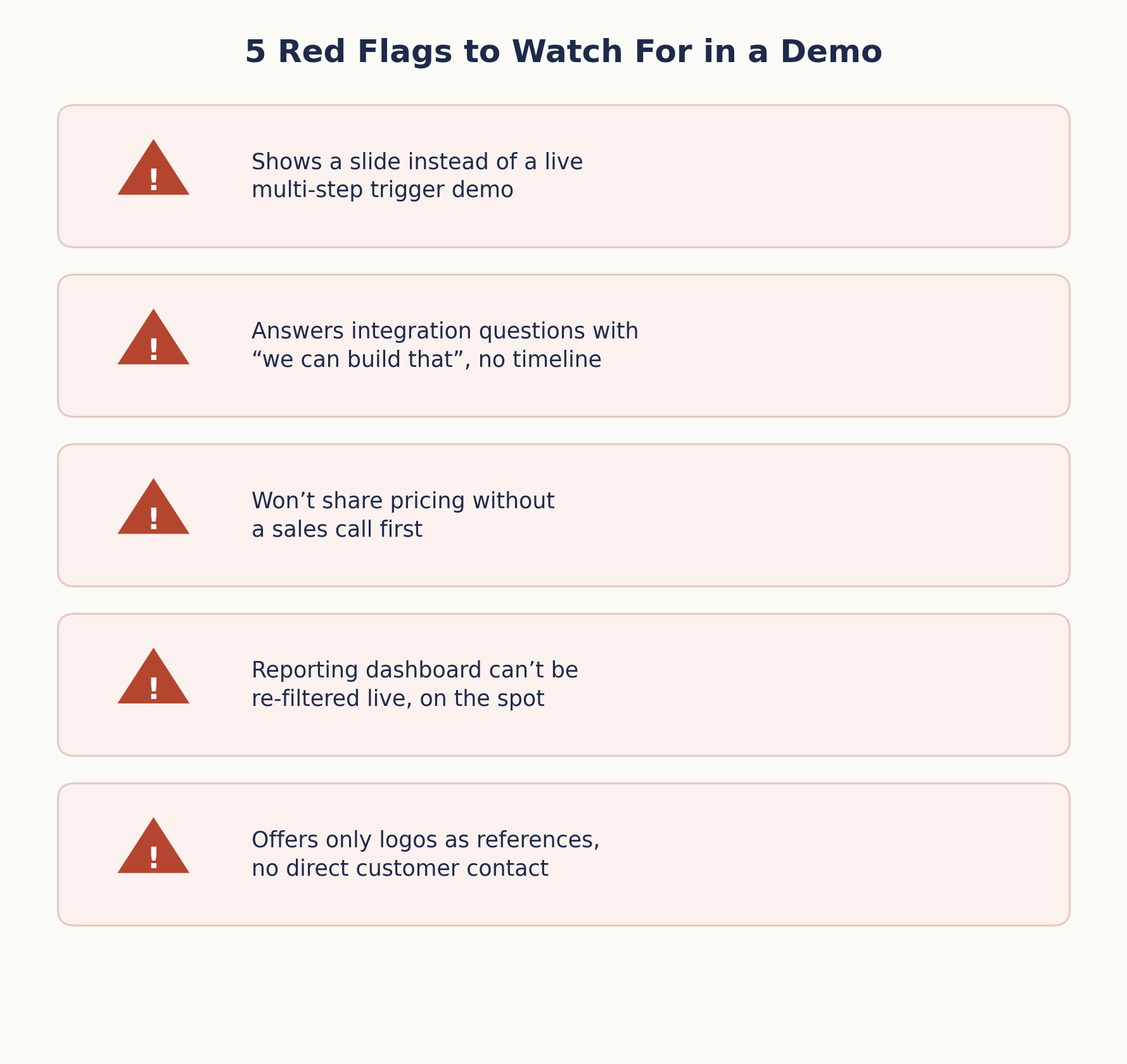
A few patterns consistently appear when a vendor avoids addressing a weakness directly. Recognizing these warning signs during a software demonstration can help teams identify limitations before committing to a purchase.
1. The Sales Representative Cannot Demonstrate a Live Multi-Step Trigger
If trigger chaining is a core capability, the sales representative should be able to demonstrate it during the presentation. Showing slides instead may indicate that the feature has limitations or requires additional configuration.
2. Every Integration Question Gets Answered With “We Can Build That”
Custom integration promises made during a sales conversation rarely include a committed timeline. Ask for the expected development timeframe, requirements, and costs in writing before treating the integration as a confirmed capability.
3. Pricing Is Unavailable Without a Sales Call
When a vendor will not provide even a general pricing range, ask how costs change with users, candidates, job postings, or additional features. Request the complete pricing structure before comparing competing platforms.
4. The Reporting Demonstration Uses Pre-Built Dashboards
If the sales representative cannot filter reports by recruiter, job role, or candidate source during the demonstration, the reporting system may have limited flexibility. Ask to see real-time filtering before evaluating its reporting capabilities.
5. References Are Limited to Website Logos
A vendor confident in its onboarding and customer support should be willing to provide a customer reference. If only company logos or written case studies are offered, ask why direct conversations are unavailable.
6. The Demonstration Skips Basic Functionality
A polished presentation of advanced artificial intelligence features means little if basic workflow requirements are not confirmed first. Ask the vendor to demonstrate essential processes using scenarios that match your team’s actual hiring workflow.
7. The Representative Cannot Explain What Happens to Your Data
Data portability and export terms are important questions during evaluation. Ask what happens to candidate records, documents, and workflow data after cancellation, including how long the vendor retains information.
What These Red Flags Tell You
None of these warning signs automatically disqualifies a vendor. However, several appearing during one demonstration may indicate that the sales process emphasizes presentation over practical functionality and real-world requirements.
Case Studies: What the Checklist Catches Before Signing
-
A 25-person edtech startup
Evaluating two ATS platforms for AI interview scheduling used a version of this checklist during demos. One vendor’s scheduling automation only handled single-interviewer bookings; the checklist question on multi-step trigger chaining surfaced this before contract signing, saving the team from discovering it mid-implementation with a panel-heavy interview process already underway.
-
A 90-person logistics company
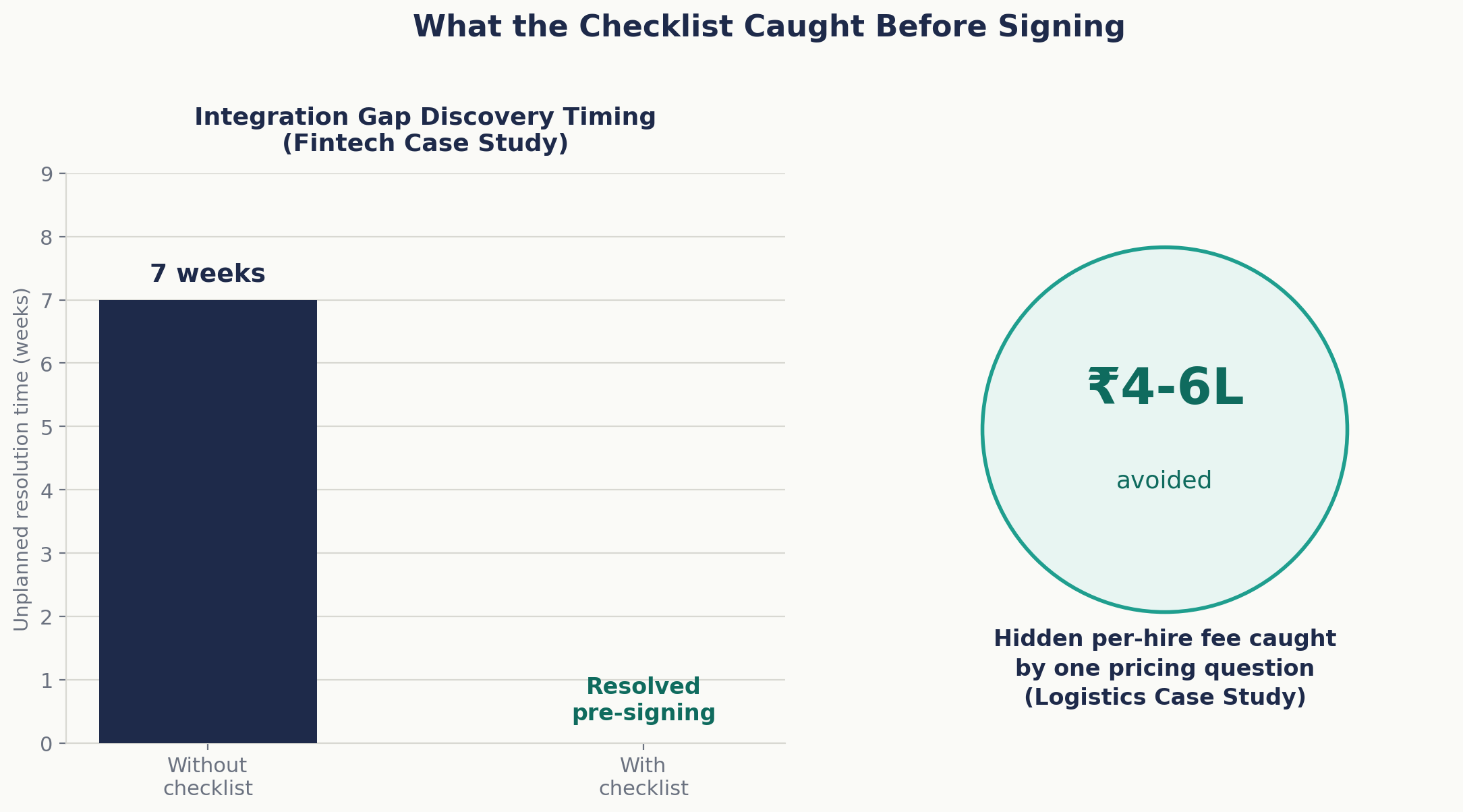
Switching from a spreadsheet-based process to dedicated job posting software asked the pricing-model question directly during evaluation and found that one finalist charged a hidden per-hire fee not listed on the public pricing page. That single question changed their vendor choice and avoided an estimated ₹4-6 lakh in unbudgeted annual fees.
-
A 45-person fintech company
Built its own version of a workflow automation software checklist after a prior tool purchase stalled during implementation over an undocumented integration gap with its payroll system.
Running the same 12 questions against three finalist vendors during the next evaluation cut the shortlist from three to one within a single round of demos, and the integration that previously took an unplanned 7 weeks to resolve was scoped and confirmed working before the contract was signed.
Decision Framework: Scoring Vendors Against the Checklist
A simple scoring approach works better than a gut-feel comparison after multiple demos start to blur together.
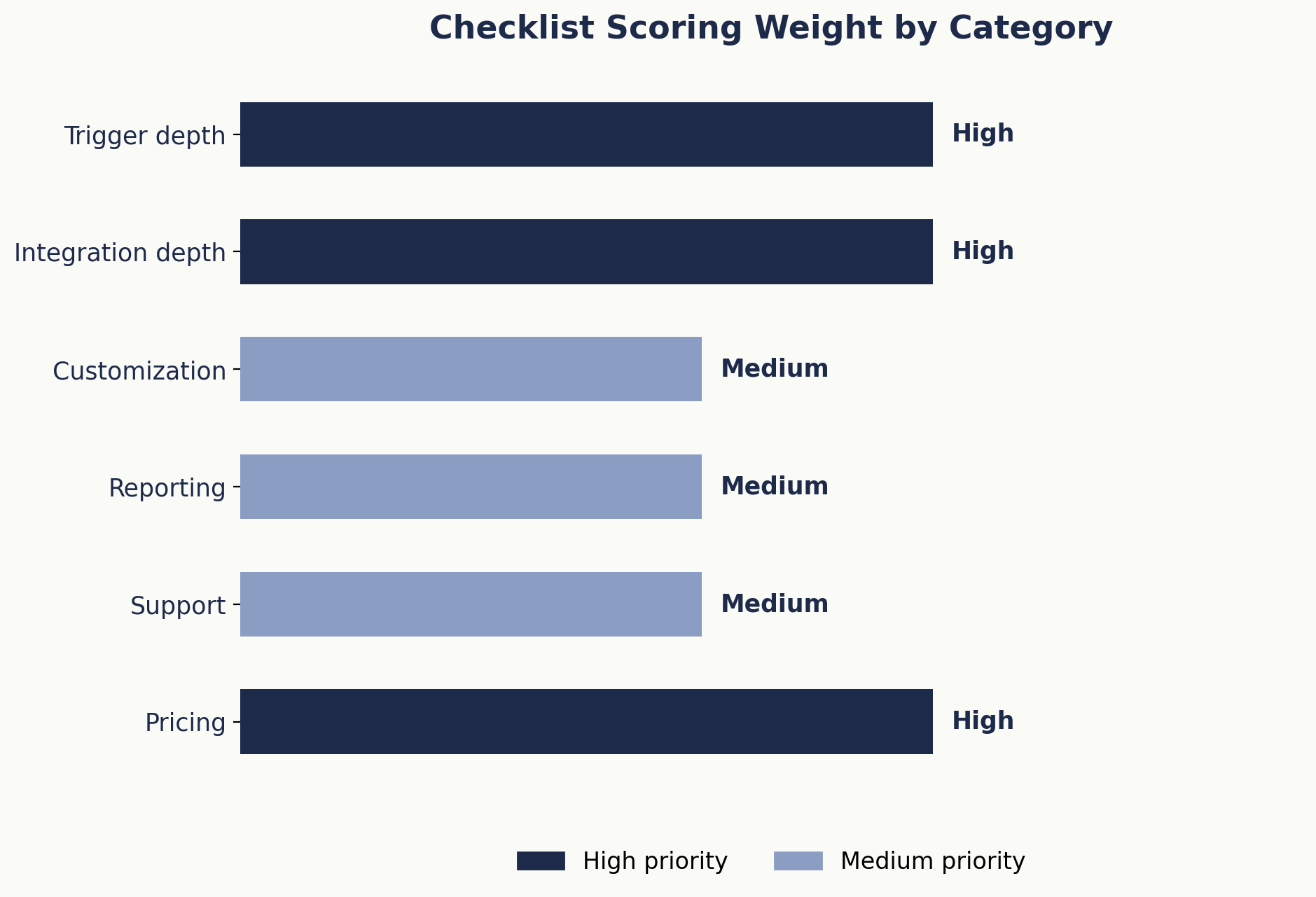
| Category | What to Score | Weight for Most Startups/SMBs |
| Trigger depth | Multi-step, conditional logic demoed live | High |
| Integration depth | Native integrations with tools already in use | High |
| Customization | Workflow templates editable per role | Medium |
| Reporting | Filterable by recruiter, source, role | Medium |
| Support | Documented response time, tier included | Medium |
| Pricing | Flat, transparent, no hidden per-hire fees | High |
Score each finalist 1 to 5 per category, weight the high-priority rows double, and total it.
This turns a subjective “which demo felt better” decision into a comparable number across vendors, and it’s worth doing even when only evaluating two options, because it forces the same 12 questions to get asked of both.
The weighting matters more than the raw score. A vendor that scores a 5 on reporting but a 2 on integration depth might still lose to a vendor with the reverse profile, if the team’s actual bottleneck is disconnected systems rather than reporting gaps.
Before scoring any vendor, it’s worth ranking the six categories by which one, if it failed, would cause the most operational pain in the first 90 days; that ranking should drive the weighting, not a generic default.
How Does Hirium Score on This Checklist?
Since this checklist applies to any workflow automation vendor, it’s worth noting where Hirium lands against its own framework: native integrations across calendar and communication tools without third-party connector fees, per-role workflow customization rather than a fixed default sequence, filterable reporting across recruiter and source, and flat pricing with no per-hire recruiter fees.
The free plan lets a team run this exact 12-question test against a live account before committing to anything.
What Most Teams Get Wrong
Most buying teams treat the demo as the evaluation. It shouldn’t be. A demo shows what a vendor wants to show, in an environment built to make every feature succeed. The actual evaluation happens when you ask a question the demo wasn’t scripted to answer.
The second mistake is evaluating workflow automation software the same way regardless of team size.
A 15-person startup with one recruiter has fundamentally different integration and reporting needs than a 150-person company running parallel hiring pipelines across departments, yet many teams use the same generic checklist for both, weighting features that don’t actually matter at their current scale.
The third, and most expensive, mistake: not asking about migration until after signing.
Data migration complexity is one of the highest hidden costs in switching ATS or automation platforms, and it’s rarely discussed until implementation kickoff, by which point the contract is already signed and the leverage to negotiate migration support is gone.
A fourth pattern worth naming: teams often score vendors on how many total features are listed rather than how deep the features they’ll actually use go.
A platform with 40 shallow features and one with 15 deep ones can look identical on a comparison spreadsheet, but only one of them will still be doing useful work for the team a year in.
A workflow automation software checklist built around actual daily workflows, rather than a feature-count comparison, catches this before it becomes a wasted contract year.
FAQ
1. What questions should I ask before buying workflow automation software?
Focus on trigger depth (single-step versus multi-step, conditional logic), integration depth (native versus third-party connectors), customization limits (editable workflows versus fixed templates), reporting flexibility, support response times, and full pricing structure including hidden fees. All twelve are covered in the checklist above, grouped by these six categories, and each is designed to be askable during a live demo rather than requiring a formal written proposal.
2. What are common red flags in a workflow automation software demo?
Watch for reps who show slides instead of live multi-step triggers, vague “we can build that” answers to integration questions without a written timeline, pricing that’s withheld until a sales call, and reporting demos that can’t be re-filtered live. Each of these usually signals a real limitation the vendor would rather not detail upfront, and pushing past the first deflection often reveals more than the initial answer did.
3. How much should workflow automation software cost for a small hiring team?
Pricing varies widely by vendor and model; some charge per recruiter seat, others per job posting or per hire. Rather than comparing sticker prices directly, get the full pricing structure in writing, including renewal terms and any per-hire fees, since two similarly priced tools can have very different total costs at scale.
4. What’s the difference between trigger-based and conditional automation?
Trigger-based automation fires off a single event, like a status change. Conditional automation adds logic on top firing only if multiple conditions are met, such as a status change combined with a passed screening question. Conditional logic is what enables more sophisticated workflows like multi-step approval chains.
5. How long does workflow automation software implementation typically take?
For a small hiring team migrating existing candidate data and job history, realistic implementation timelines run 2 to 6 weeks depending on data volume and integration complexity. Vendor-quoted timelines are often optimistic; asking for a recent customer’s actual timeline, not a sales estimate, gives a more reliable number.
6. Should candidate database management be part of the automation evaluation, or a separate decision?
It should be part of the same evaluation. Automation triggers and candidate database structure are tightly linked; how candidates are tagged, searched, and re-engaged determines which automations are even possible, so evaluating them separately risks choosing tools that don’t work well together.
7. Do I need a written RFP, or is a structured checklist enough for a small team?
For teams under roughly 100 employees, a structured checklist run consistently across 2 to 3 vendor demos usually provides enough comparative data without the overhead of a formal RFP process. Larger organizations with procurement requirements or compliance obligations typically need the more formal process.
8. How is a workflow automation software checklist different from a general software RFP?
An RFP is typically a broad, formal document covering security, compliance, and vendor viability alongside product fit, useful for larger, regulated purchases. A workflow automation software checklist is narrower and more tactical: it’s built to be run live during a demo, question by question, and produces a comparable score across vendors without the multi-week turnaround an RFP process usually requires.
Before You Sign
None of these 12 questions require a formal RFP process or procurement team; they’re demo questions any hiring manager or founder can ask directly, and the answers (or the dodges) tell you most of what a feature list won’t.
Keep the scoring table alongside the checklist during every demo call, fill it in immediately afterward while details are fresh, and resist the urge to decide based on how polished the presentation felt rather than how the vendor answered the harder questions.
If you’re comparing workflow automation platforms and want to run this checklist against a live account rather than a scripted demo, Hirium plan is built for exactly that kind of side-by-side test, with no credit card required to start.