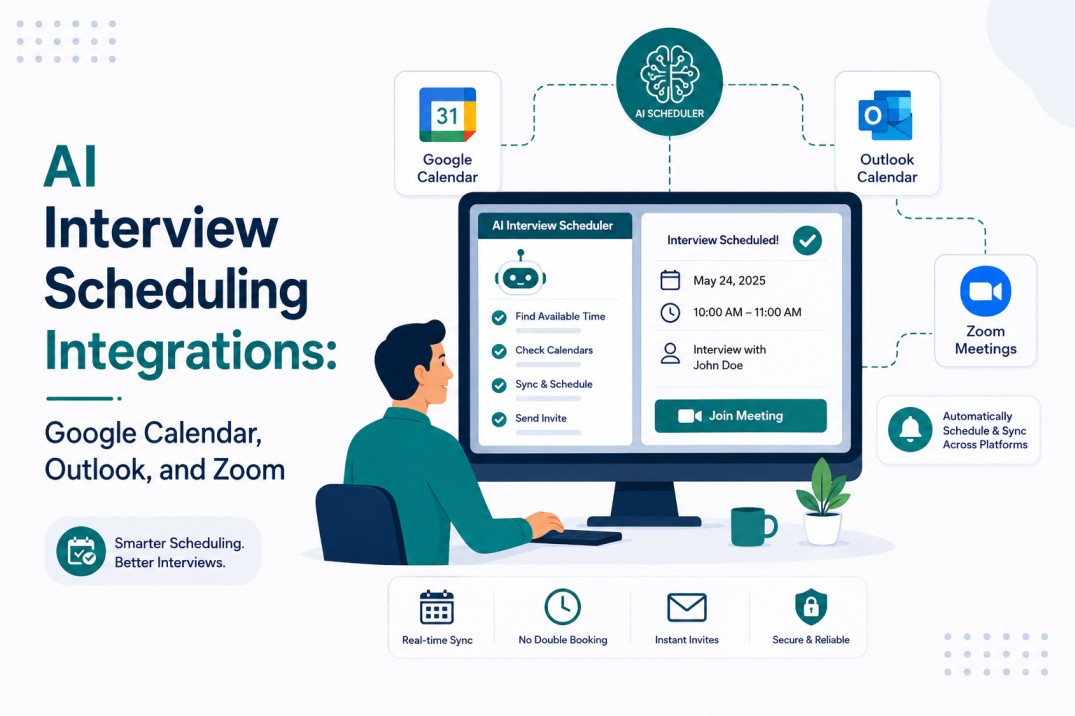
AI Interview Scheduling Integrations: Google Calendar, Outlook, and Zoom
Scheduling interviews can become a time-consuming task when recruiters have to coordinate candidates, hiring managers, interview panels, calendars, and video meetings separately.
Even a simple interview can involve checking multiple calendars, finding a suitable time, creating a meeting link, sending an invitation, and following up with reminders.
A January 2026 industry report found that recruiters spend 38% of their working time scheduling interviews, more than they spend screening resumes or running the interviews themselves
Most recruiting teams already use tools such as Google Calendar, Microsoft Outlook, Zoom, and an applicant tracking system (ATS).
The challenge is making these tools work together without creating extra manual work.
AI interview scheduling integrations connect these systems so recruiters can check availability, schedule interviews, generate meeting links, and send updates from a more organized workflow.
This becomes especially useful for growing teams handling multiple roles and interview rounds at the same time. Instead of moving between different platforms for every interview, recruiters can automate repetitive scheduling tasks while keeping the hiring process organized.
In this guide, we’ll explain how Google Calendar, Outlook, and Zoom integrations work with AI interview scheduling, how to prevent double-bookings and scheduling conflicts, common integration issues to watch for, and the steps you can follow to set up an efficient interview scheduling workflow.
What Are AI Interview Scheduling Integrations?
AI interview scheduling integrations are the automated connections between an applicant tracking system and the calendar and video tools recruiters already use, typically Google Calendar, Microsoft Outlook, and Zoom.
They read interviewer availability, book time slots, generate video links, and send confirmations and reminders without a recruiter manually checking each calendar or copy-pasting a Zoom link into an email.
The Core Problem: Why Manual Scheduling Breaks Down at Scale
The math gets ugly fast once a company is hiring for more than two or three roles at once.
A single interview can require checking the availability of a candidate, a hiring manager, and two or three panel members across different time zones. If even one of those calendars isn’t connected to the scheduling tool, the process reverts to email threads.
Most teams underestimate how much this compounds.
A recruiter juggling 20 open requisitions with three interview rounds each is coordinating roughly 60 separate scheduling events in a single hiring cycle, and industry data shows a single interview alone can take 30 minutes to 2 hours to lock in when it’s handled manually.
At that rate, a mid-sized hiring push consumes 30 – 40 hours of pure coordination time per month, time that isn’t spent talking to candidates or improving the process.
The failure points are predictable:
- Disconnected calendars. A hiring manager’s Outlook calendar isn’t synced to the ATS, so the system books over an existing meeting.
- No single source of truth for video links. Zoom links get generated manually and pasted into three different emails, and one of them is wrong.
- Time zone mismatches. A candidate in a different region confirms a slot that reads correctly on their end but lands at 11 p.m. for the interviewer.
- Silent sync failures. A calendar integration token expires, and nobody notices until a candidate shows up to an empty meeting room.
None of these failure points are exotic.
They’re the predictable result of stitching together tools that were never designed to share state in real time. Google Calendar wasn’t built to know that a Zoom link needs to be regenerated when a candidate reschedules.
Outlook wasn’t built to understand that an ATS considers a slot “tentatively held” versus “confirmed.” Zoom wasn’t built to check whether the meeting it just created duplicates one that already exists.
Each tool does its own job well; none of them was built to coordinate hiring workflows on its own, which is precisely the gap AI interview scheduling integrations are meant to close.
The teams that feel this most acutely are the ones hiring across multiple functions at once engineering, sales, and operations roles running in parallel, each with a different panel of interviewers and a different set of scheduling constraints.
A recruiter supporting three hiring managers simultaneously is effectively running three separate scheduling processes by hand unless the underlying systems are connected, and the coordination overhead scales roughly linearly with every additional open role.
Each of these is a candidate database management and process design problem as much as a technical one; the fix isn’t just “buy scheduling software,” it’s connecting the tools correctly and building in checks for when a sync fails quietly instead of loudly.
There’s also a candidate experience cost that rarely shows up in internal metrics but shows up in offer acceptance rates.
A candidate who receives a wrong Zoom link, or who confirms a slot that later gets silently moved, forms an early impression of the company’s operational discipline before they’ve even had the interview.
For startups and SMBs competing against larger employers on culture and speed rather than brand recognition, a clean scheduling experience is one of the few parts of the process a candidate directly feels.
Poorly connected AI interview scheduling integrations don’t just cost recruiter hours they cost first impressions at exactly the moment a company is trying to make a strong one.
Building the Integration Stack: A Deep Dive
Getting Google Calendar integration, Outlook calendar integration, and Zoom working together inside an ATS is mostly a permissions and process exercise, not a heavy engineering lift.
Step-by-Step: Connecting Calendars and Video Tools
1. Authenticate the ATS against the calendar provider
For Google Workspace, this means an OAuth connection scoped to calendar read/write access for each interviewer, not just the recruiting team’s own calendar.
For Microsoft 365 environments, the equivalent is a Microsoft Graph API connection through Outlook, which needs admin consent at the tenant level for anything beyond individual opt-in.
2. Grant free/busy visibility, not full calendar access
Interviewers should not have to expose meeting titles or attendee lists to the scheduling tool; only free/busy status is enough for the system to find open slots.
Over-requesting permissions is a common reason IT teams reject a scheduling tool at the security review stage.
3. Connect the video conferencing layer
Zoom’s API integration should be configured to auto-generate a unique meeting link per interview, tied to the specific calendar event, rather than reusing a static personal meeting room link. Static links are a recurring source of confusion when two interviews land close together.
4. Map interviewer roles inside the ATS
Panel members, hiring managers, and recruiters need distinct permission levels so the system knows whose availability is mandatory versus optional when it’s assembling a slot.
5. Test the full loop before go-live
Book a dummy interview end-to-end: calendar hold, Zoom link generation, candidate confirmation email, and reminder trigger before rolling the integration out across a live requisition.
6. Document the fallback process
Even a well-configured stack occasionally needs manual intervention: a last-minute panel change, a candidate in an unusual time zone.
Write down who owns manual overrides and how they’re logged, so a one-off exception doesn’t turn into a permanent workaround that quietly breaks the automation for everyone else.
Teams that skip the documentation step in particular tend to see the integration erode over a few months, as one-off manual fixes accumulate into a parallel, undocumented process that nobody fully owns.
Common Sync Errors and How to Fix Them
Even a correctly configured stack breaks occasionally. The most frequent issues, and the fixes that actually resolve them:
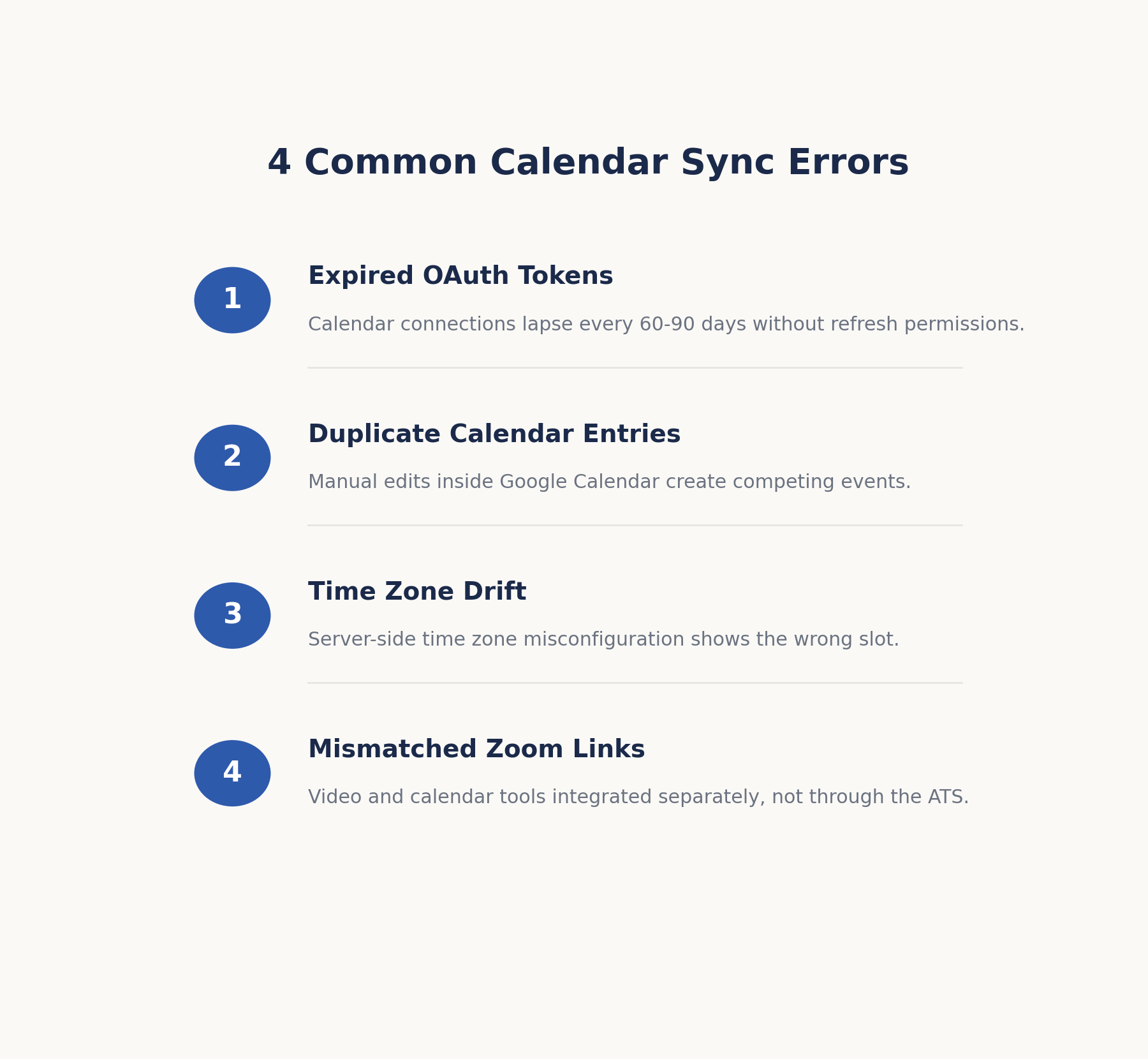
- Expired OAuth tokens. Calendar connections typically expire every 60–90 days if refresh permissions weren’t granted correctly. The fix is enabling silent token refresh at setup, plus a monthly audit of connected accounts.
- Duplicate calendar entries. This usually happens when a recruiter reschedules manually inside Google Calendar instead of through the ATS, creating two competing events. The rule that prevents it: all schedule changes go through the ATS, never directly in the calendar.
- Time zone drift. Interviews booked across regions sometimes display correctly in the ATS but incorrectly in the calendar invite. This is almost always a server time zone misconfiguration on the ATS side and is fixed by setting the account-level time zone explicitly rather than relying on browser detection.
- Zoom links that don’t match the calendar invite. This happens when the video tool and calendar tool are integrated separately rather than both routed through the ATS as the single source of truth.
How Automated Reminders Trigger Across Tools?
Once an interview is confirmed, reminder logic should fire from the ATS, not from the calendar or Zoom independently, so every party gets a consistent message.
A well-built workflow automation software setup typically triggers a confirmation email immediately on booking, a 24-hour reminder to both candidate and interviewer, and a same-day reminder with the direct video link 30–60 minutes before start time.
This is also where recruitment email templates matter: a reminder that looks like an afterthought reads as unprofessional to candidates evaluating the company at the same time the company is evaluating them.
Cost Implications of Getting AI Interview Scheduling Right
The cost of implementing AI interview scheduling depends on the ATS, the number of interviewers, the integrations you need, and the level of automation your recruiting team requires.
Some ATS platforms include interview scheduling features within their existing plans, while others may charge separately for advanced features or integrations.
The initial setup usually involves connecting calendars, configuring permissions, mapping interviewer availability, integrating Zoom, and testing the complete scheduling workflow.
The time required can vary depending on the size of the hiring team and the organization’s IT or security requirements.
However, the higher cost to consider is the time spent on manual scheduling.
When recruiters regularly move between calendars, emails, and video platforms to coordinate interviews, those repetitive tasks can take time away from candidate communication and other important hiring activities.
Automating these steps can help recruiting teams use their time more efficiently while keeping the scheduling process organized.
-
Compliance and Data-Handling Considerations
Calendar integrations involve access to scheduling information, so security and data handling should be considered before connecting them to an ATS.
Start by checking what permissions the integration requires and whether the scheduling system can work with free/busy availability instead of accessing unnecessary calendar details.
It is also important to understand how the platform handles authentication tokens, who can access scheduling information, and how long candidate and interview data is retained.
Organizations should also have a clear process for removing access when an interviewer leaves the company or changes roles.
For teams working in regulated industries, these checks should be part of the normal vendor and security review process.
Reviewing permissions, data retention, access controls, and integration security before implementation can help reduce unnecessary data exposure and make the scheduling workflow easier to manage.
Quick-Start Setup Checklist
Before using AI interview scheduling with live candidates, make sure your setup covers these key steps:
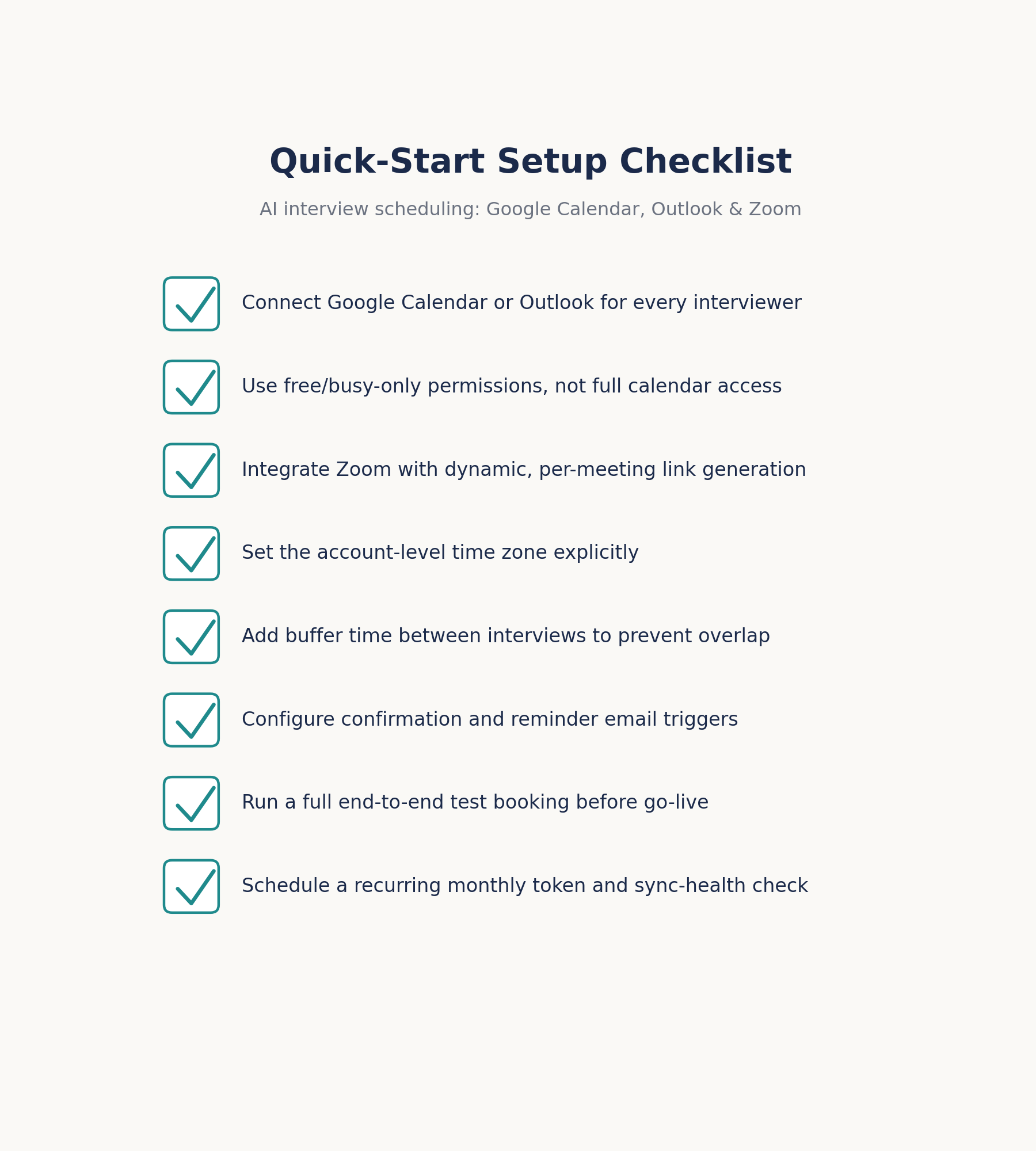
- Connect Google Calendar or Outlook for every required interviewer.
- Use the minimum calendar permissions needed to check availability.
- Integrate Zoom so each interview can receive the correct meeting link.
- Set the correct account and interviewer time zones.
- Add buffer time between interviews to reduce scheduling conflicts.
- Configure confirmation and reminder emails for candidates and interviewers.
- Test the complete workflow with a dummy interview before going live.
- Check calendar connections regularly and resolve authentication or sync issues promptly.
Case Study: Fixing Scheduling at Scale
As hiring teams grow, interview scheduling can become difficult to manage when recruiters have to coordinate multiple interviewers, calendars, and video meetings manually.
A connected scheduling workflow can reduce this complexity by bringing these tasks into one organized process.
For example, a growing SaaS company hiring across several departments may face recurring scheduling conflicts when hiring managers and interview panel members have separate calendars.
Connecting their Outlook calendars to the ATS can give recruiters a clearer view of interviewer availability, while automated Zoom meeting creation can remove the need to create and share meeting links manually.
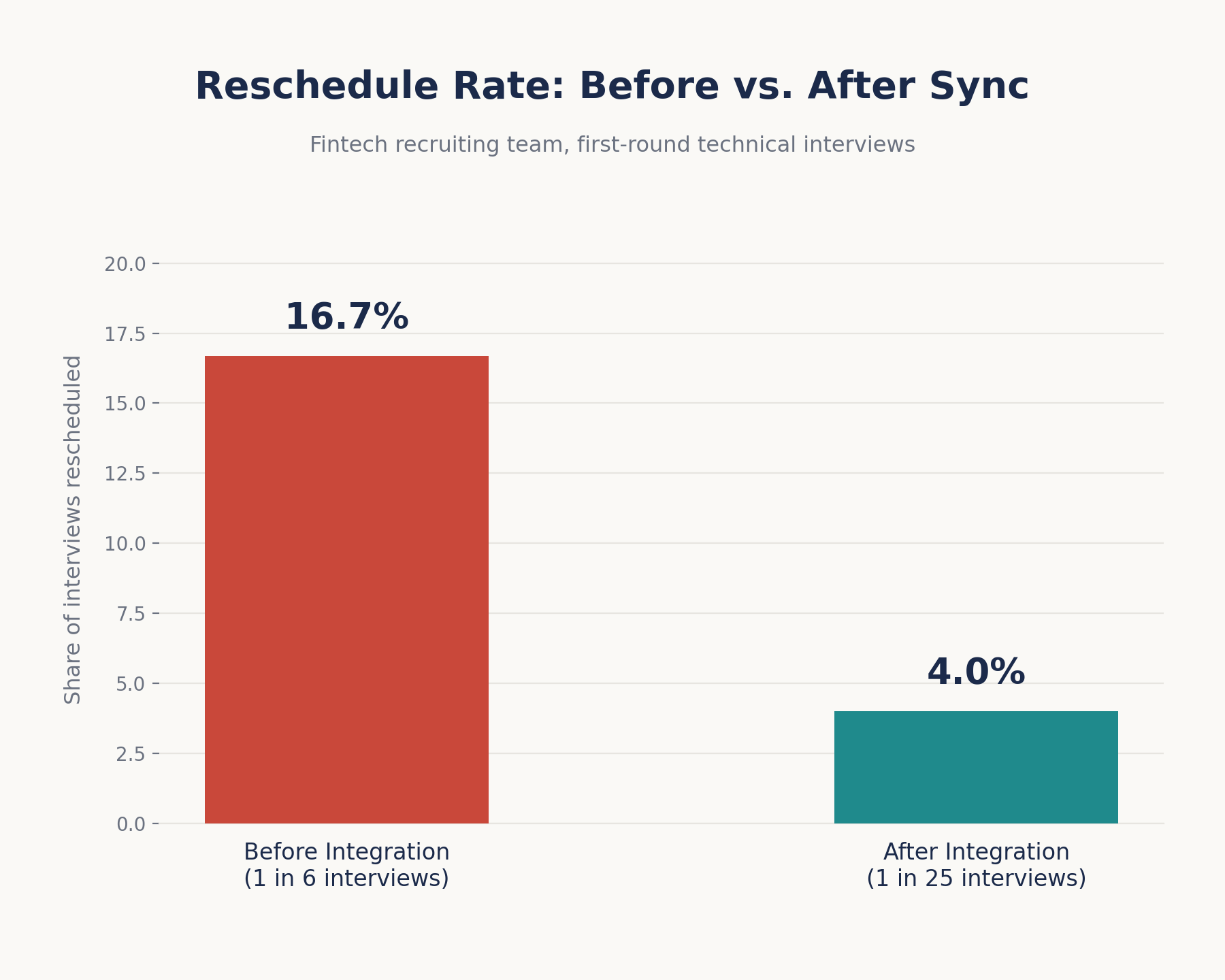
A similar challenge can occur in high-volume technical hiring, where several interviews need to be scheduled each day.
Syncing interviewer calendars, adding buffer time between meetings, and managing rescheduling through the ATS can help reduce calendar conflicts and make the process easier for recruiters to manage.
These examples highlight an important point: interview scheduling challenges are not always caused by a lack of recruiting resources.
In many cases, they come from disconnected systems and repetitive manual processes.
When the ATS, calendar, and video conferencing tools work together, recruiters can spend less time coordinating schedules and more time focusing on candidates and the overall hiring process.
Comparison: Choosing the Right Integration Approach
| Approach | Setup Effort | Double-Booking Risk | Best Fit |
| Manual calendar + email scheduling | Low upfront, high ongoing | High | Very early-stage teams hiring under 5 roles/year |
| Standalone scheduling tool (not ATS-native) | Medium | Medium sync gaps between tools | Teams that already have a mature ATS and just need scheduling |
| ATS-native scheduling with calendar + Zoom integration | Medium upfront, low ongoing | Low | Startups and SMBs scaling hiring across multiple roles |
| Fully custom API-built scheduling layer | High | Low, if maintained | Larger organizations with dedicated engineering support |
For most startups and SMBs, an ATS with native interview scheduling software built in rather than a separate scheduling point solution bolted onto the ATS removes an entire category of sync failures, because there’s only one system of record instead of two systems trying to stay in agreement.
The decision often comes down to how many tools a recruiting team is willing to maintain long term.
A standalone scheduling point solution might look cheaper or more flexible in a demo, but every additional integration point is another place where a token can expire, a permission can lapse, or a sync can silently fail.
Teams that have gone through a failed scheduling rollout once tend to weigh “fewer systems of record” much more heavily the second time around, even if it means giving up a feature or two that a specialized point solution offers.
What Most Teams Get Wrong?
Setting up an interview scheduling integration is only the first step. The bigger challenge is keeping the system working properly as the recruiting team, calendars, and security requirements change.
Small gaps in the original setup can eventually lead to scheduling conflicts, failed syncs, or incorrect interview information.
1. Treating the Integration as a One-Time Setup
Calendar integrations need occasional maintenance. Interviewers may join or leave the team, calendar permissions can change, and authentication connections may need to be renewed. If new interviewers are added without connecting their calendars, the scheduling system may not have a complete view of availability.
Regularly checking connected accounts and calendar sync status can help identify these issues before they affect candidates.
2. Giving the Scheduling Tool More Access Than It Needs
Another common mistake is granting broader calendar access simply to make the integration easier to set up. In many cases, the scheduling system only needs to know whether an interviewer is available or busy.
Using the minimum permissions required for scheduling can reduce unnecessary access to calendar information and make security reviews easier. Before connecting production calendars, recruiting and IT teams should review exactly what data the integration can access.
3. Making Schedule Changes Directly in the Calendar
Recruiters sometimes update an interview directly in Google Calendar or Outlook when they need to make a quick change. While this may seem faster, it can create inconsistencies between the calendar and the ATS.
For example, the calendar may show the new interview time while the ATS still contains the original schedule. This can lead to incorrect candidate notifications or reminders.
A better approach is to manage interview changes through the ATS whenever possible, so the candidate, interviewer, calendar, and automated notifications stay aligned.
4. Not Training Interviewers on the New Workflow
Even a well-configured AI interview scheduling integration can become difficult to manage if hiring managers and interviewers are not familiar with the new process.
Recruiters may understand the workflow, while occasional ATS users continue suggesting times through email or making calendar changes manually.
A short onboarding guide can prevent this problem.
Make it clear how interviewers should check availability, get interview feedback, confirm interviews, request changes, and handle rescheduling.
Keeping everyone on the same workflow helps the integration deliver consistent results as the hiring team grows.
FAQ
1. What is AI interview scheduling, and how is it different from a shared calendar?
AI interview scheduling automates the process of finding mutual availability, booking the slot, generating a video link, and sending reminders all from within the ATS. A shared calendar only shows availability; it doesn’t book, confirm, or notify anyone automatically, which is why teams relying on shared calendars alone still spend hours coordinating manually.
2. Can Outlook and Zoom sync automatically without IT setting up custom code?
Yes, in most cases. Modern ATS platforms connect to Microsoft Graph for Outlook and to Zoom’s native API using standard OAuth authentication, which typically requires admin consent but not custom development. Teams on older, heavily customized Microsoft 365 environments occasionally need IT involvement to approve the connection at the tenant level.
3. Why do calendar sync errors happen even after integration is set up correctly?
The most common causes are expired authentication tokens, a newly added interviewer whose calendar was never connected, or a manual edit made directly in the calendar instead of through the ATS. A monthly sync health check catches most of these before they affect a live interview.
4. How do you prevent double-booking across multiple interviewers and time zones?
Sync every interviewer’s calendar rather than just the recruiter’s, require a confirmation step before a slot locks, set explicit buffer time between interviews, and configure the account-level time zone manually rather than relying on browser auto-detection.
5. Is AI interview scheduling secure enough for enterprise or regulated hiring teams?
Free/busy-only calendar permissions mean the scheduling tool never sees meeting titles, attendee lists, or content only open and busy blocks. This is generally sufficient for security review, though regulated industries should confirm the ATS vendor’s data handling and retention policies, token encryption practices, and revocation process before connecting production calendars used for live hiring.
6. How long does it typically take to fully roll out calendar and Zoom integration across a hiring team?
For a team of under 50 interviewers, initial technical setup usually takes a few hours, but full rollout including interviewer onboarding and a test cycle typically spans 1–2 weeks. Larger organizations with tenant-level IT approval requirements for Microsoft 365 or Google Workspace should budget closer to 3–4 weeks to account for security review.
7. Does adding AI scheduling integration slow down onboarding for new interviewers?
No, the interviewer-side setup is typically a single OAuth consent click, not a technical configuration. The heavier lift is on the admin side, mapping the new interviewer’s role and permission level inside the ATS.
8. What happens if a candidate reschedules after the calendar hold and Zoom link are already generated?
A properly integrated system releases the original hold, regenerates or reassigns the Zoom link, and re-triggers the confirmation and reminder sequence automatically. This is the scenario where non-integrated tools most often produce duplicate or conflicting invites, because two separate systems have to independently register the change.
Where to Go From Here
If your team is still losing hours a week to calendar back-and-forth, the fix usually isn’t hiring more recruiting coordinators it’s closing the gap between the calendar, the video tool, and the ATS so scheduling stops requiring a human in the loop for every step.
Hirium’s scheduling and workflow automation is built on exactly this integration model, with free/busy-only calendar syncing, native Zoom link generation, and automated reminder sequences included on every plan, including the free tier.
If you want to see how your current calendar setup would map onto an integrated workflow, connect Hirium careers or the team.