Job Posting Software Buyer's Guide: What to Check Before You Pay
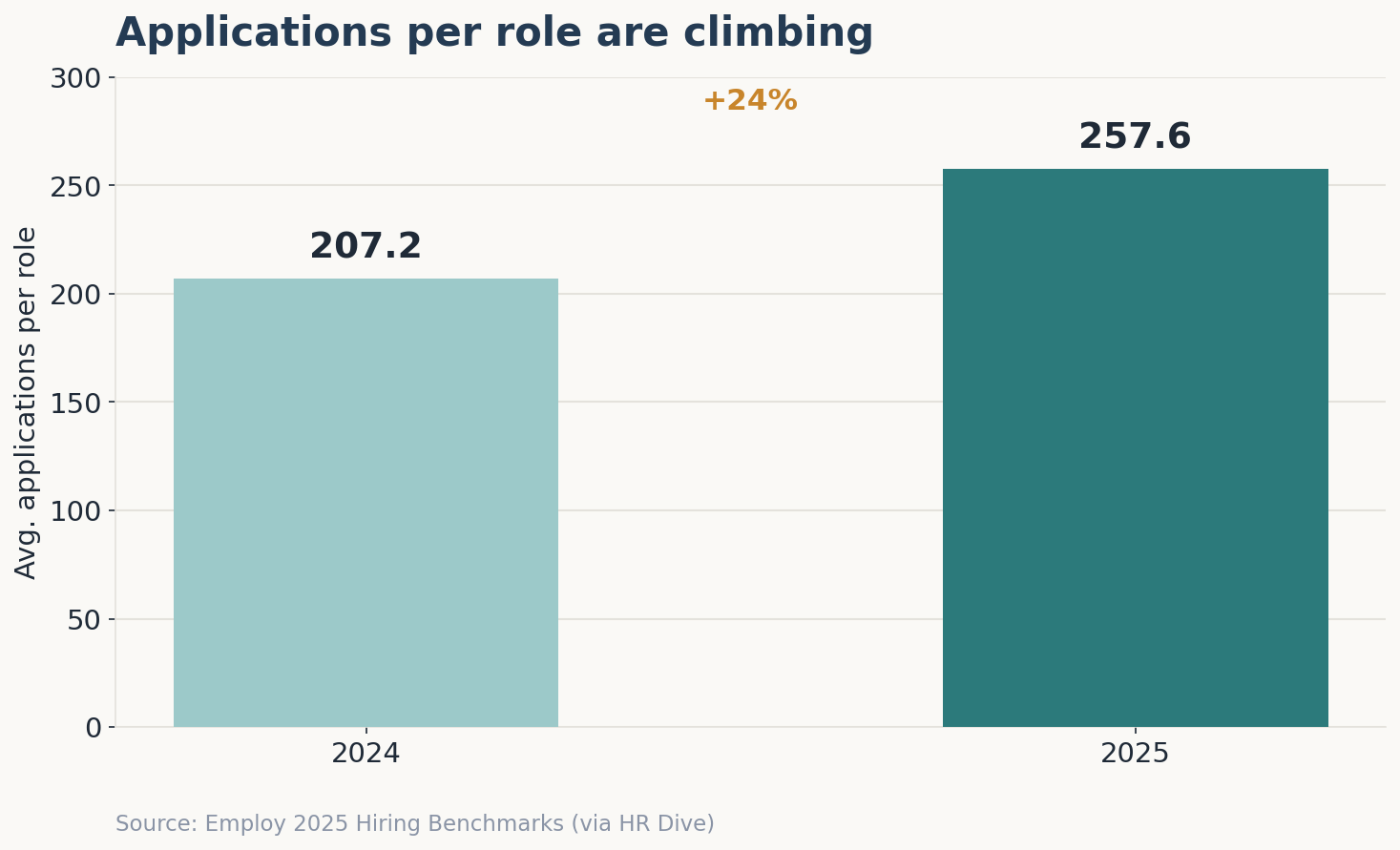
The average corporate role now attracts 257.6 applications, up from 207.2 just a year earlier. Volume at that scale quietly changes what you are actually buying: not a way to publish a job, but the infrastructure that decides whether those applications become hires or just noise.
Hiring today is no longer about attracting applicants, it’s about managing overwhelming volume efficiently. As application numbers continue to rise, the real challenge is turning that volume into qualified hires without slowing down your team.
That’s where Job Posting Software becomes critical. What looks like a simple publishing tool actually determines how jobs are distributed, tracked, and converted into interviews making it a core part of your hiring infrastructure, not just a posting utility.
Recent data highlights the shift: according to the LinkedIn Future of Recruiting Report, over 70% of recruiting professionals say improving hiring efficiency is their top priority heading into 2026driven largely by increasing application volumes and tighter hiring timelines.
Here is the part vendors rarely volunteer during a polished walkthrough. The market is full of Job Posting Software that demos beautifully and operates poorly, and the gap almost never shows up in the sales call. It surfaces three months later, when the “seamless” posting feature creates duplicate listings, the analytics dashboard reports vanity metrics, and the per-recruiter price quietly climbs at renewal.
Most buying guides hand you a feature list and call it a day. This one treats the purchase as the procurement decision; it really is one with measurable downstream costs in recruiter hours, time-to-hire, and budget that escalates after you have already migrated your data.
By the end, you will have a checklist of features that actually matter, a list of demo red flags, real pricing benchmarks to anchor negotiations, and a framework for comparing vendors before you sign anything. The goal is simple: spend the next twenty minutes here so you do not spend the next twelve months locked into the wrong tool.
What Job Posting Software Is
Job Posting Software is a recruitment tool that lets employers create, publish, and distribute job openings across multiple job boards and a company career page from one place, then collect and organize the resulting applications. Most modern options bundle posting with applicant tracking, screening, and reporting.
That definition matters because the category boundary is blurry on purpose. Pure posting tools push listings out and stop there. The stronger products fold posting into a wider applicant tracking system (ATS) so the candidates you attract land in a structured pipeline instead of an inbox.
The Real Cost of Choosing Wrong
A bad posting tool rarely announces itself. It leaks value in increments an hour here reformatting a listing for a fourth board, a strong candidate lost there because nobody followed up in time.
Run the math on a single open role. At an average time-to-hire of 63.5 days and a flood of applicants per posting, a recruiter manually screening even a fraction of those resumes can burn 8–12 hours per requisition. Across ten concurrent openings, that is more than a full work week consumed before a single interview is scheduled.
Then there is the spend most teams forget to model. SHRM pegs the average cost per hire in the US at $4,700, and that figure assumes your process runs cleanly. Every extra week a role stays open adds lost productivity, agency temptation, and the risk that your top candidate accepts elsewhere.
The quieter failure is data. When postings live in one tool and applicants scatter across email, spreadsheets, and a separate candidate database, you lose the one thing that compounds over time: a searchable record of everyone who ever applied. Most teams underestimate this loss by 3–4x because it never shows up as a line item, it shows up as re-sourcing candidates you already had.
The Must-Have Feature Checklist
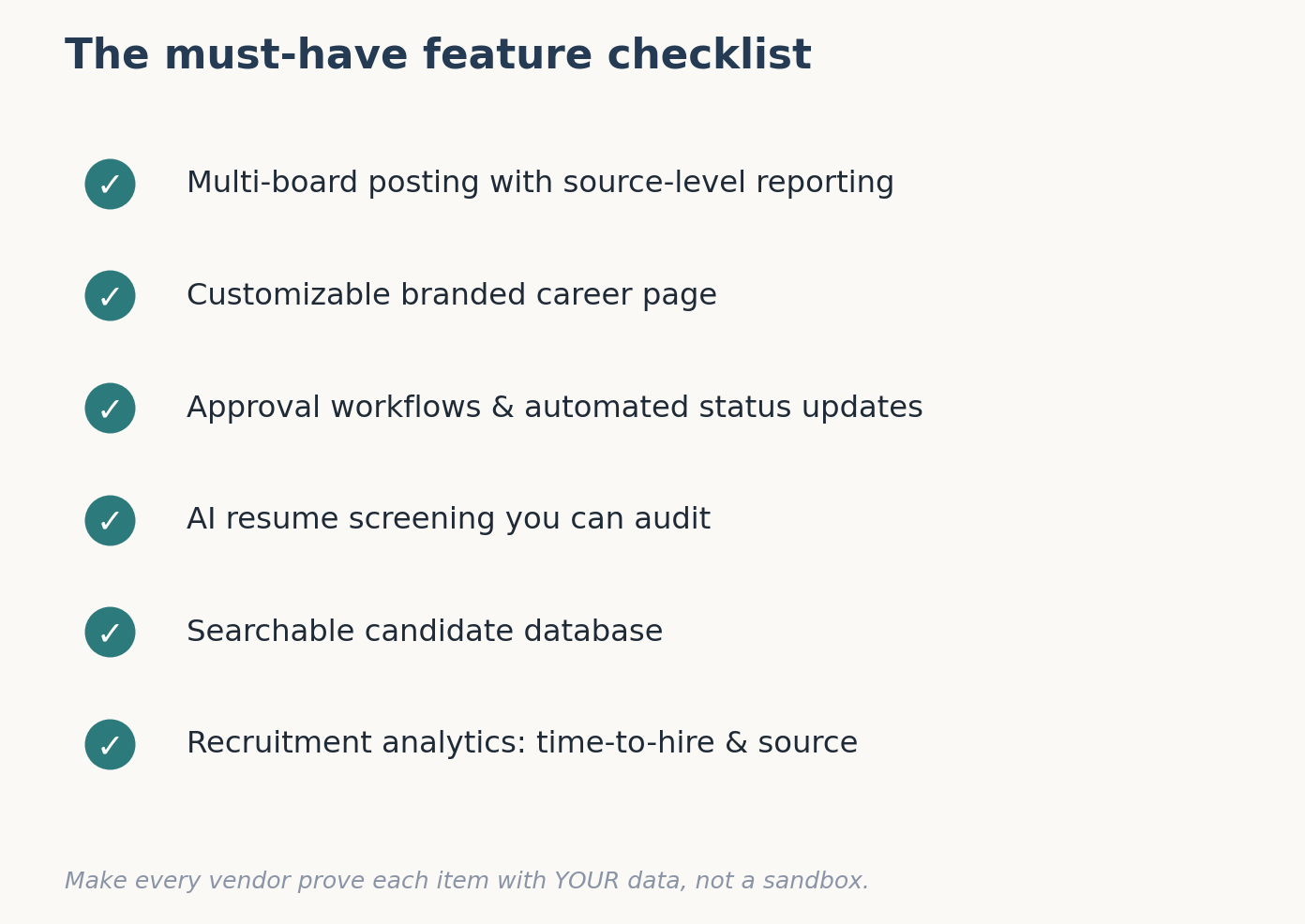
This is the section to read slowly. Vendors will show you dozens of features; only a handful change outcomes. Use the headings below as your demo agenda and make the salesperson prove each one with your own data, not their canned sandbox.
Multi-board posting and real job board distribution
The headline promise of any posting tool is reach. Multi-board posting means writing a listing once and pushing it to many destinations, major aggregators, niche sites, and your own page without re-keying anything.
Reach is not uniform, though. A single posting on ZipRecruiter is automatically shared with over 100 partner boards, and Indeed alone draws roughly 300 million monthly visitors, so raw volume is easy to come by. The harder question is source effectiveness: niche and curated boards consistently convert applications to responses at far higher rates than the giant aggregators. Demand a tool that reports performance by source, not just total clicks, or you will keep paying to amplify your weakest channels.
Branded career page
Job boards produce the most applicants, but they rarely produce your best ones. Industry data shows boards supply around 60% of applications while company career pages and referrals deliver higher-quality candidates per applicant.
That is why a customizable branded career page belongs on the must-have list, not the nice-to-have list. A page that carries your logo, voice, and values improves both candidate experience and conversion, and it is the one channel where you own the audience instead of renting it. Check that the page is genuinely yours to brand custom domain, your colors, your copy and not a generic template with the vendor’s footer stamped across the bottom.
Workflow automation software: approval flows and auto-updates
Posting a job is the easy part. Moving thirty applicants through five stages without anything falling through the cracks is where teams quietly drown, and it is where workflow automation software earns its keep.
Look for configurable approval workflows so a hiring manager signs off before a role goes live, automatic status updates that keep candidates informed, and reminder triggers that nudge interviewers before a stage stalls. Roughly 60% of candidates say hiring-timeline transparency would make them more likely to apply, and automated status communication is the cheapest way to deliver it at scale. The test in a demo: ask the vendor to build one of your real approval chains live. Watch how many clicks it takes.
AI Resume Screening that filters without the bias tax
With hundreds of applications per role, manual first-pass review is no longer realistic. AI Resume Screening parses incoming resumes, extracts structured data, and ranks candidates against the requirements you define so recruiters spend their attention on the shortlist instead of the slush pile.
The caveat is real and worth raising in the room: automated screening can encode bias if it is trained or configured carelessly. Ask exactly what the model evaluates, whether you can audit why a candidate was ranked low, and whether the system supports anonymized or structured first-round screening to reduce subjective drift. A vendor who cannot explain their screening logic is selling you a black box, and a black box is a compliance problem waiting to happen.
Candidate Database management that survives growth
Every applicant you attract is an asset, but only if you can find them again. Candidate Database management is the difference between a one-time funnel and a talent pipeline you can re-engage for the next role.
A centralized database should let you search past applicants by skill, tag and segment them, and surface qualified people from previous searches before you spend money sourcing new ones. The Gem data widely cited in 2025 found that sourced candidates are roughly five times more likely to be hired than cold inbound applicants and your own database is the cheapest sourcing pool you will ever own. If a tool dumps closed roles into a dead archive you cannot query, treat that as a disqualifier.
Recruitment analytics and AI Candidate Insights
You cannot improve what you do not measure, and most posting tools measure the wrong things. Recruitment analytics should report the metrics that map to business outcomes: time-to-hire, offer acceptance rate, recruiter load, and source effectiveness, not just how many people viewed a listing.
The next tier up is AI Candidate Insights: pattern detection across your pipeline that flags which sources produce hires, where candidates drop off, and which roles are stalling before you notice manually. For context, the average offer acceptance rate sat near 83.9% in 2025, so a tool that shows yours slipping below that and why is giving you a lever, not a vanity chart. Insist on seeing a real reporting dashboard during the demo. If the vendor “will send a sample later,” assume the live version is thin.
Your demo-day checklist
Bring this numbered list to every vendor call and score each item pass or fail before you discuss price:
- Post one role to at least three boards plus your career page in a single workflow.
- Confirm postings are de-duplicated across boards automatically.
- Build one of your real approval chains live, end to end.
- Run AI Resume Screening on a batch of your own anonymized resumes and explain the ranking.
- Search the candidate database by skill and pull up a past applicant.
- Open the live analytics dashboard and locate time-to-hire and source effectiveness.
- Trigger an automated candidate status update and confirm it actually sends.
Red Flags to Watch For in a Vendor Demo
The demo is theater. Your job is to break the fourth wall and see the production behind it. A few patterns reliably predict regret.
The first is the pre-loaded sandbox. If every example uses the vendor’s pristine sample data, you are watching a best-case fiction. Ask to load a slice of your own roles and resumes; a confident product handles it without a “we’ll set that up offline.”
The second is the vanishing price. When a rep talks about features for forty minutes and dodges the pricing question until the end, the number is usually complicated for a reason: seat minimums, posting caps, or escalators they would rather you not dwell on.
The third is the feature that requires “professional services.” Watch for the moment a capability you assumed was included turns out to need a paid implementation. Roughly 75% of ATS buyers report unexpected integration charges, and implementation and training can account for as much as half of total first-year cost. The fourth red flag is any reluctance to talk about data export. If getting out is vague, you are looking at a tool designed to trap you in.
Pricing Benchmarks: What Job Posting Software Should Cost
Pricing in this category is deliberately hard to compare, which is exactly why benchmarks protect you. The same capability can be priced four different ways, and the cheapest sticker is not always the lowest total cost.
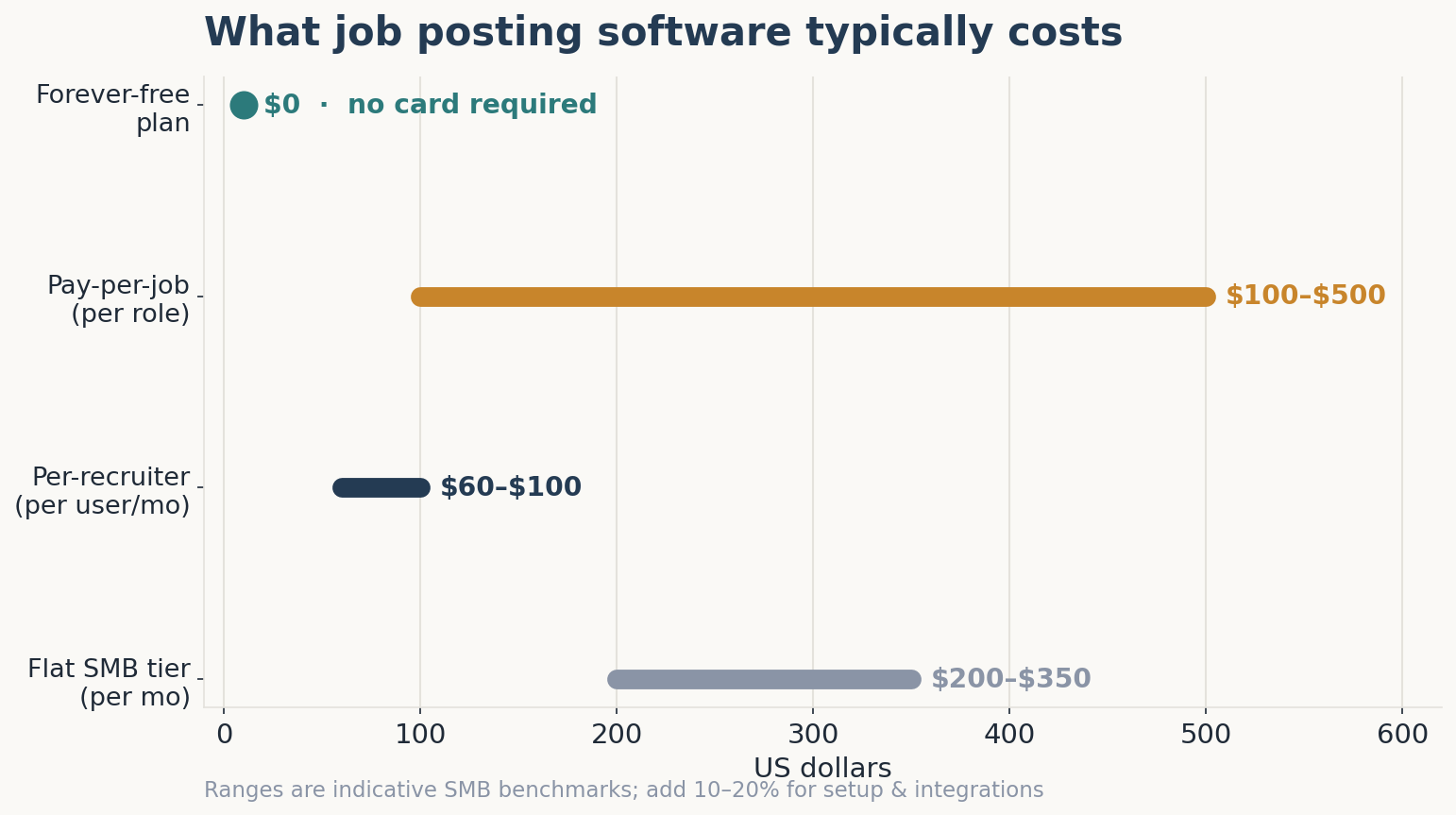
Per-recruiter pricing is the most common model, typically $60–$100 per user per month for mainstream tools, with an industry-wide average around $80. Pay-per-job models run $100–$500 per open position, which gets expensive fast above 10–20 active roles. Flat SMB tiers often start near $200–$350 per month regardless of seat count, and forever-free plans exist for low-volume hiring.
Annualized, that means small businesses with 10–50 employees usually land between $250 and $3,000 per year, while mid-market teams budget roughly $3,600 to $12,000. But the advertised price is rarely the real price. Plan for setup fees, training, and $30–$100 per integration, and reserve 10–20% of the subscription for change-management contingencies most buyers forget.
Two clauses save real money at renewal: cap the annual price escalator (5–11% hikes are common and quietly compound), and secure data-export rights plus migration assistance in writing before you sign.
How Two SMB Teams Cut Time-to-Hire
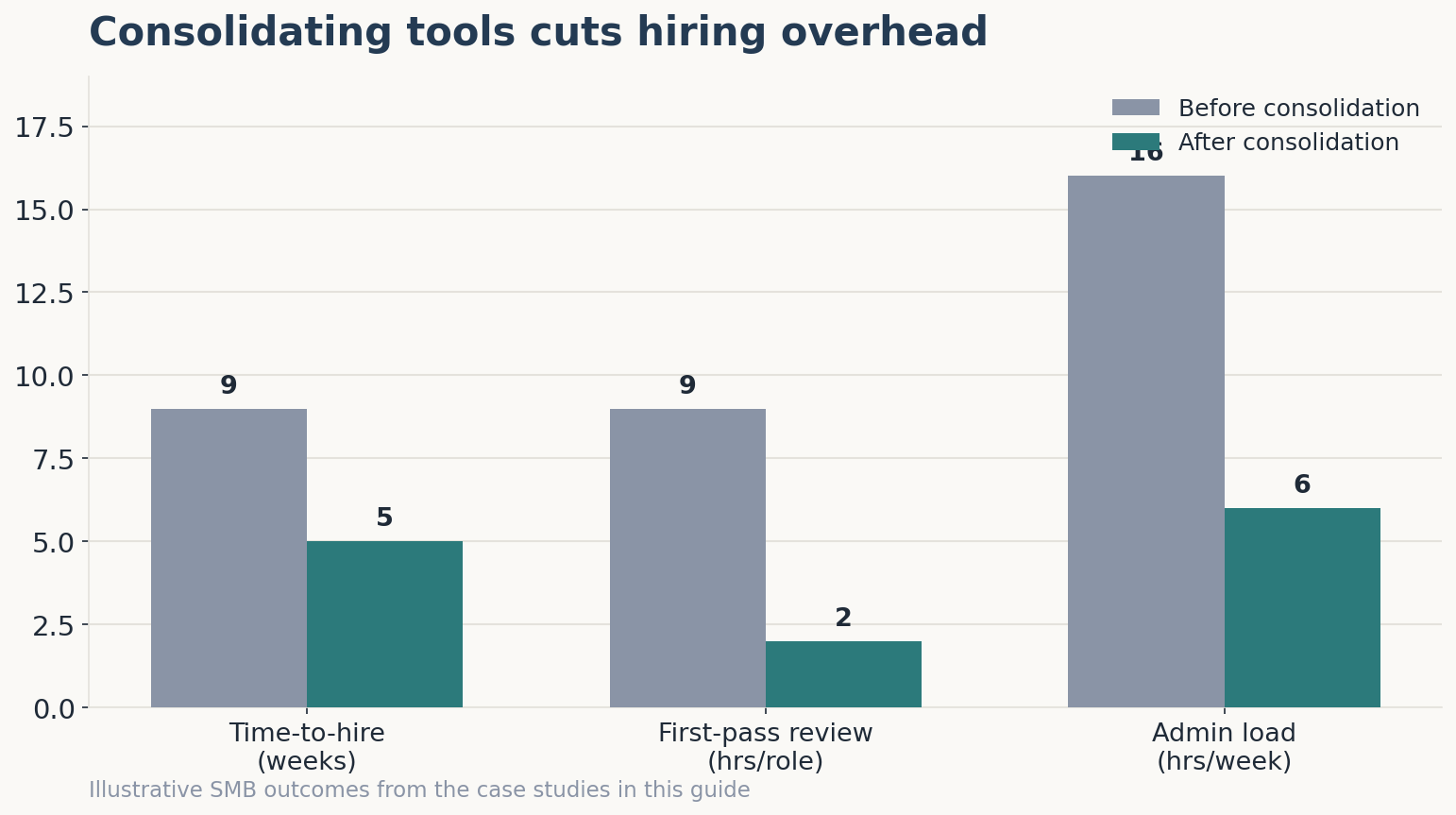
A 30-person SaaS startup hiring across engineering and sales was posting each role manually to four boards and tracking applicants in a shared spreadsheet. After moving to a single tool with multi-board posting and AI Resume Screening, first-pass review dropped from roughly nine hours per role to under two, and their time-to-hire compressed from about nine weeks to five.
A 60-person services company in a comparable scenario cut manual hiring and onboarding admin from around 16 hours a week to under 6 after consolidating posting, tracking, and a centralized candidate database into one platform. Duplicate data entry between systems fell by more than half. Neither team added headcount; they removed the administrative gaps between tools that were eating their week.
The common thread is not a single magic feature. It is consolidation replacing a stack of disconnected tools with one system where a posting, the applications it produces, and the analytics that explain them all live together.
A Decision Framework for Evaluating Vendors
Once two or three tools pass your demo checklist, stop comparing feature lists and start comparing fit to your hiring pattern. The right pricing model depends entirely on how and how often you hire.
| Pricing model | Best fit | Typical cost | Watch-out |
| Pay-per-job | Fewer than ~10 hires a year, sporadic | $100–$500 per role | Costs spike with volume |
| Per-recruiter | Stable team, steady hiring | $60–$100 per user/mo | “Viewer” seats may be billed |
| Flat SMB tier | Predictable, multi-stakeholder | $200–$350+/mo | Hidden user or posting caps |
| Forever-free plan | Startups and SMBs starting out | $0, no card required | Confirm posting + database limits |
Use the table as a starting filter, then pressure-test the finalist against the seven demo items above. A free or low-cost tier that includes genuine multi-board posting, a branded page, and a working candidate database the model platforms like Hirium offer with a forever-free plan and no recruiter fees often beats a mid-tier paid product loaded with features you will never configure.
The deciding question is never “which tool has the most features.” It is “which tool fits how my team actually hires over the next two to three years,” because switching costs, retraining, rebuilt workflows, migrated data are the real lock-in.
What Most Teams Get Wrong
After watching enough of these evaluations, one mistake repeats more than any other: teams buy for the posting and ignore everything that happens after the application lands.
It is an understandable error. Posting is visible and easy to demo, so it dominates the sales conversation. But postings are commoditized; almost every tool can push a listing to the big boards. The differentiation, and the actual return on investment, lives downstream in screening, the candidate database, automated workflows, and analytics. Buy on posting reach alone and you optimize the cheapest 10% of the problem.
The second recurring mistake is treating “free” as a synonym for “limited.” A serious forever-free plan can be the smartest entry point for a startup, provided you read the fine print on posting volume, user seats, and whether the candidate database is searchable rather than archived. The trap is not free tools; it is free tools that cap the one feature you will need most as you scale.
And the third? Teams evaluate in isolation. They never load their own messy data, never build their own approval chain, never ask the awkward export question. The tool that survives your reality, not the vendor’s sandbox, is the one worth paying for.
Before You Sign: Pressure-Test Your Shortlist
If you are evaluating Job Posting Software right now, do not let the demo set the terms. Bring your own roles, your own messy resumes, and your own approval chain to every call, and score each finalist against the seven-point checklist above before anyone mentions price.
When you want to see how a posting-and-tracking workflow holds up against your real hiring volume multi-board posting, a branded career page, AI screening, and a searchable candidate database in one place Hirium offers all of it on a forever-free plan, with no credit card and no recruiter fees, so you can stress-test the approach before committing budget to any vendor. Run your shortlist through the framework here first; the twenty minutes you spend now is the cheapest insurance against a twelve-month contract you regret.
Frequently Asked Questions
What features should job posting software have?
At minimum, look for multi-board posting with source-level reporting, a customizable branded career page, configurable approval workflows, AI-assisted resume screening, a searchable candidate database, and recruitment analytics covering time-to-hire and offer acceptance. Posting reach is table stakes; the features that move outcomes are the ones that manage applicants after they apply, so weigh your evaluation toward screening, tracking, and reporting.
How much does job posting software cost?
Expect roughly $60–$100 per recruiter per month for per-user tools, $100–$500 per role for pay-per-job models, or flat SMB tiers around $200–$350 monthly. Annual totals run about $250–$3,000 for small businesses and $3,600–$12,000 for mid-market teams. Budget an extra 10–20% for setup, training, and integration fees that rarely appear on the headline quote.
Is free job posting software worth it?
For startups and SMBs making their first hires, a genuine forever-free plan can be excellent value, especially one with no credit card requirement and no per-recruiter fees. The caveat is to verify the limits: active posting volume, number of users, and whether the candidate database stays searchable. Free becomes a false economy only when it caps the feature you will rely on most as hiring volume grows.
What is the difference between job posting software and an ATS?
Posting software focuses on publishing and distributing openings; an applicant tracking system manages the full pipeline from application to offer. The line has blurred most strong products now combine both but the distinction matters at purchase. If a tool only posts and leaves applicant management to your inbox, you have solved the easy half of the problem and ignored the expensive half.
How do I post one job to multiple job boards at once?
Multi-board posting lets you write a listing once and distribute it to several boards plus your career page from a single dashboard, with the system handling formatting and de-duplication. The capability to demand is source-level analytics, so you can see which boards actually produce hires rather than just clicks, and reallocate spend toward the channels that convert.
What are the biggest red flags in a vendor demo?
The clearest warning signs are demos that run only on pre-loaded sample data, pricing that stays vague until the final minutes, core features gated behind paid “professional services,” and evasiveness about data export. If a rep cannot load your real roles, explain the screening logic, or commit migration terms in writing, treat the call as a no and move to the next finalist on your list.