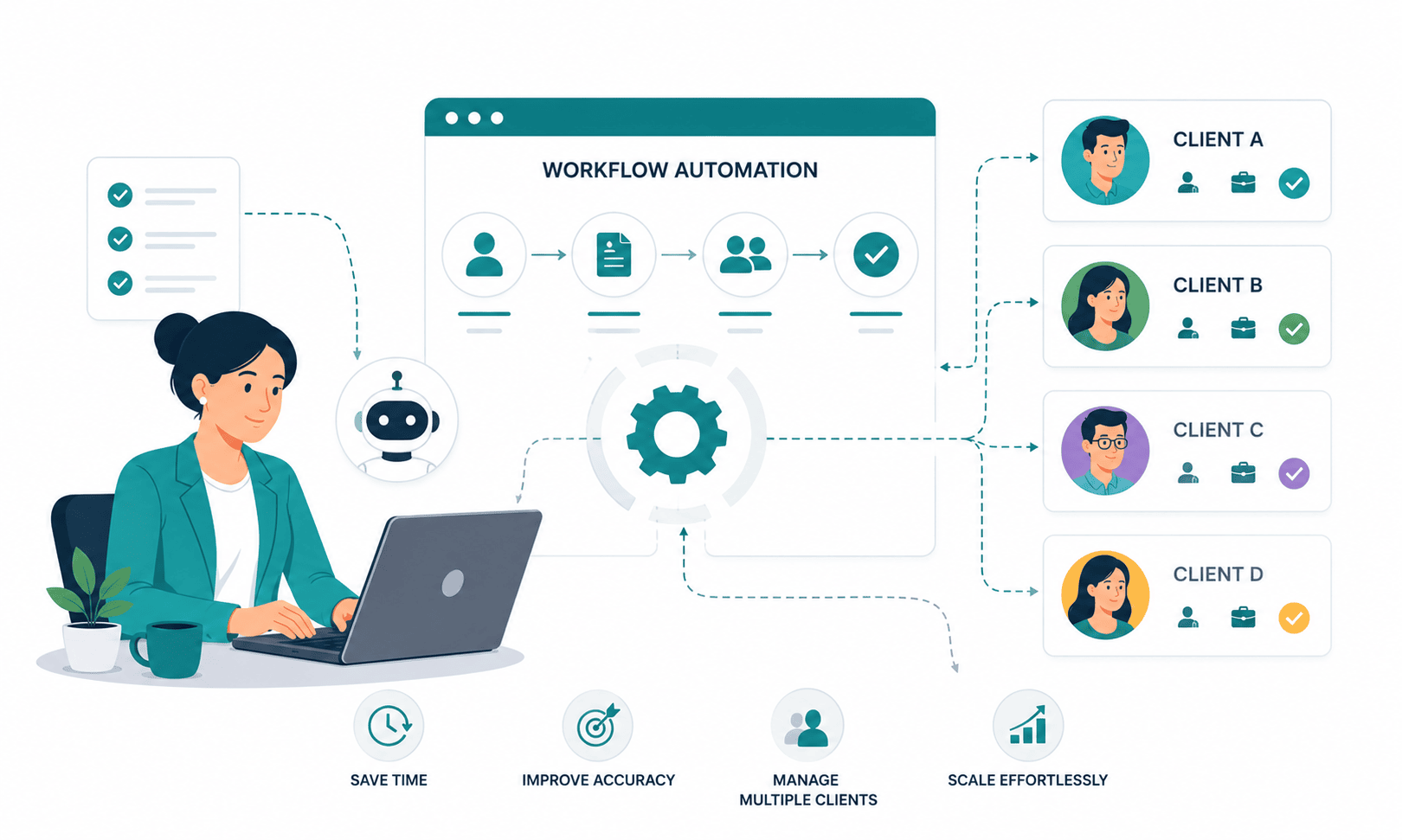
Recruitment Workflow Automation for Agencies: Managing Multiple Clients Without the Chaos
A recruiter running roles for one employer spends roughly 17.7 hours of manual admin per vacancy, according to Totaljobs research. Now multiply that across an agency desk carrying 6 clients and 14 open requisitions simultaneously and add the overhead that in-house recruiters never face: separate submission formats for each client, separate reporting cadences, separate SLAs, and the constant risk of submitting the same candidate to two competing accounts.
That multiplication is why agency operations break in ways in-house teams don’t. The work doesn’t scale linearly with client count; it compounds. Every new client adds a new pipeline structure, a new set of stakeholders expecting updates, a new invoicing trigger, and a new place for candidates to fall through the cracks. Most agencies respond by hiring coordinators or asking recruiters to work 55-hour weeks. Both approaches cap growth at the exact moment revenue should be accelerating.
Recruitment workflow automation for agencies solves the compounding problem differently: it makes each additional client cheaper to service than the last, not more expensive. When status updates, interview coordination, candidate communication, and per-client reporting run on rules instead of memory, a desk that comfortably handles 10 open roles can handle 25 with fewer dropped candidates, not more.
This guide covers the challenges specific to multi-client recruiting, how to architect client-specific workflows, which automations deliver measurable hours back first, and what a working multi-client dashboard actually looks like. It is written for agency owners and delivery leads who have outgrown spreadsheets but don’t want to inherit enterprise-software complexity.
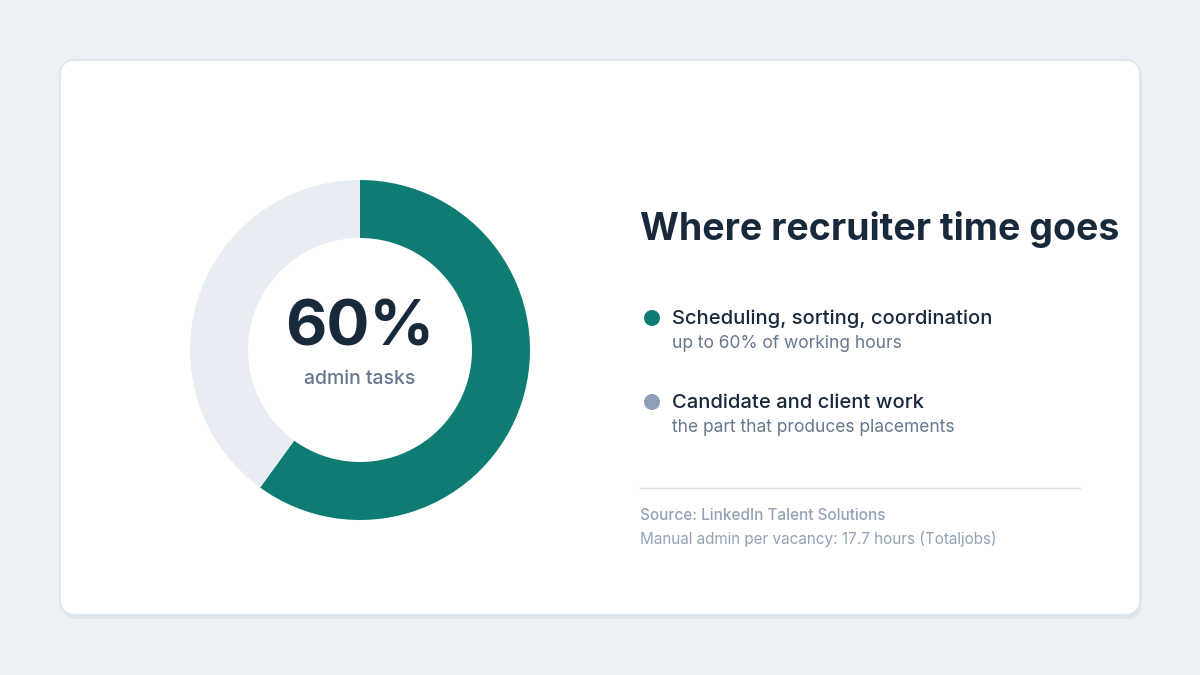
LinkedIn Talent Solutions research found that recruiters spend up to 60% of their working time on administrative tasks such as scheduling interviews and sorting resumes time that produces zero placements.
What Is Recruitment Workflow Automation for Agencies?
Recruitment workflow automation for agencies is the use of software rules to execute repetitive hiring tasks status updates, candidate emails, interview scheduling, job distribution, and client reporting automatically across multiple client accounts. It replaces manual coordination with trigger-based actions, so each client’s pipeline moves forward without a recruiter touching every step.
The Core Problem: Why Multi-Client Recruiting Breaks Manual Processes
The math is unforgiving. An in-house recruiter serves one employer with one recruitment process. An agency recruiter serving 6 clients effectively runs 6 different hiring processes in parallel each with its own stages, stakeholders, submission rules, and expectations. Manual coordination costs don’t add up across clients; they multiply.
Three failure modes show up in almost every growing agency.
Multi-client pipelines collapse into a single undifferentiated mess. When every requisition lives in one spreadsheet or one generic pipeline, a recruiter cannot answer the question “where are we on the Series B fintech’s backend role?” without 10 minutes of digging. Industry surveys consistently show recruiters spending 30–40% of their week on exactly this kind of zero-pipeline admin searching, updating, reformatting.
Candidate ownership conflicts create commercial and legal risk. The same senior engineer applies through Client A’s job posting in March and gets sourced for Client B in May. Who “owns” that candidate? If your database can’t show first-touch attribution with timestamps, you’re one duplicate submission away from a fee dispute and agency fee disputes routinely involve 15–25% of a candidate’s annual salary.
Per-client reporting eats entire days. A 10-client agency producing weekly status reports manually spends 8–12 hours per week just assembling numbers: submittals, interviews, offers, time-to-hire per requisition. That’s more than one full recruiter-day per week producing documents rather than placements.
Underneath all three sits the same root cause: information that lives in inboxes, memory, and spreadsheets instead of a structured system. Automation can’t fix a process that doesn’t exist which is why the next section starts with architecture, not tools.
Building Client-Specific Workflows: The Complete Setup
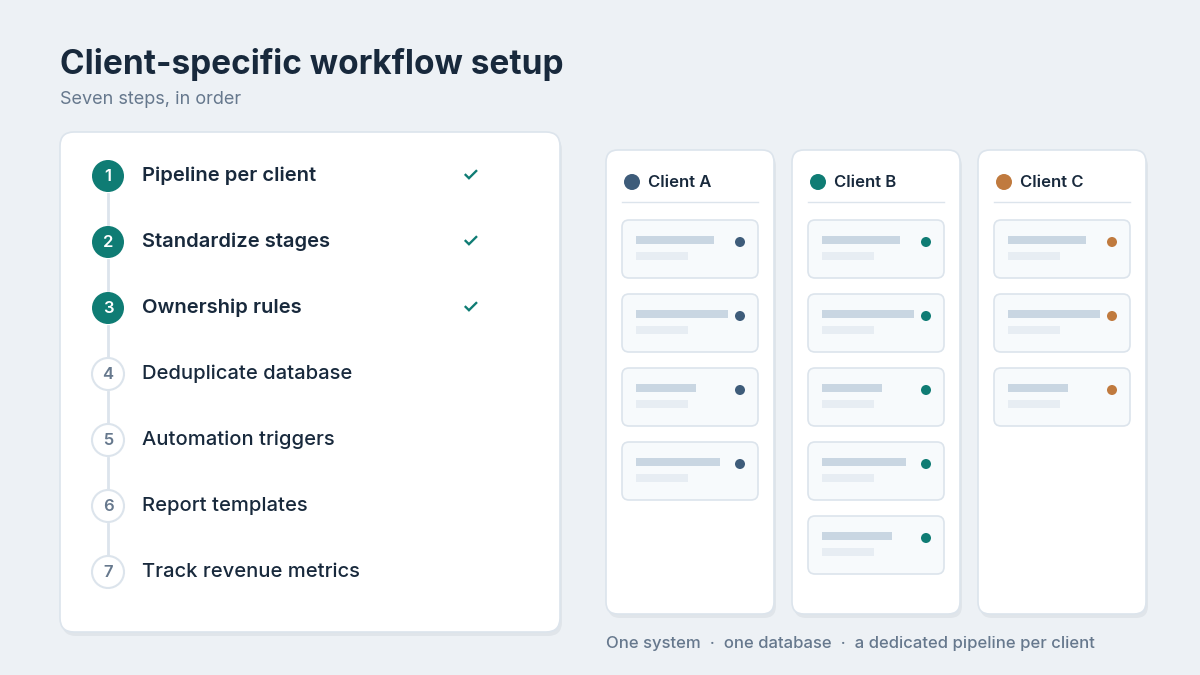
This is where most guides get vague and most agencies get stuck. The goal is a structure where every client feels like they have a dedicated process, while your team operates one system. Here’s the architecture, step by step.
Step-by-Step: How Recruitment Agencies Manage Multiple Clients in One System
Set up in this order. Agencies that skip steps 1–3 and jump straight to automation end up automating chaos.
- Create one workspace or pipeline per client, not per job. Each client gets its own container with its own pipeline stages, so “Submitted to Client” means something different for a 2-round startup process than a 5-round enterprise process. Jobs live inside client containers.
- Standardize your internal stages, customize the client-facing ones. Internally, every role moves through the same 6–8 macro stages (Sourced → Screened → Submitted → Client Interview → Offer → Placed). Client-specific sub-stages map onto these. This is what makes cross-client reporting possible later.
- Define candidate ownership rules before importing data. Decide your attribution window (commonly 6 or 12 months from first submission), record first-touch source and date on every candidate record, and enforce duplicate detection at the point of entry.
- Migrate and deduplicate your existing talent pool. Run resume parsing on your historical CVs so every record is searchable by skill, location, and salary band not just by name. A 20,000-record database with 30% duplicates is worse than a clean 14,000-record one.
- Build automation triggers per stage transition. Every stage change should fire its defined actions: notify the account owner, email the candidate, update the client report, start an SLA timer. (Detailed below.)
- Set per-client reporting templates. Each client gets a report format once; the system fills it weekly. Zero assembly time after setup.
- Instrument the metrics that drive agency revenue. Time-to-submit, submittal-to-interview ratio, interviews-per-placement, and offer acceptance rate tracked per client and per recruiter from day one.
Done properly, this setup takes a 5–15 person agency 2–4 weeks, including data migration. Done as an afterthought, it takes 6 months of retrofitting.
Candidate Database Management Across Multiple Clients
The single database is the asset; everything else is workflow on top of it. Strong candidate database management for agencies means three specific capabilities, and it’s worth verifying each one before committing to any platform.
First, structured parsing at intake. Every CV that enters the system from job boards, referrals, or your careers page should be parsed into structured fields automatically. Manual data entry runs 8–15 minutes per candidate; at 200 new candidates a month, that’s 27–50 recruiter-hours you either automate or pay for.
Second, cross-client search with ownership visibility. When a recruiter searches “React developer, Pune, 8–12 LPA,” the results must show which candidates are already active in another client’s pipeline, who submitted them first, and when the attribution window expires. This single feature prevents the majority of duplicate-submission disputes.
Third, engagement history as a first-class record. A candidate rejected by Client A in Q1 is often the perfect submit for Client B in Q3. Agencies that treat their talent pool as a renewable asset re-engage past candidates at 3–5x the response rate of cold outreach but only if every past interaction is logged and searchable.
Recruitment Email Templates That Scale Per Client
Communication volume is where agencies quietly hemorrhage hours. A single placement typically involves 30–50 candidate and client touchpoints: acknowledgments, screening invitations, submission notifications, interview confirmations, rejections, offer follow-ups.
Well-built recruitment email templates turn those touchpoints into a library. The agency-specific requirement the one in-house teams never think about is per-client variants. Your submission email to a formal enterprise client and your submission email to a 15-person startup should differ in tone, signature, and branding, while pulling from the same template logic with merge fields for candidate name, role, client, stage, and next step.
The templates that deliver the most recovered time, in order: application acknowledgment (100% automatable), interview confirmation with details (95% automatable), stage-change updates to candidates (90% automatable), and rejection with feedback (80% automatable the feedback line stays human). Automated, personalized rejections alone measurably improve candidate experience: candidates who receive a timely, respectful no re-apply and refer at significantly higher rates than those who get silence.
One firm rule: automate the notification, never the negotiation. Offer discussions, counteroffer handling, and salary conversations stay human, always.
AI Interview Scheduling Across Clients and Time Zones
Scheduling is the most brutal coordination task in agency recruiting because it’s three-sided: your recruiter, the candidate, and the client’s interviewers none of whom share a calendar. Research cited by iQTalent found 67% of recruiters need 30 minutes to 2 hours to schedule a single interview, and 42% of candidates abandon processes where scheduling drags.
AI interview scheduling removes the back-and-forth by reading interviewer availability, offering candidates self-serve slots, handling time zones, and automatically managing reschedules and reminders. For an agency, the compounding benefit is per-client configuration: Client A’s panel format, Client B’s 48-hour feedback SLA, and Client C’s video-link preferences all encode once and execute forever.
A related capability worth evaluating: AI-led first-round screening. Platforms now offer an AI interviewer that conducts structured, consistent first-round conversations and scores responses against role criteria. For agencies handling screening volume of 100+ applicants per role, this compresses days of phone screens into hours and applies identical questions to every candidate, a meaningful step toward unbiased screening that clients increasingly ask about in vendor reviews.
Job Posting Software and Multi-Client Distribution
Posting the same role to 6 boards manually takes 45–60 minutes and invites inconsistency; the salary range gets updated on four boards and forgotten on two. Multiply by 14 open requisitions across clients and posting becomes a part-time job in itself.
Modern job posting software usually built into an applicant tracking system rather than bought separately distributes a role to multiple boards from one form, tracks source effectiveness per posting, and routes every applicant into the correct client pipeline automatically. The agency-specific requirements to check: per-client branded career pages (your client’s employer brand, not just yours), UTM-level source tracking so you can prove which channels produce hires per client, and automatic pipeline routing so a candidate applying to Client A’s role never lands in a generic bucket.
Source tracking matters more than most agencies realize. When your recruitment analytics show that one niche job board produces 60% of placements for engineering roles while a general board produces applications but no hires, you can reallocate posting budget with evidence and show the client you did.
How to Automate Candidate Status Updates Per Client
Status updates are the highest-frequency, lowest-judgment task in agency work, which makes them the ideal first automation. The design pattern is simple: every pipeline stage transition triggers a defined set of actions, configured per client.
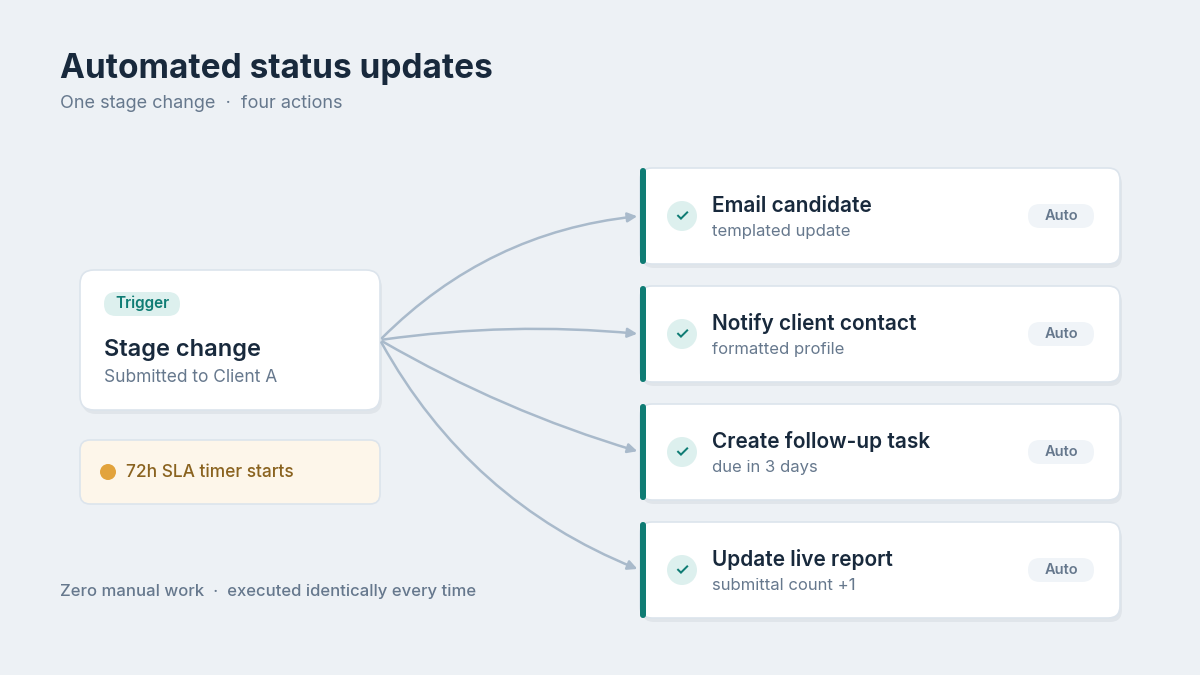
A worked example. When a candidate moves to “Submitted to Client” in Client A’s pipeline: the candidate receives a templated update email, the client contact receives the formatted profile in Client A’s required submission format, the recruiter’s task list adds a 3-day follow-up, and Client A’s live report increments its submittal count. Four actions, zero manual work, executed identically every time.
Layer SLA timers on top. If a submitted candidate sits without client feedback for 72 hours, the system nudges the client contact and flags the account owner. Agencies that enforce feedback SLAs through automation report 25–40% faster time-to-hire on the same roles not because anyone works harder, but because nothing sits idle waiting for a human to remember it.
The Multi-Client Recruitment Dashboard: A Sample View
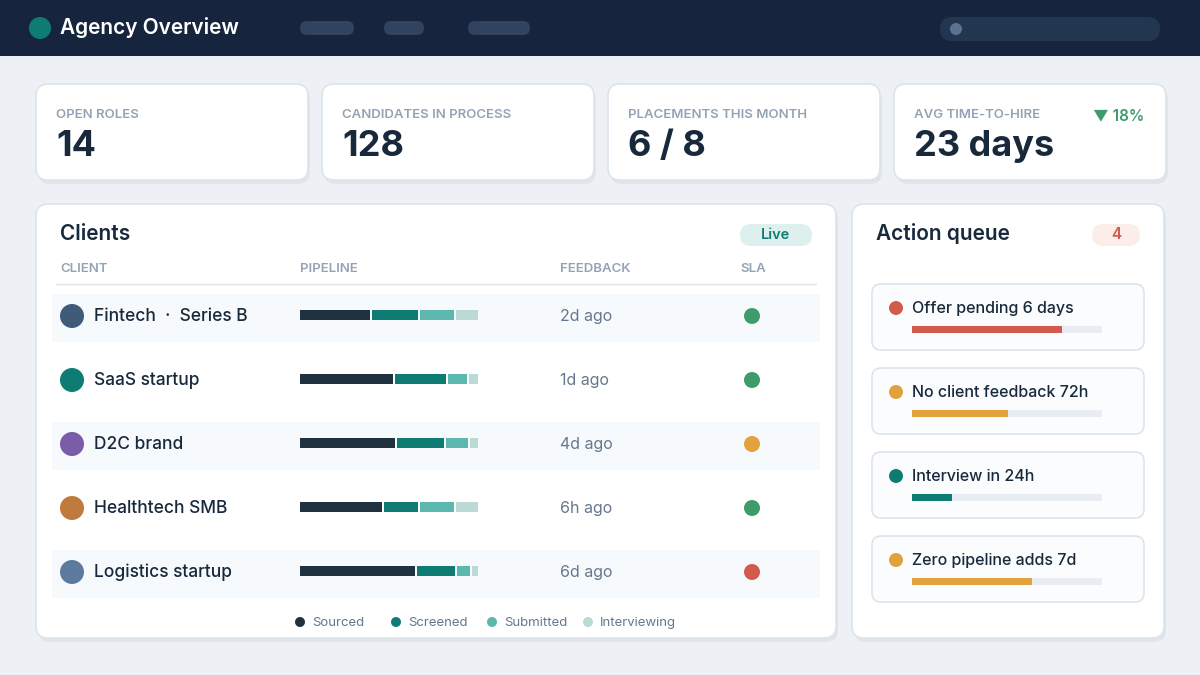
A functional multi-client dashboard answers one question at a glance: where does every client stand right now, and what needs attention today? Here’s a layout that works for agencies running 5–20 active clients:
Top band agency-wide health (4 tiles): active requisitions, candidates in process, placements this month vs. target, average time-to-hire trailing 90 days.
Middle band per-client rows. One row per client showing: open roles, candidates per stage (sourced / screened / submitted / interviewing / offer), days since last client feedback, and a red/amber/green SLA indicator. A delivery lead should spot the stalled account in under 10 seconds.
Bottom band action queue. Auto-generated flags: candidates stuck in one stage beyond threshold, interviews in the next 48 hours, offers pending beyond 5 days, and roles with zero pipeline additions in 7 days.
Recruiter load view (secondary tab): requisitions and active candidates per recruiter, so reassignment happens before burnout, not after resignation. Your recruitment CRM or ATS should generate all of this from live pipeline data the moment a dashboard requires manual updating, it’s already wrong.
Real-World Application: What This Looks Like in Practice
Two anonymized examples from the startup and SMB hiring space illustrate the before/after.
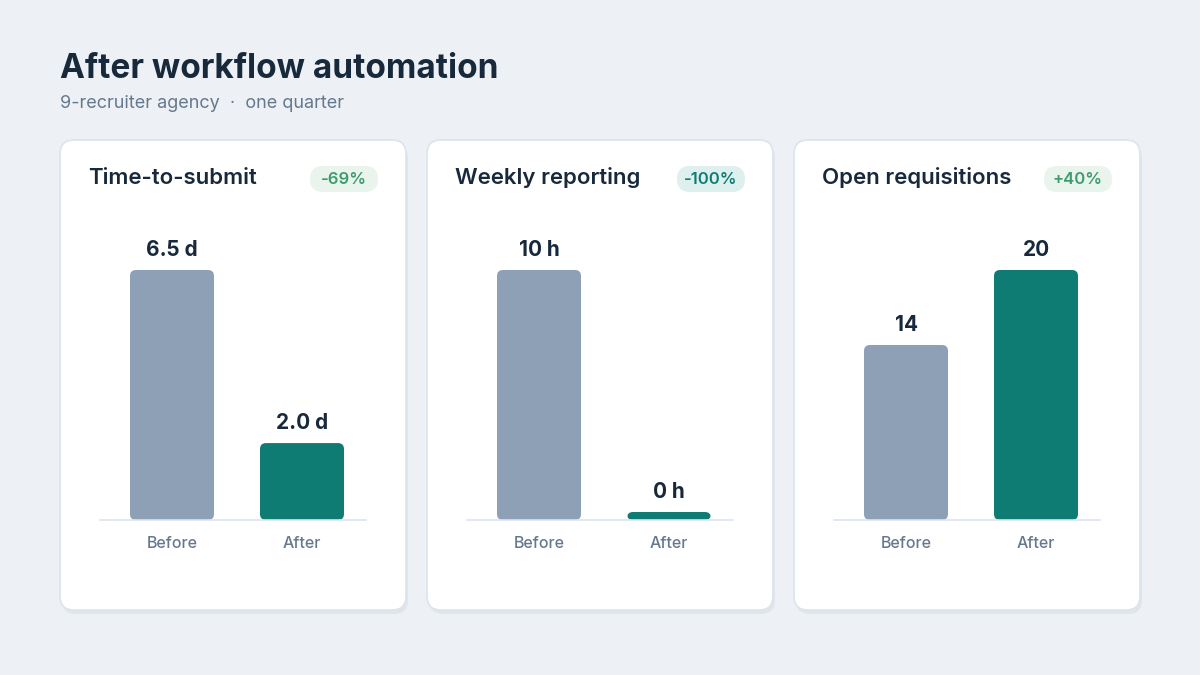
A 9-recruiter technical staffing agency serving Indian SaaS startups ran everything through shared spreadsheets and a group inbox. After moving to client-specific pipelines with automated stage-triggered updates, their average time-to-submit dropped from 6.5 days to 2 days, weekly reporting went from 10 recruiter-hours to zero, and the same team carried 40% more open requisitions within one quarter without added headcount.
A boutique 4-person firm placing operations and finance roles for SMBs had lost two client relationships in a year over duplicate submissions and slow updates. Implementing first-touch ownership tracking and SLA-based auto-nudges eliminated ownership disputes entirely over the following 12 months, and their submittal-to-interview ratio improved from 1-in-6 to 1-in-3.5 as recruiters redirected recovered admin hours into better screening. Both agencies made the shift on sub-enterprise budgets; one migrated from a legacy ATS at no cost using vendor-supported migration.
Decision Framework: Choosing an Automation Approach
Agencies typically face three realistic paths. The right one depends on client count, budget, and how much process you already have.
| Approach | Best For | Typical Cost | Trade-Off |
| Spreadsheets + point tools (scheduler, email plugin) | 1–2 clients, <5 open roles | ₹0–5,000/month | Breaks past 3 clients; no ownership tracking or per-client reporting |
| Generic CRM + custom automation (Zapier-style) | Agencies with technical staff and unusual workflows | ₹15,000–40,000/month + build time | 3–6 months of setup; you maintain every integration forever |
| Purpose-built recruitment ATS with native automation | 3+ clients, scaling desks, SMB budgets | Flat or per-user SaaS pricing; free tiers exist | Less infinitely customizable than DIY but working in weeks, not months |
Evaluation questions that separate agency-ready platforms from in-house-oriented ones: Can pipelines be structured per client with different stages? Does it flag ownership conflicts at submission time? Can reports be branded and scheduled per client? Is migration from your current tool supported and free? Does the pricing model punish growth with per-recruiter fees? If a vendor can’t demo the first three with your real scenario, keep looking.
What Most Agencies Get Wrong About Automation
The pattern across hundreds of agency implementations is consistent, and it’s contrarian to how most teams actually buy software.
Agencies automate communication before fixing data. The most common sequence is: buy a tool, switch on automated emails, and watch automation broadcast the mess faster with wrong names in merge fields, candidates contacted about roles they were rejected from, duplicate outreach from two recruiters. Clean, deduplicated, ownership-tagged data is the unglamorous prerequisite. Budget 2 weeks for it. Nobody does. Everybody pays for skipping it.
The second mistake is over-automating the human moments. Candidates tolerate and actually prefer automated confirmations, reminders, and status updates. They resent automated offer conversations and templated rejection calls for final-round candidates. The line is simple: automate logistics, humanize judgment. Agencies that blur it see their offer acceptance rate slide even as their efficiency metrics improve, which is a trade no agency should accept.
The third: treating reporting as a client deliverable instead of an operating system. If the weekly client report is assembled manually, it’s stale on arrival and nobody internally ever looks at it. When the same live data drives both the client’s view and your team’s daily standup, reporting stops being overhead and starts being how the agency runs.
Fix the data, respect the human moments, run on live numbers. That sequence, not any specific feature, is what separates agencies that scale from agencies that churn tools every 18 months.
Put Your Multi-Client Workflow on Rails
If your agency is at the stage where every new client makes delivery harder instead of revenue easier, the fix is structural, not heroic: client-specific pipelines, one clean candidate database, and automation on every repetitive touchpoint.
You can pressure-test everything in this guide without a procurement cycle. Hirium’s forever-free plan with no credit card, flat pricing, no per-recruiter fees includes multi-pipeline tracking, AI resume screening, automated workflows, and free supported migration from tools like Zoho Recruit. 5,000+ businesses use it and rated 4.5/5 on G2. Set up two of your real clients side by side, run one week of live requisitions through it, and measure the admin hours that disappear.
Frequently Asked Questions
What is recruitment workflow automation and how is it different for agencies?
It’s the use of trigger-based software rules to execute repetitive hiring tasks, emails, scheduling, status updates, and reporting automatically. For agencies, the difference is multiplicity: automations must be configured per client, respect candidate ownership across accounts, and roll up into both client-facing and agency-wide reporting. In-house tools built for one employer’s process typically can’t model this.
How do recruitment agencies manage multiple clients without things falling through the cracks?
The reliable pattern is one system, client-specific containers: each client gets its own pipeline, stages, templates, and reports inside a single shared candidate database. Stage transitions trigger updates automatically, SLA timers flag anything sitting idle, and a multi-client dashboard surfaces the accounts needing attention. Memory and inbox-searching stop being part of the operating model.
Which recruitment tasks should an agency automate first?
Start with candidate status updates and application acknowledgments with the highest frequency, zero judgment required, and the fastest visible win. Interview scheduling comes second because it removes the largest single coordination burden. Per-client reporting comes third. Leave offer negotiations, final-round feedback, and client relationship conversations fully human, permanently.
How much time does recruitment workflow automation actually save?
Published research puts recruiter admin at 30–60% of working hours; agencies automating status updates, scheduling, and reporting typically recover 8–14 hours per recruiter per week. For a 10-recruiter agency, that’s the output equivalent of adding 1.5–2 recruiters without the payroll and the savings compound as client count grows.
How do agencies handle candidate ownership conflicts between clients?
Through first-touch attribution enforced by the database: every candidate record carries a timestamped source, submitting recruiter, and client, with a defined ownership window (commonly 6–12 months). The system flags conflicts at the moment of submission, before a duplicate reaches a client. Policy alone doesn’t prevent disputes; policy enforced automatically at data entry does.
What should a staffing agency look for in recruitment automation software?
Client-specific pipeline configuration, duplicate and ownership detection, per-client branded reporting, native scheduling and email automation, resume parsing at intake, and pricing that doesn’t scale punitively with recruiters or placements. If you’re evaluating platforms, run your three messiest real scenarios in a trial: a shared candidate, a stalled client, a Monday reporting cycle before signing anything. A free plan or free migration support makes that pressure-test costless.